October 24, 2026
·
8 min read
How to Create a B2B Case Study Testimonial: 8 Steps
A practical guide to creating a credible B2B case study testimonial that stays usable across channels — choosing your outputs, building an intake system, capturing a proof spine (baseline/timeframe/metrics), drafting the case study, locking a canonical quote, running an approvals gate, publishing everywhere, and instrumenting the process so you can repeat it next month.

You finally get a customer win worth talking about—and then you waste days trying to turn it into a quote you can actually reuse.
If the testimonial has fuzzy attribution, missing baseline/timeframe, or wording the customer never approved, it becomes risky to put on your site, awkward for sales to send, and painful to repurpose into a one-pager, slide, or proof card. This guide gives you an 8-step workflow to set the outputs first, capture the right inputs in one place, produce a canonical quote, clear approvals, publish across surfaces, and track what performs so the next case study is faster.
Step 1: Pick outputs
A case study testimonial— a customer endorsement (quote or clip) packaged with enough attribution and context to be credible inside a longer case study and reusable elsewhere—gets unusable fast when you don’t know where it must fit.
Steps
- Decide your primary surface: a web case study page, a one-page PDF, slides, and/or a small proof card for a site module.
- Choose “website-first” or “PDF-first” now. AO Network recommends publishing on your website with a PDF download option rather than making PDF the only format.
- Lock length constraints per output. A one-page case study is typically 500–800 words, while web case studies can run 800–1,500 words—those ranges change how much quote/video you can include.
- Set quote/video fit rules upfront. If you want a video snippet, define a hard cap (Vidyard reports 65% of viewers stay engaged to the end for videos under 1 minute), plus the exact placements where it must appear.
Once these constraints are fixed, you can build prompts and storage fields that match each output instead of collecting “nice quotes” you can’t publish.
Step 2: Build intake system
Your job here is to make “getting the raw testimonial” boring and repeatable—one link, one interview option, one place where everything lands.
Steps
- Pick your two-lane workflow (and stick to it): a structured form/collection link for most customers, plus an optional scheduled interview when you need richer story detail (AO Network recommends 45 minutes minimum for a recorded customer interview).
- Write prompts that force specifics, not praise. Limit yourself to a small set of questions (ShowTrust supports up to five) like: what problem you had, what changed after adopting the solution, what surprised you, and who you’d recommend it to.
- Set video rules before you send the link. If you collect video, define a hard maximum and keep it consistent; ShowTrust lets you set max length from 15 seconds up to 5 minutes (with 2 minutes as the default), and the recorder shows questions on-screen with a countdown and retake option.
- Create one system of record. Decide where every submission lives (text, video file, customer name/title, logo permission, notes), and ban “DM screenshots” and scattered docs.
- Route everything through a moderation/approval queue—a holding area where submissions are collected first and only published after review. In ShowTrust, new testimonials arrive as Pending and won’t appear on your wall until you approve them.
If intake isn’t centralized, your “b2b case study testimonial format” breaks before drafting even starts.
Step 3: Capture proof spine
A testimonial without a proof spine turns into follow-up email roulette when you try to reuse it.
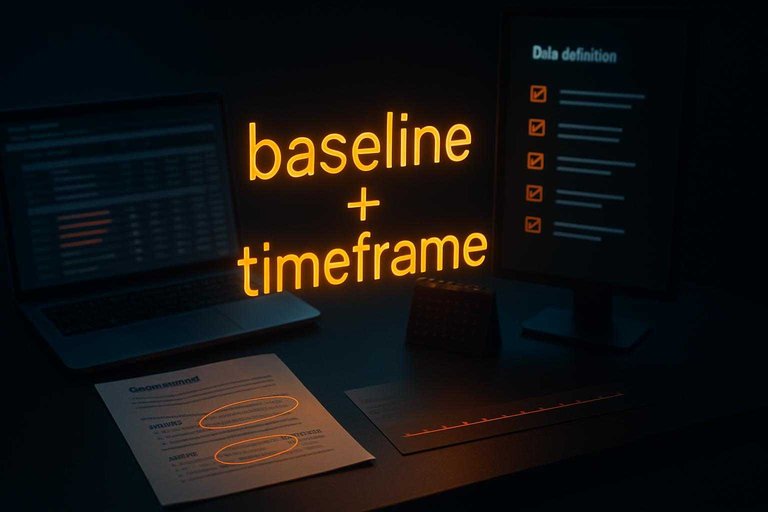
Baseline / timeframe—your “before” state and the period the change happened over—are the two fields that make a results claim interpretable instead of vibes.
Steps
- Highlight every claim in the raw story. Circle anything comparative (“faster,” “less,” “went from X to Y”) and every number.
- Lock baseline + timeframe per claim. Write the starting point, the end point, and the dates (or month/quarter) so “improved” can’t float.
- Define each metric like an analyst would. What exactly counts, what tool/report it came from, the unit (e.g., hours, dollars, days), and the scope (team, region, product line).
- Record the math, not just the outcome. Note whether it’s absolute vs percent change, and save the supporting export/screenshot or a link to the report.
- Capture “typical results” support while you’re here. The FTC is explicit that disclaimers don’t neutralize a specific-results endorsement; you need proof the results are typical or a clear disclosure of generally expected performance.
Do this once, and drafting the quote + results box becomes assembly—not archaeology.
Step 4: Draft case study
You’re drafting in a structure so your proof (baseline, timeframe, metrics) lands in the same places every time—and so the testimonial is already “placed” when the customer reviews it.
Steps
- Pick your spine: Edithly’s snapshot template or 4P. Either outline a result-led headline, customer snapshot, challenge, approach/solution, results, a customer quote, and a call to action—or use the 4P arc: Problem → Process → Plan → Performance.
- Write the story around the proof you captured. Draft Problem/Solution/Implementation/Results so every claim is tied to the exact baseline + timeframe you already documented—no new numbers in drafting.
- Extract one reusable pull quote. A pull quote is a short excerpt from the customer, visually set apart to be scanned and reused across pages and decks. Pull a single customer line that (a) names the “before,” (b) states the “after,” and © still makes sense with attribution.
- Decide placement, then derive versions. Put the same quote in three planned slots: hero (shortest, strongest clause), results (paired with the key metric), and sidebar (slightly longer, more context). Keep the words and numbers consistent across all three.
- Package a review-ready “proof card.” Quote + attribution + the results paragraph it depends on, so the customer can approve in one pass.
If you do this now, Step 6 becomes approval of wording—not archaeology for missing context.
Step 5: Make canonical quote
A pull quote becomes reusable when it has one “official” version you can protect. Create a canonical quote—the one source-of-truth version of a testimonial you store, approve, and derive excerpts from—so reuse doesn’t drift or lose context.
Steps
- Build the canonical testimonial card. One card, one quote, exactly as written (no synonym swaps), plus the single metric claim it relies on.
- Lock attribution in the same record. Speaker name, title, company, and what you’re allowed to display (name/logo/role). If any piece is missing, the quote isn’t publishable yet.
- Add a “context line” you refuse to drop. One short sentence that makes the claim intelligible when the quote is pasted into slides or a web module.
- Derive short variants by deletion only. Make a PDF version, a slide caption, and a web-module snippet by cutting clauses—not paraphrasing—and never changing numbers.
- Store the variants under the canonical card. If someone edits a variant, you update the canonical card first, then re-derive.
G2 explicitly calls out using short customer quotes in case studies—this is how you keep those quotes consistent everywhere.
Step 6: Run approvals gate
Approval is where good proof turns into publishable proof—without it, you’re one email away from pulling the asset.
Steps
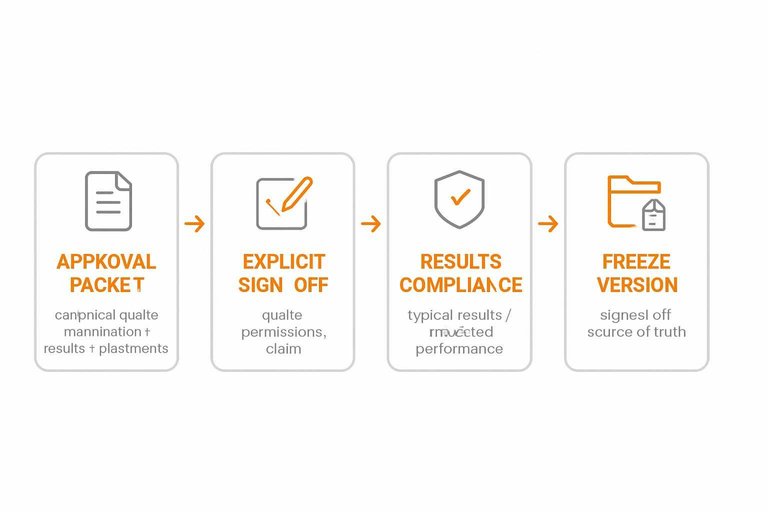
- Send one approval packet. Include the canonical quote, the exact attribution line (name, title, company), the results paragraph, and every place it will appear (web, PDF, slides).
- Get explicit sign-off on three things: quote wording, attribution/brand permissions (including logo if used), and the results claim.
- Run the “results compliance” check. The FTC’s Endorsement Guides (16 CFR Part 255) are clear: disclaimers like “results not typical” don’t change how readers interpret a specific-results endorsement—you need proof the results are typical or a clear disclosure of generally expected performance.
- Disclose any material connection—any relationship that could affect how a reader weighs the endorsement (payment, free product, incentive)—next to the testimonial.
- Freeze the approved version. Store the signed-off text and disclosures as the publishable source of truth so edits don’t quietly drift, using advanced approval organization workflows when you need a repeatable system.
Do this gate once, and publishing stops being a legal/brand gamble.
Step 7: Publish everywhere
Ship website-first so your b2b case study testimonial format has one linkable, indexable “source of truth.” (CMI’s 2025 research reports 75% of B2B marketers used case studies/customer stories in the last 12 months, and they rated videos (58%) and case studies (53%) among the most effective—distribution is part of the asset.)
Steps
- Publish the canonical web page first. Use a stable URL and include the approved attribution, context line, and any required disclosure next to the testimonial.
- Offer an optional PDF download—never PDF-only. Put the canonical URL on the PDF (header/footer) so forwarded copies always point back to the master.
- Embed the proof card where buyers browse. Add it to key pages and your Wall of Love—a curated public page or widget that displays multiple testimonials as social proof—and link every excerpt back to the canonical case study (see how to embed testimonials on your website).
- Track per placement, not “overall.” Log impressions/clicks for each embed and the PDF download link, so the next case study earns the slots that get used.
Step 8: Instrument and repeat
Steps
- Track consumption by placement. Measure widget impressions/clicks, PDF downloads, and the case study CTA click—separately for each page/module.
- Tie it to conversions. Add a unique UTM set per placement so demo/contact submissions map back to the exact embed.
- Version updates safely. Treat the approved quote + attribution as the source of truth; when it changes, re-derive every excerpt and republish in one sweep.
- Automate (optional) with the API. For /v1 endpoints, send
x-showtrust-account-idandx-api-keyheaders;POST /v1/auth/agent-init—a public API endpoint used by AI agents to initialize an account and retrieve credentials for later authenticated calls—is the exception. It’s rate-limited to 5 requests/hour per IP and 3 requests/hour per email, and unclaimed accounts haveexpiresInDays: 3. - Review monthly and queue the next story based on placements that actually create pipeline.
Make the testimonial a system
The fastest way to stop burning days on “usable quotes” is to stop treating the testimonial as a line of copy and start treating it as a controlled asset: one system of record, a proof spine (baseline + timeframe) attached to every claim, and a canonical quote you only shorten by deletion. When attribution, context, and metrics are captured and frozen before you draft, approvals become a simple sign-off—not a scavenger hunt—and every reuse stays consistent across web, PDF, slides, and proof cards. Your first move is to lock the outputs and build the canonical testimonial card fields (quote, attribution, context line, metric + support) so the next customer win ships cleanly the first time—and gets easier to repeat next month.
Frequently Asked Questions
- Is a B2B case study testimonial format the same thing as a customer success story?
- Not quite. A customer success story is the full narrative (Problem/Process/Plan/Performance), while the case study testimonial is the approved customer quote (with attribution and context) you can reuse inside that story and across other assets.
- Do I have to include “results not typical” disclaimers in a B2B case study testimonial?
- No—those disclaimers don’t change how readers interpret a specific-results endorsement under the FTC Endorsement Guides. If you claim specific results, you need proof the results are typical or a clear disclosure of generally expected performance in the circumstances shown.
- How long should a video testimonial be in a B2B case study testimonial format?
- Keep the primary snippet under 1 minute—Vidyard reports 65% of viewers stay engaged to the end for videos under 1 minute. If you’re collecting video through a tool like ShowTrust, cap recordings at 5 minutes and then cut a sub‑1‑minute excerpt for the case study page.
- Should I put customer quotes on every case study page, or only in the results section?
- Use at least one short customer quote in every case study, then place it where it supports the claim you want scanned first (often near the headline or results). G2 explicitly calls out incorporating short testimonials/quotes as part of a case study.
- What’s the best way to collect consistent inputs for a B2B case study testimonial without doing a full interview?
- Use a structured collection page with a small set of prompts—ShowTrust supports up to five questions—so every submission arrives with the same fields and is easier to approve and reuse. Add a follow-up interview only when the submission is missing a baseline, timeframe, or attribution you need to publish.
Publish a Verifiable Proof Wall
Once you’ve defined the fields and workflow, the bottleneck shifts to capturing submissions in one place and turning them into an approved, reusable, website-first asset.
ShowTrust gives you a hosted testimonial collection page plus an embeddable Wall of Love widget, so only approved testimonials publish and prospects can verify proof without friction.
Written by
ShowTrust
Notes from the ShowTrust team on collecting testimonials and building authentic social proof.
Share: