June 7, 2026
·
12 min read
Embed Testimonials on Your Website: Everything to Know
A complete pillar guide to embedding testimonials on your website—define what qualifies as a testimonial, choose compliant sources, embed the right formats, place proof at decision moments, and avoid UX/SEO/schema pitfalls.


You’ve got happy customers—but your website still feels like it’s asking visitors to “just trust you.” Copying a few quotes into a page helps, yet it often lacks context, credibility, and the details buyers look for when they’re on the fence.
This guide shows you what actually counts as a testimonial, when embedding beats rewriting, and how to use proof strategically. You’ll learn where to source testimonials, how to handle permission and platform rules, which embed formats work best, and how to keep design, accessibility, and SEO/schema clean.
What Counts as Testimonials
A testimonial is any customer- or third-party-created statement that vouches for your product, service, or brand. It includes reviews, endorsements, and pulled quotes, as long as the source is clear and you have permission.
“Embed” means you display that proof by pulling it from a source into your site, usually in a way that can update. That’s different from pasting static text, uploading a screenshot, or recreating the content as an image.
Testimonial types
Different formats create different kinds of belief. Pick the type that matches the risk your buyer feels.
- Quote snippets: fast credibility near CTAs
- Star reviews: quick comparison for high-volume products
- Video testimonials: strong emotion for high-consideration offers
- Social proof posts: real-world context and timeliness
- Case snippets: specific outcomes for skeptical buyers
Match format to friction. Use heavier proof where objections are strongest.
Embed vs copy
Embedding changes how content stays current and how much control you keep.
| Option | Freshness | Control | Best for |
|---|---|---|---|
| Widget | High | Medium | Reviews at scale |
| Iframe | Medium | Low | Fast launch |
| API feed | High | High | Custom layouts |
| CMS block | Medium | High | Modular pages |
| Manual copy | Low | High | Curated quotes |
If you need trust at scale, optimize for freshness. If you need precision, optimize for control.
Core mental model
Testimonials work when you treat them like a system, not a decoration. The goal is reliable trust, delivered where decisions happen.
Use this chain: source → permission → format → placement → trust signals → maintenance. Break any link and your proof either feels fake, goes stale, or gets ignored.
Build the pipeline once, then keep it alive. That’s how testimonials keep earning their spot.
Why Embedding Works
Embedded testimonials work because they show proof at the exact moment doubt appears. They lower perceived risk, answer silent objections, and borrow credibility from the surrounding page context. Put the right voice next to the right claim, and your copy stops arguing.
Trust mechanics
Credibility isn’t a vibe. It’s a stack of small cues that make a review feel earned, not staged.
Specificity: concrete details beat generic praise.
Recency: newer feedback signals the product still delivers.
Identity detail: role, use case, and context raise believability.
Consistency: the same themes appear across pages and platforms.
Verifiability: links, full names, or sources reduce doubt.
If a testimonial can’t be checked, it won’t carry weight when it matters.
Decision moments
Testimonials don’t help everywhere equally. They help when the user is about to commit or bounce.
- First impression: confirm you’re legitimate
- Comparison: break a tie fast
- Pricing: justify the cost
- Checkout: calm last-second fear
- Post-purchase: reduce buyer’s remorse
Place them at friction points, not in the “nice-to-have” margins.
Objection matching
Match the testimonial to the objection the page creates. Otherwise, you’re adding noise.
- List the top objection on the page.
- Find testimonials mentioning that objection in plain language.
- Place them beside the claim that triggers doubt.
- Add a tiny label for context, like “Support” or “Switching.”
- Rotate in fresh proof as objections evolve.
When proof answers the objection directly, you stop selling and start confirming.
Choose Testimonial Sources
Different testimonial sources change how credible you look, how much permission you need, and how hard embedding becomes.
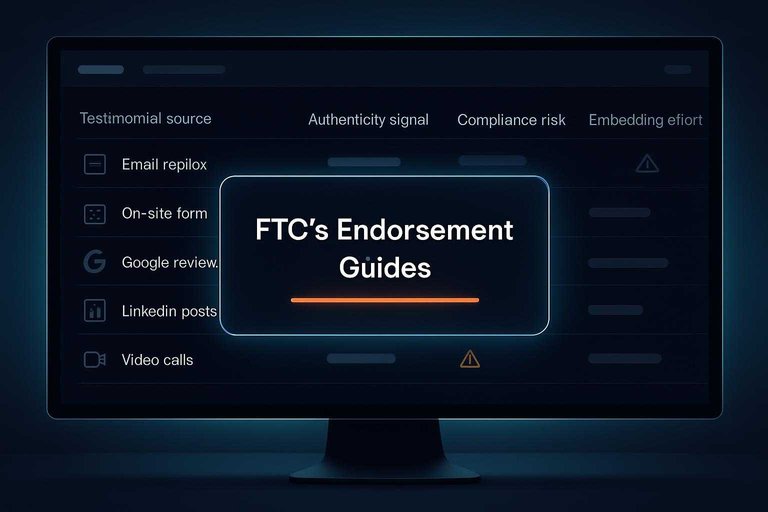
| Source | Authenticity signal | Compliance risk | Embedding effort |
|---|---|---|---|
| Email replies | Strong, direct | Medium, consent needed | Medium, manual |
| On-site form | Good, controlled | Low, clear consent | Easy, native |
| Google reviews | Strong, third-party | Medium, platform rules | Medium, widget |
| LinkedIn posts | Strong, identity-linked | High, reuse permission | Hard, manual |
| Video calls | Very strong, human | Medium, release needed | Hard, editing |
Pick the source you can re-use cleanly, because “real” without permission becomes a liability (see FTC’s Endorsement Guides).
Permission and Compliance
Embeddings feel simple, but the legal surface area is large. Get permission, respect platform terms, and keep marketing claims grounded.
Get explicit consent
Consent keeps you out of screenshots-and-lawyers territory, especially when you copy text or pair it with a name. Ask before you publish, and make removal easy.
- Confirm who owns the words and where they were posted.
- Ask permission to republish, including name, photo, and business title.
- Specify placement and edits, like trimming for length or correcting typos.
- Document the approval, then honor withdrawals with a fast removal path.
- Offer an update flow if they want revisions or anonymity later.
Treat consent as an ongoing setting, not a one-time checkbox.
Follow platform rules
Most platforms allow sharing, but not unlimited copying or reformatting. Terms change, so build a habit of checking before you ship.
- Use official embed tools when available.
- Avoid copying full reviews into your own markup.
- Don’t remove timestamps, star ratings, or platform branding.
- Don’t imply the platform endorses your business.
- Don’t gate or edit reviews to change meaning.
If you can’t comply cleanly, link to the source instead.
Avoid misleading claims
Testimonials become advertising the moment you use them to sell. That triggers disclosure duties when there’s compensation, special access, or any other incentive behind the praise.
Keep the message true to the original and true for typical customers. If you edit for clarity, don’t edit for impact, and don’t splice sentences into a new claim.
When outcomes vary, add context like “results vary” and avoid turning one person’s experience into a guarantee. Your safest move is simple: show real words, with honest framing, and let the proof do the work.
Formats You Can Embed
Testimonials usually land in three embed formats: text, video, and social posts. Each trades off speed, design control, and perceived authenticity. Pick the format that matches the decision risk on the page.
Text and ratings
Text is the fastest to load and the easiest to style, so it fits product pages and comparison pages. Ratings add scanning speed, but only if the scale is obvious.
Use a clean pattern:
- Quote: one clear claim, no jargon.
- Name: real person when possible.
- Role + company: adds buyer context.
- Photo: optional, but consistent sizing.
- Rating: show the scale, like “4.8/5”.
Avoid mystery meat.
Don’t show stars without saying what they represent.
If you’re placing quotes directly in your own layout, plain HTML embed integration keeps styling and performance predictable.
Avoid mystery meat.
Don’t show stars without saying what they represent.
Video testimonials
Video can feel more credible, but it can also slow pages and annoy users. Make it frictionless.
- Keep it short, one takeaway.
- Add captions, always.
- Choose a clear thumbnail frame.
- Host for performance, not vanity.
- Default to click-to-play.
Your best video testimonial is the one users can skip until they care.
Social embeds
Social embeds borrow credibility from a public timeline, but you inherit platform risk. Use official tools and plan for failure.
- Pick a post that stands alone without a thread.
- Use the platform’s official embed code.
- Add one line of context above the embed.
- Provide a fallback screenshot or quote.
- Handle deletions with a graceful placeholder.
If you can’t explain it without the embed, you’re outsourcing trust.
Placement That Converts
Testimonials convert when they appear exactly where doubt appears. Tie placement to the funnel, then target the specific moment your visitor needs proof. Tools like ShowTrust can help here by making it easier to curate the right quotes and keep them consistent across the pages where trust tends to break.
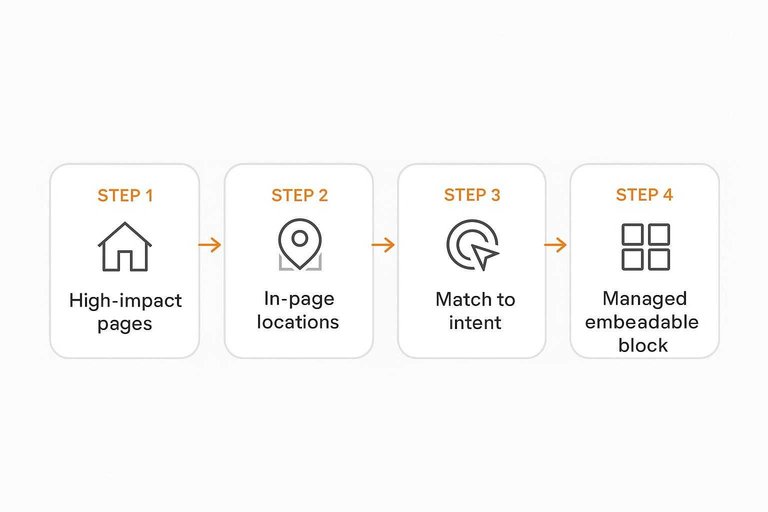
High-impact pages
Start with the pages where decisions happen, not where you have spare space.
- Homepage: proof you solve a common problem
- Product or service pages: proof the key promise holds
- Pricing page: proof value beats risk
- Checkout or signup: proof you are safe
- About page: proof you are real
Treat each page like a different objection, not a different template. If you’re using an embeddable testimonial widget (for example, via a social-proof tool), it becomes much simpler to tailor what shows up on each page without manually copy-pasting and drifting out of date.
In-page locations
Most pages have five trust gaps, and each gap has a natural testimonial slot. Place testimonials where they support a claim or unblock a click.
Put a short, punchy quote above the fold to reduce initial skepticism. Add one near your primary CTA to lower “will this work for me” anxiety. Place one beside big claims, like “fast setup” or “accurate reporting,” so the proof arrives with the promise. Add a specific testimonial after common objections, like “too complex” or “not for my industry.” Use FAQs for the leftover doubts that stop people from scrolling back up.
Make the testimonial do a job, or it becomes decoration. A practical way to keep these placements from turning into one-off design elements is to use a managed, embeddable block—so you can swap, approve, and update testimonials in one place while they stay properly positioned on the page (e.g., a Trustpilot TrustBox widget).
Match to intent
Relevance beats volume, especially for visitors with a clear use-case.
- Identify intent by page, query, and CTA language.
- Pick testimonials that match the same persona and scenario.
- Add labels like role, industry, and use-case for instant scanning.
- Validate clarity by removing jargon and vague praise.
If the visitor can’t see themselves in it, they won’t believe it. This is where having a simple workflow to organize and curate testimonials (e.g., approving, tagging, and grouping them before publishing) helps you consistently match the right proof to the right intent instead of defaulting to whatever quote is most flattering.
Design and UX Rules
Testimonials fail when they look like decoration, not evidence. Your job is to make them readable, verifiable, and calm on every screen.
Credibility details
Add small proof points so your testimonials read like real customer stories, not marketing copy.
- Show full name or clear initials
- Include role and company
- Use a real headshot
- Display an honest date
- Add specific, checkable outcomes
If your cards can’t answer “who said this?” quickly, trust drops fast.
Accessibility basics
Testimonials are often tiny text inside fancy components, so they quietly become unusable. Set a readable baseline, then make the interaction predictable for keyboards and screen readers.
Use strong contrast, comfortable font sizes, and clear focus states for keyboard navigation. Provide meaningful alt text for photos, captions for any video, reduced-motion options for animations, and semantic markup like quotes, headings, and landmarks.
Mobile-first layout
Carousels look tidy on desktop, then turn into thumb traps on phones. Design the mobile layout first, then scale up.
- Stack testimonial cards vertically, one per row.
- Avoid auto-rotating carousels and infinite swipe loops.
- Make tap targets large, with clear next actions.
- Use progressive disclosure for long quotes, with “Read more”.
- Keep the attribution visible, even when collapsed.
When mobile feels effortless, desktop credibility follows for free.
SEO and Schema Basics
Testimonials can help SEO because they add unique, relevant copy that matches how customers describe your product. They also improve on-page trust signals, which can lift conversions even when rankings stay flat. Schema can amplify the effect, but only when the page genuinely qualifies for rich results.
Review vs testimonial
A testimonial is usually first-party content you publish on your own site, often curated and edited for clarity. A review is typically a third-party rating or opinion left on a platform with its own moderation and scoring.
For SEO, treat them differently:
- On-site testimonials help content depth and relevance.
- Third-party reviews can support trust, but Google still evaluates your page’s own content.
- Rich results eligibility usually depends on having valid review data about a specific item, not generic praise.
If you can’t point to “what is being reviewed” on that page, don’t mark it up like a review.
If you do have eligible review data, consider using a review schema generator tool to create clean, valid markup that matches what’s on the page.
If you can’t point to “what is being reviewed” on that page, don’t mark it up like a review.
Schema dos and don’ts
Schema helps search engines interpret your page, and misuse is the fastest way to waste it. Keep markup tied to what’s visible, specific, and verifiable.
- Do match schema to the page’s primary entity.
- Do use Product for a specific product page.
- Do use LocalBusiness for a specific location page.
- Don’t add AggregateRating without real, page-supported ratings.
- Don’t mark up testimonials as third-party reviews.
If your markup reads like marketing, not data, Google treats it like spam.
Duplicate content risks
Testimonials get reused across pages, sites, and partner listings, which can dilute uniqueness. You can reduce risk without hiding social proof.
- Pick a “home” URL for each testimonial cluster and keep it consistent.
- Use canonicals when the same block appears in multiple URLs.
- Excerpt the quote and add page-specific context around it.
- Prefer official third-party embeds when republishing platform reviews.
- Keep the surrounding copy unique: use cases, constraints, and outcomes.
Your goal is simple: make every page earn its own reason to rank.
Performance and Reliability (So Embeds Don’t Cost Conversions)
Embedding testimonials can quietly hurt conversions when it slows pages, shifts layout, or fails unpredictably. Treat performance like part of trust: if the proof jitters, takes forever to load, or disappears, it doesn’t feel credible.
Common embed performance traps
Some formats are inherently heavier, and some implementations add unnecessary risk.
- Third-party scripts that block rendering or load multiple trackers
- Iframes that resize late and cause layout shift
- Social embeds that pull large bundles of JavaScript for one post
- Video embeds that auto-load players on page load
- Carousels that reflow the page as slides change
If the embed increases friction, it cancels the benefit of the proof.
Make embeds fast by default
You don’t need a perfect setup—you need a predictable one.
- Load non-critical testimonial widgets after primary content (defer/async where appropriate).
- Reserve space for embeds so the page doesn’t jump when they appear.
- Prefer lightweight previews (static card + “View” link) over loading full social threads.
- For video, use click-to-play with a thumbnail, and only load the player on interaction.
- Keep the number of distinct third-party scripts low; one heavy script can undo a lot of optimization.
Aim for “instant page, optional proof,” not “proof first, content later.”
Reliability: plan for missing content
Embedded testimonials can break: posts get deleted, privacy settings change, platforms throttle, scripts fail, and ad blockers interfere. Don’t let that create blank holes on high-intent pages.
Use a graceful fallback:
- Show a placeholder state (“Testimonial currently unavailable”) instead of a broken box.
- Include a text excerpt you have permission to use, plus a link to the original when possible.
- Log failures so you can replace or remove dead embeds quickly.
Trust is partly consistency. If your proof disappears randomly, users notice.
Privacy and consent in a script-heavy world
Some testimonial widgets bring cookies, tracking, or external calls that may trigger your consent banner rules. Even when it’s “just a review,” the underlying embed can behave like marketing tech.
Keep it clean:
- Know which embeds set cookies or call third-party domains.
- Where needed, load the widget only after consent (or use a no-cookie / privacy-friendly mode if offered).
- If you can’t meet your privacy requirements, switch to a permissioned excerpt + source link rather than forcing a leaky embed.
Performance, reliability, and privacy aren’t technical nitpicks—they’re how your testimonials stay believable under real browsing conditions.
Embed Proof Where Decisions Happen
- Pick the pages where visitors decide (pricing, product/service, case studies, high-intent landing pages) and map the top 3 objections on each.
- Choose testimonial sources that naturally answer those objections, then get explicit permission and follow each platform’s embedding rules.
- Embed in the format that fits the context (short text near claims, video for high-stakes trust, social embeds for freshness) and include credibility details (name, role, company, date, relevant result context).
- Finish with UX + SEO hygiene: mobile-first layout, accessible embeds, and careful schema use (don’t mark up testimonials as reviews unless they meet review guidelines, and avoid misleading or duplicated claims).
Frequently Asked Questions
- Can I embed testimonials on my website without slowing down page speed?
- Yes—prefer lightweight embeds, lazy-load testimonial widgets below the fold, and avoid loading multiple third-party scripts on the same page. Test with Google PageSpeed Insights or Lighthouse to confirm the embed isn’t adding excessive JavaScript or blocking rendering.
- How do I track whether embedded testimonials actually improve conversions?
- Add an analytics event for testimonial interactions (scroll into view, carousel clicks, “read more” expansions) in GA4 or your tag manager, then compare conversion rates for pages/variants with and without embeds. A/B testing tools can validate lift more reliably than before/after comparisons.
- What’s the best way to embed video testimonials on a website?
- Host videos on a reliable platform (YouTube, Vimeo, or your own CDN) and embed with a click-to-play thumbnail to reduce initial load. Include captions and a short text summary for accessibility and for visitors who can’t play audio.
- How often should I refresh or rotate embedded testimonials on my website?
- Update them whenever your offer, positioning, or target audience changes, and rotate in newer testimonials as you collect them so claims and context stay current. A quarterly review is a practical cadence for most sites, with faster updates after launches or major product changes.
- Is there a simple way to collect new testimonials and embed them on my website in one workflow?
- Yes—use a tool that combines collection, approval, and embedding so you’re not copying quotes manually or managing scattered links. ShowTrust is one option that lets you request testimonials via a shareable form, curate them, and publish embeddable displays on your site.
Turn Feedback Into Trust
Embedding testimonials the right way takes more than copy-pasting quotes—source, permission, design, and placement all have to work together to convert.
ShowTrust makes it easy to request, curate, and embed verified testimonials with widgets and a public wall—so visitors see credible proof fast and take action.
Written by
ShowTrust
Notes from the ShowTrust team on collecting testimonials and building authentic social proof.
Share: