June 12, 2026
·
10 min read
Advanced Testimonial Approval and Organization Workflows
An explainer on building advanced testimonial approval and organization workflows—map lifecycle states, scale approvals with roles and policies, control claims with evidence, manage consent and rights, and keep testimonials findable through metadata and versioning.


Testimonials are easy to collect and surprisingly hard to ship. The moment you publish a quote, you’re juggling approvals, consent, claim accuracy, privacy constraints, and a growing library no one can reliably search.
This explainer shows you how to design a workflow that stays fast without getting reckless: clear lifecycle states, scalable approval models, evidence-backed claims, consent treated as structured data, and an organization system that keeps every testimonial discoverable and reusable across teams.
Workflow Shape Map
Advanced testimonial workflows fail when states and approvals are implied, not modeled. Map the lifecycle first, then place gates where risk actually changes.
Lifecycle states
You need a state model that shows ownership, not just progress. Otherwise approvals become comments, and publication becomes guesswork.
A practical state model looks like this:
- Captured → Anyone with intake access (forms, sales, CS)
- Enriched → Marketing ops or content team
- Verified → Customer owner, CS lead, or evidence reviewer
- Approved → Brand owner and legal, depending on gate rules
- Scheduled → Channel owner (web, email, paid, PR)
- Published → Channel owner or CMS publisher role
- Retired → Content owner with compliance override
Treat state transitions as permissions, not preferences.
Gates vs flags
Gates block publishing. Flags add context without stopping the line.
- Gate: Legal approval; Flag: High-risk claim
- Gate: Brand review; Flag: Featured candidate
- Gate: Privacy consent; Flag: Needs clarification
- Gate: Evidence check; Flag: Restricted use
- Gate: Regional compliance; Flag: Time-sensitive
Separate them so “needs attention” doesn’t become “can’t ship.”
Two-track pipelines
You often run two pipelines at once because internal standards and customer confirmation move at different speeds. If you force them into one lane, you either stall publishing or ship unverified claims.
Track A is internal: enrichment, evidence check, brand fit, legal positioning. Track B is external: customer wording confirmation, consent scope, logo usage, and attribution details.
They merge at a single gate: “publishable with stated permissions,” not “perfectly finalized everywhere.”
Single source truth
Pick one canonical record, then push clean derivatives outward. Otherwise every tool becomes a competing version of “the quote.”
- Choose a system of record with IDs, states, and audit trail.
- Define a field map for each destination tool.
- Generate derivatives as views, not rewrites.
- Sync on state changes, not on edits.
- Lock publication to the canonical “approved + consented” status.
Centralize truth, decentralize rendering.
Approval Models That Scale
High-volume testimonial programs fail in predictable places: too few approvers, too many decisions, and unclear accountability. You need an approval topology that matches risk, not ego, and you need it to keep working when volume spikes.
Role-based approvals
Roles reduce chaos because each role owns a different kind of decision. Without roles, you get the classic trap: everyone can approve, so nobody does.
Owner defines policy, scope, and acceptable risk. Editor fixes clarity and format. Approver validates claims and permissions. Publisher controls final placement and timing.
Design the roles so the Approver approves content, not schedules, and the Publisher publishes, not rewrites.
Policy-based routing
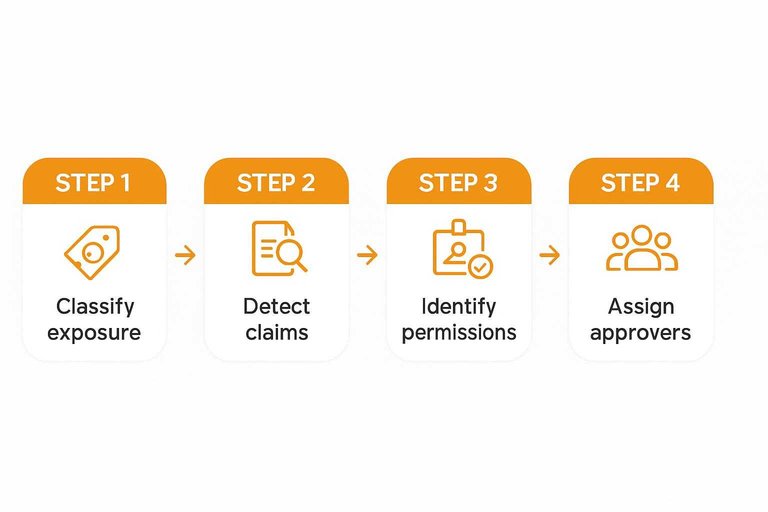
Route approvals by risk signals so low-risk items flow fast and high-risk items slow down.
- Classify the testimonial by industry and regulatory exposure.
- Detect claims and regulated terms in the text and metadata.
- Identify the customer segment and permission status.
- Match the destination channel to its compliance bar.
- Assign the minimal approver set based on the policy matrix.
If every item hits the same approver, you built a queue, not a system. (For a concrete compliance baseline to route against, see the 16 CFR Part 255 text.)
Exception handling
Exceptions are where scalable approvals either stay stable or melt down. Define escalation paths before you need them.
- Escalate stalled items to a time-boxed backup approver.
- Resolve conflicting edits with a single named decision owner.
- Reassign unavailable approvers via an on-call rotation.
- Trigger emergency takedowns with a two-person kill switch.
Your happy path is irrelevant if your exceptions are undefined.
Guardrails, not gates
Hard-stop approvals are expensive because they turn every change into a meeting. Guardrails shift work left, so most items arrive already “safe enough.”
Use pre-approved templates for common formats, claim libraries for allowed phrasing, and inline linting to flag risky terms as someone writes. Make the tool nudge edits in real time, then reserve human approval for true edge cases.
The fastest approval is the one your workflow never has to request.
Evidence and Claim Control
Testimonials fail in two ways. They get too bold, or they lose their paper trail.
Build a lightweight system that ties each claim to evidence and preserves the quote’s history. You’ll ship faster with fewer surprises—and you’ll build transparency in your process.
Claim taxonomy
You need shared labels for what a testimonial is claiming. Otherwise, reviewers argue taste instead of risk.
Start with a small taxonomy and define substantiation rules per category:
- Performance: speed, uptime, reliability, efficiency outcomes
- Comparative: “better than,” “best,” “#1,” “leading,” replacement claims
- Compliance: legal, regulatory, security, privacy, accessibility statements
- Anecdotal: feelings, preferences, “easy,” “love,” “helped us”
Once categories are explicit, approval becomes routing. Not debate.
Evidence requirements
Require evidence based on the claim type, not the channel. A tweet and a homepage need the same backbone.
- Tickets or support threads → performance, reliability
- Invoices or contracts → purchase, usage, tenure
- Analytics snapshots → performance, behavioral outcomes
- Internal approval notes → compliance, comparative phrasing
- Customer sign-off record → edited quotes, sensitive context
If evidence can’t be attached, downgrade the claim. Keep the story, drop the sharp edges.
Context preservation
You need to defend how the final quote was produced. That means keeping the original, plus every decision.
- Store the original wording with source URL or message export.
- Record each edit as a diff with editor, timestamp, and reason.
- Track redactions separately, including what was removed and why.
- Attach evidence links and approval IDs to the final version.
- Lock the published quote with a version hash or immutable ID.
When Legal asks “where did this come from,” you’ll answer in seconds.
Quote editing boundaries
Edit for clarity, not advantage. The line is whether meaning changes for a reasonable reader.
Allowed edits: grammar, punctuation, removing filler words, adding light clarifiers in brackets. Prohibited edits: changing outcomes, inserting comparisons, upgrading certainty, or removing limiting context.
Document approvals on the edited version, not the intention. That’s what keeps “light touch” from becoming “rewritten.”
Consent, Privacy, Rights
Treat consent like a workflow asset, not a footnote. When you model scope, retention, and revocation explicitly, misuse becomes harder. Compliance stops being a scramble and starts being a system — especially when you’re collecting and publishing customer quotes as social proof, where the line between “great marketing” and “out of scope” can get thin fast.
Consent as data
Consent should be queryable, enforceable, and reviewable. If it lives in a comment thread, it will be missed under pressure.
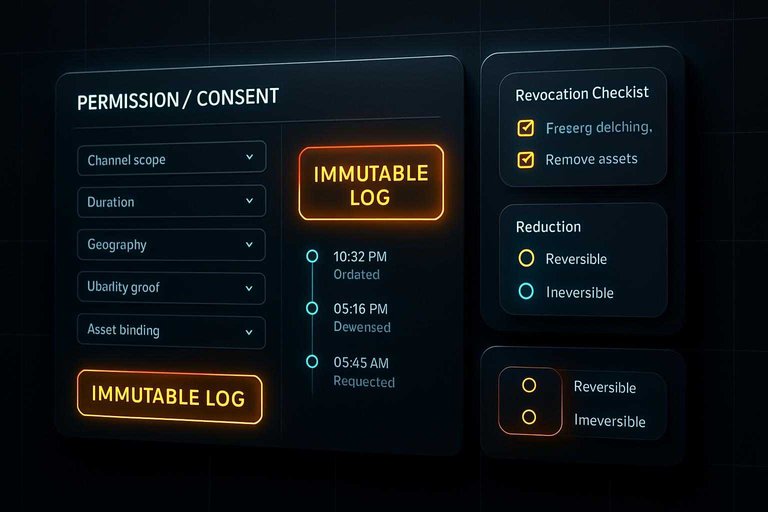
Store consent as structured fields:
- Channel scope: website, ads, email, sales decks
- Duration: start date, end date, renewal rule
- Geography: where you can publish and target
- Identity proof: signer role, email domain, verification method
- Asset binding: which quote, logo, or screenshot
When scope is data, approvals can block the wrong publish automatically. This is particularly useful in testimonial workflows (for example, in tools like ShowTrust) where a single customer statement might be reused across a public wall, a homepage widget, and a sales deck—each requiring clearly recorded scope. See the ICO’s guidance on recording and managing consent for a regulator-backed reference.
Redaction patterns
Redaction is a workflow choice, not a last-minute edit. You need a repeatable approach that preserves meaning without leaking identity.
- Classify the risk: direct identifiers, indirect identifiers, sensitive context.
- Choose reversible redaction for internal drafts: tokenized names, masked emails.
- Choose irreversible redaction for publication: blur faces, remove logos, rewrite specifics.
- Apply by asset type: names, titles, logos, screenshots, metadata.
- Record the method and owner: what changed, why, and who approved.
If you can’t explain your redaction method, you can’t defend it later. For published testimonials, it helps when the system you use to curate and display them keeps the “clean” public version distinct from internal drafts so you don’t accidentally ship an unredacted quote.
Revocation playbooks
Revocation will happen at the worst time. A playbook turns panic into a bounded checklist.
- Customer request: freeze publishing, remove assets, confirm completion.
- Contract change: re-check scope, update terms, re-approve artifacts.
- Incident or breach: suspend distribution, notify owners, preserve evidence.
- Identity dispute: verify signer, quarantine content, escalate to legal.
- Channel expansion: treat as new consent, not an implied extension.
Propagate takedowns across your CMS, DAM, ad libraries, and sales tools, or you didn’t really revoke it. If you run testimonial widgets or a public testimonials page, include those surfaces explicitly in the checklist so revocation actually removes what prospects can see.
Audit-friendly trails
Audits go faster when your trail is complete and boring. The goal is defensible records without turning every approval into paperwork.
Keep an immutable log of key events: request, edits, approvals, publication, revocation. Capture approver identity, timestamp, and a short rationale field like “scope covers paid social” or “logo removed per request.”
When legal asks “who approved this and under what scope,” you should answer in one screen. This becomes easier when your testimonial collection and publishing workflow captures approvals and publication changes alongside the asset itself, rather than scattering that context across email threads and docs.
Organization That Stays Findable
You want testimonials to stay reusable without turning into an untraceable pile of “quote-ish” fragments. The goal is simple: every snippet stays connected to its source, consent, and context across channels.
Metadata schema
Treat a testimonial like an asset with constraints, not a paragraph in a doc. Good fields let you reuse safely, filter fast, and prove provenance when someone asks.
Use a schema with clear definitions (especially if you manage broader voice of the customer inputs):
- Persona: who the buyer is in the story.
- Segment: SMB, mid-market, enterprise, or your internal tiers.
- Industry: customer’s industry category.
- Product: product or module referenced.
- Use case: the job-to-be-done described.
- Claim type: outcome, capability, comparison, experience.
- Risk level: low, medium, high based on compliance review.
- Channel eligibility: approved channels, plus restricted channels.
- Expiry: date or event that ends usage.
If a field can change the approval decision, it must be captured as metadata.
Facet strategy
Facets only work when tags mean the same thing next month. Decide which fields are controlled vocabularies, then enforce them where people actually enter data.
- Controlled: persona, segment, industry, product, risk level
- Controlled: claim type, channel eligibility, use case
- Free text: notes, context, internal rationale
- Guardrails: aliases, deprecated tags, and required picklists
- Anti-drift: quarterly review of “new” tags and merges
If you allow free text in a filter field, you’re choosing future rework.
Versioning strategy
Variants are inevitable, but orphan variants are optional. Keep one canonical record, then hang every adaptation off it with explicit lineage.
- Create a canonical quote with source, speaker, and consent scope.
- Generate derivatives for short/long and platform constraints.
- Store translations as linked children with locale and translator metadata.
- Track A/B variants as siblings with hypothesis and channel context.
- Lock approvals to the canonical consent, then add channel overrides if needed.
Lineage is what lets you update once and fix everywhere.
Deduplication logic
Duplicates happen when the same story arrives through different pipelines. Your workflow should detect likely matches before people re-approve the same consent.
Match using layered signals:
- Customer identity: normalized company name, domain, CRM account ID.
- Source URL: original review page, email thread link, recording link.
- Text similarity: near-duplicate detection for lightly edited quotes.
- Consent scope: what was approved, for which channels, for how long.
When two records share identity and consent, merge the assets, not the approvals.
Turn Your Workflow Into a System You Can Trust
Start by defining one shared lifecycle with explicit states and a single source of truth, then layer in role- and policy-based approvals that handle exceptions without stalling the whole pipeline. Treat claims and consent as first-class data: require the right evidence, preserve context, and keep auditable trails with revocation-ready playbooks. Finally, invest in findability—consistent metadata, sensible faceting, versioning, and deduplication—so every approved testimonial stays usable long after it’s collected.
Frequently Asked Questions
- What’s the easiest way to approve and organize testimonials when multiple teams (sales, support, marketing) all contribute?
- Use a single intake channel and route each testimonial by owner, use case, and risk level, then require approvals only for high-claim or regulated categories. A dedicated tool like ShowTrust can help centralize collection and curation so teams aren’t approving in spreadsheets and DMs.
- How do I track testimonial versions and edits without losing the original customer wording?
- Store the raw submission as read-only, then create separate “edited for clarity” and “short excerpt” variants with timestamps and editor notes. Publish only from approved variants, and keep the original linked for audit and context.
- Can I reuse the same testimonial across my website, ads, and sales decks without re-approving it each time?
- Yes, if you pre-approve reuse by defining allowed channels and excerpting rules as part of the approval record. If the claim strength changes (new headline, stronger promise, different context), treat it as a new approval event.
- How do I measure whether my testimonial approval workflow is actually working?
- Track cycle time from submission to publish, approval rejection reasons, and how often content gets blocked for missing consent or evidence. Also monitor downstream usage (where testimonials are reused) to see if your organization system is improving findability.
- What should I do when a customer asks to revoke a testimonial after it’s already published?
- Remove it from all active placements first, then record the revocation and where it had been used so it doesn’t get republished later. Keep only the minimum internal record needed for compliance and suppression, based on your retention policy.
Operationalize Testimonial Governance
Once you map workflows, scale approvals, and lock down consent, the remaining challenge is keeping testimonials organized and publish-ready without slowing teams down.
ShowTrust helps you collect, approve, and organize testimonials in one place, then publish verified trust signals through widgets and a public wall to lift conversions.
Written by
ShowTrust
Notes from the ShowTrust team on collecting testimonials and building authentic social proof.
Share: