Works with Next, Astro, Vite, and plain HTML
Copy-paste integration guides for Next.js (App Router & Pages), Astro, Vite + React, and plain HTML.
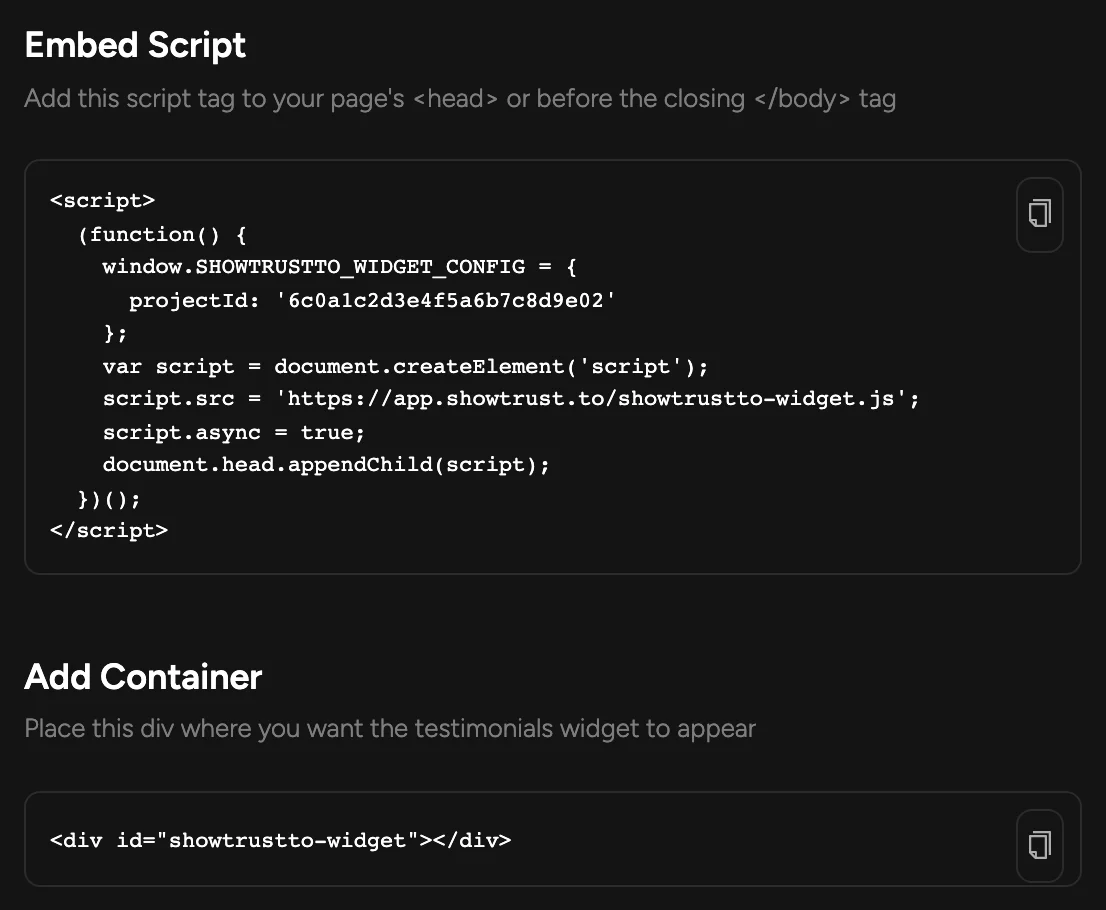
The embed is universal, but every framework has its own idea of where a script belongs. ShowTrust ships dedicated guides so the snippet lands in the right place for your stack.
Whether you're on the Next.js App Router, Next.js Pages, Astro, Vite + React, or plain HTML, there's a short guide that gets you live without guesswork.
The problem
A generic snippet still leaves you guessing where it goes in a component tree, an Astro island, or a hydration boundary — and a wrong placement silently breaks the widget.
How it works
Find your framework
Open the integration guide for Next.js, Astro, Vite + React, or plain HTML.
Follow the placement
Each guide shows exactly where the snippet goes for that framework's rendering model.
Verify it renders
Load the page and confirm your Wall of Love shows your approved testimonials.
What you get
Guides for Next.js App Router and Pages Router
Guides for Astro and Vite + React
A plain-HTML guide for any other stack
Correct placement for each rendering model
FAQs
My framework isn't listed — can I still use ShowTrust?
Yes. The plain-HTML guide works anywhere you can add a script tag; the framework guides just save you the placement details.
Is the snippet different per framework?
The embed is the same; the guides differ only in where you place it for that framework.
Related concepts
Related features
One snippet, live in minutes
Paste one small snippet into your page. No build step, no backend, no SDK.
Install with an AI coding agent
Hand the install to your AI agent — the ShowTrust skill places the snippet for your framework and you're live in seconds.
A REST API for projects, testimonials and your wall
Create projects, add and list testimonials, configure your wall and fetch the embed snippet — programmatically, with an API key.
Add a Wall of Love in minutes
Collect text and video testimonials, curate the best, and embed them anywhere with one line. Free to start — no card required.