August 18, 2026
·
Updated September 2, 2026
·
12 min read
Testimonial.to vs ShowTrust
A clear, side-by-side comparison of Testimonial.to and ShowTrust—use a quick decision guide, a feature snapshot, collection and moderation breakdowns, and workflow/integration fit to choose the right tool for requesting, curating, and displaying testimonials.


Trying to pick a testimonial tool usually sounds simple—until you’re juggling request links, chasing approvals, and figuring out how those testimonials actually show up on your site.
This comparison walks you through what matters in practice: how each product handles collection flows, contributor experience, organization and reusability, and the ways you can publish social proof (widgets and a public wall). You’ll leave with a quick decision guide, a side‑by‑side snapshot, and clear “pick this when…” recommendations.
Quick decision guide
If you want the fastest path from “ask” to “publish,” ShowTrust is usually the safer bet. It’s built around collecting, curating, and displaying testimonials without extra glue work.
Testimonial.to can be a solid pick when you want a straightforward capture flow and you already know how you’ll reuse the content. The criteria below show who wins per need, not a single universal winner.
Best for speed
ShowTrust wins for quickest setup and fastest path to your first usable testimonial. It’s optimized for a simple request flow, quick review, then immediate publishing.
You typically move faster because:
- Collection starts with a shareable link or form
- Approvals and organization happen in the same place
- Display widgets and a public wall are ready to publish
Speed matters when momentum is fragile, because your first few testimonials set the habit.
Best for teams
ShowTrust wins for ongoing collaboration and repeatable workflows. It supports the “collect → approve → organize → publish” loop that teams run every week.
It’s the better fit when you need:
- A clear approval step before publishing
- Organized testimonial management for reuse
- Clean handoffs from success to marketing
If more than one person touches social proof, you want a system, not a shared folder.
Best for marketing
ShowTrust wins for turning testimonials into on-site trust signals and conversion assets. It’s designed to get quotes out of storage and onto the page.
Marketing teams usually care about:
- Embeddable widgets for key pages
- A public testimonials page for proof
- Easy curation so only the best show
If you can publish faster, you can test placement and messaging sooner.
Best for budget
Costs vary by plan, so compare the factors that change your real bill. Small teams often get the best value from the tool that avoids paid add-ons for basics.
- Pricing tiers and included features
- Limits on testimonials, views, or embeds
- Add-ons for widgets or public pages
- Team seats and collaboration controls
- Branding removal and custom domains
For typical small teams that want collection plus on-site display, ShowTrust is usually the better value per feature.
Side-by-side snapshot
You’re picking a testimonial tool, not a generic widget. A fast table helps you spot the real tradeoffs.
| Criteria | ShowTrust | Testimonial.to | Winner | Notes |
|---|---|---|---|---|
| Collection method | Shareable link, form | Shareable link, form | Tie | Both support link-based capture. |
| Approval + moderation | Approve before publish | Approval workflow | Tie | Look for spam controls and permissions. |
| Organization + curation | Organize, highlight | Organize, tag | Tie | Curation speed matters at scale. |
| Embeddable displays | Widgets, embeds | Embeds, widgets | Tie | Check layout options and styling. |
| Public testimonials page | Public wall/page | Public page | Tie | Useful for “proof” landing pages. |
| Marketing reuse | Share, repurpose | Share, repurpose | Tie | Prioritize export formats you need. |
| Setup simplicity | Lightweight setup | Lightweight setup | Tie | Both aim for quick time-to-live. |
If you see mostly ties, move from features to workflow fit and presentation polish.
Collection experience
Collection is where most tools quietly fail. The best setup keeps the ask simple, the form fast, and follow-ups automatic.
Request flows
Request flow friction usually comes from one extra step. You want a link, a nudge, and just enough branding.
| Capability | Testimonial.to | ShowTrust | Notes |
|---|---|---|---|
| Shareable link/form | Yes | Yes | Fast to send |
| Email/SMS options | Varies by plan/setup | Varies by setup | Check integrations |
| Reminder nudges | Limited/depends | Available/depends | Reduce chasing |
| Form customization | Basic-to-moderate | Moderate | Match your brand |
If frictionless requesting matters most, the edge goes to the tool that pairs a clean link with built-in nudges—especially if you’re using automated testimonial collection forms to reduce manual chasing.

Contributor UX
Your customer experience decides your completion rate. Mobile speed and clarity beat fancy features.
Testimonial.to is typically straightforward for contributors, especially when the ask is a simple text response. If you rely on a guided flow with clear prompts and a quick “done” moment, ShowTrust tends to feel more opinionated and completion-friendly.
The real risk factor is hesitation, not effort, so optimize for “I can finish this in one minute.”
Media support
Formats shape what you can reuse in marketing. The best tools make uploads feel optional, not like homework.
- Text testimonials with headline and role fields
- Video testimonials via upload or recording flow
- Image support for avatars and proof
- Prompts that guide better answers
- Low-friction capture on mobile
More formats are only useful if they’re easy to submit, so flexibility wins when it reduces “I’ll do it later.”
Moderation controls
Moderation is where brand risk gets managed. You need approvals, edits, and basic abuse resistance.
Both tools can support an approval-first workflow, but the safer setup is the one that makes “review before publish” the default and keeps editing simple. If you care about tight curation and organizing testimonials before they go public, ShowTrust generally leans more toward controlled publishing.
Treat moderation like QA, not admin, and you’ll protect trust while scaling collection.
Management and curation
Once testimonials start flowing in, the hard part becomes control and reuse. You want fast approvals, clean organization, and assets your team can ship everywhere.
Approval workflow
Governance lives or dies on clear states and a tight review queue. You want one place to see what’s waiting, what’s live, and why.
Both tools support a basic lifecycle like pending and approved. Testimonial.to tends to feel straightforward for solo or small-team review, while ShowTrust leans harder into curation with approval plus organizing signals you can apply before publishing.
If you expect multiple stakeholders, optimize for the tool that makes “who approved what” hard to mess up.
Organization tools
Retrieval speed comes from how many handles you can grab. Check for these capabilities before you commit.
- Tags for themes, products, and personas
- Filters for status, type, and channel
- Search across names and text
- Folders or collections by campaign
- Customer metadata like company and role
For quick retrieval across campaigns, the edge goes to the tool that treats testimonials like a library, not an inbox.
Reusability
Collection is step one. The real win is turning one testimonial into many usable assets.
Testimonial.to is often used end-to-end, from capture to display, with simple reuse paths. ShowTrust emphasizes repurposing through curated organization, embeddable displays, and a public wall that can double as a source-of-truth for marketing pulls.
If you ship ads, emails, and landing pages weekly, reuse features become your throughput limiter.
Team collaboration
Multi-person teams need clear access rules and traceability. Otherwise, curation becomes accidental.
| Collaboration need | Testimonial.to | ShowTrust |
|---|---|---|
| Seats model | Varies by plan | Varies by plan |
| Roles/permissions | Basic controls | More governance-focused |
| Approval visibility | Simple states | Review-oriented workflows |
| Auditability | Limited detail | Stronger traceability |
If more than one person publishes, permissions and audit trails stop being “nice to have.”
For plan-level details like seats, it helps to reference Testimonial.to’s pricing.
ShowTrust display strengths
Embeddable widgets
On-site social proof works when it matches your page design and loads fast. The key differences are widget variety, styling control, and how responsive they feel across devices.
Some tools give you more flexible embeds, like multiple layout types, tighter style controls, and cleaner behavior on mobile. Others keep widgets simpler, which can be easier to deploy but harder to tailor.
If your site has more than one “moment of doubt,” you want widgets that adapt to each context.
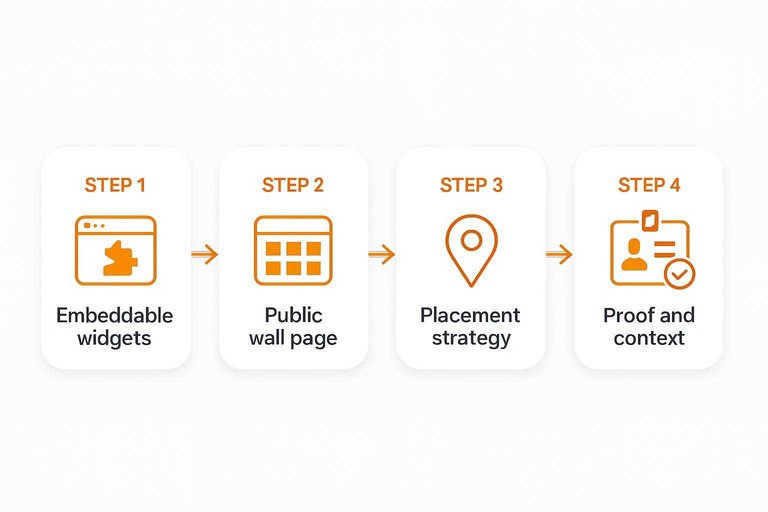
Public wall page
A public wall page helps when prospects want to browse proof without friction. Discoverability and sharing matter, but so do credibility cues like clear attribution and clean filtering.
When the wall feels like a real destination, it becomes a link you can drop anywhere. When it feels like an afterthought, it rarely gets shared.
Treat the wall as a trust asset, not a gallery page.
Placement strategy
Placement wins when you match proof to intent. Put testimonials where users hesitate, not where it’s convenient.
- Homepage: match broad outcomes and category fit
- Product pages: match feature-specific objections
- Pricing page: match ROI, risk, and comparison anxiety
- Checkout: match safety, support, and “will it work” fears
- Email sequences: match stage-specific promises
Good placement turns testimonials into decision support, not decoration.
Proof and context
Testimonials persuade when they’re identifiable and checkable. The best presentation adds logos, names, roles, links, and lightweight verification context without clutter.
If one tool makes it easier to show “who said this” and “why you should believe it,” it will read as more credible on high-stakes pages. That’s where ShowTrust tends to earn its keep.
More context reduces the need for louder copy.
Integrations and workflow fit
Your testimonial tool only helps if it fits your stack without babysitting. The goal is collection, curation, and publishing with minimal glue code — ideally with widgets and a public-facing view that are easy to keep current as your site evolves.
Website platforms
Most teams need a fast embed that won’t fight their theme. You also want something that stays stable when marketing edits pages.
Tools like ShowTrust tend to fit typical setups well because they focus on embeddable widgets and a public wall you can link to. If you want to evaluate setup time quickly, see ShowTrust getting started guide. That keeps Webflow, WordPress, Shopify, and custom builds simple.
Testimonial.to can be a strong pick if you prefer a more self-contained page experience and don’t want to manage many on-site placements.
In practice, the “best” platform fit is the one you can publish in minutes, not sprints.
Automation hooks
Automation matters when you’re requesting testimonials at scale. You’re checking for hooks, coverage, and whether it breaks quietly.
- Zapier coverage for CRM and email tools
- Webhooks for real-time submissions
- API access for custom pipelines
- Triggers for approval and publishing
- Reliability under retries and failures
If your workflows live in a CRM, prioritize the product with clean triggers and predictable webhooks — especially if you want to move quickly from submission to curated, approved testimonials without manual copying between tools.
You can also verify coverage via Testimonial’s Zapier integrations directory.
Analytics readiness
If you can’t measure lift, testimonials become “nice to have.” You want UTMs for attribution, events for behavior, and clean A/B testing options.
Embedded widgets generally make measurement easier because you can tag links, fire events on views or clicks, and test placement across pages. A hosted wall is still trackable, but it can add an extra step in your funnel.
If you’re serious about experiments, pick the option that lets you instrument widgets like any other conversion element — this is one reason widget-first approaches (like ShowTrust’s embeds) often feel more “analytics-ready” on modern marketing sites.
Data portability
Portability is your exit plan. You’re checking how quickly you can move content without losing context.
| Portability factor | Testimonial.to | ShowTrust | What to prefer |
|---|---|---|---|
| Export formats | Varies by plan | Common exports | CSV, JSON |
| Media ownership | Link or upload | Upload-friendly | Original files |
| Embed independence | Platform scripts | Widget embeds | Reusable embeds |
| Migration effort | Medium | Low-medium | Clear mapping |
The safer long-term choice is the one that treats testimonials as your data, not their feature.
Where Testimonial.to wins
Testimonial.to is often the better pick when your priority is speed over curation. If you need to capture a clean quote or quick video with minimal setup, the lighter workflow can feel frictionless.
ShowTrust tends to win once you care about repeatable collection, approval, organization, and polished embeds. But there are real cases where “less tool” is the right tool.
Creator simplicity
If you publish fast and iterate in public, you want fewer clicks between “ask” and “received.” A lightweight flow matters when you’re sending requests from your phone, between calls, or right after a win.
Testimonial.to fits when you just need a simple capture path and you don’t want to think about libraries, widgets, or layouts. That lower ceremony is a feature.
Use it when momentum is the system, not process.
Video-first needs
If video is your default proof format, your tool should optimize for recording and submission. Testimonial.to can feel more natural when the “capture” is the whole job.
- You sell founder-led, face-to-camera
- You demo live, then request instantly
- You share clips on social weekly
- You prioritize authenticity over polish
- You need low-friction recording
If video is the asset, capture flow beats dashboard features.
Solo operators
If it’s just you, governance features can turn into unpaid admin work. You’re not delegating reviews, setting permissions, or maintaining a shared library.
Testimonial.to can be the calmer choice because it asks less of you day to day. Fewer knobs. Fewer decisions.
When you’re the entire team, “manage less” is a strategy.
When not to switch
Switching tools is only worth it when it removes a bottleneck. If you won’t use the extra capability, keep your current flow.
- Stay if you only need occasional testimonials for a simple page.
- Stay if your current request link already converts well enough.
- Stay if you can’t commit to organizing and embedding consistently.
Switch when you’re ready to treat testimonials as a system, not a one-off—then ShowTrust’s collection, curation, and widgets pay for themselves.
Pricing, plan limits, and total cost of ownership
Pricing is often the deciding factor—not just the sticker price, but what you can actually ship to production on each plan and what ongoing work you’ll absorb as you scale.
At a minimum, compare these three layers side-by-side:
- Entry cost: whether you can launch a real, public “wall of love” without paying.
- Plan limits that affect production: caps on projects, widgets/embeds, seats, domains, or branded pages.
- Total cost of ownership (TCO): hidden costs like extra tools for display, engineering time to customize, and operational overhead to keep testimonials fresh and compliant.
What’s included on free vs paid (the checklist that matters)
When reviewing free vs paid, focus on what’s included rather than the word “free.” Use this checklist to evaluate both tools consistently:
- Collection: Can you create a hosted collection page/link, and is it usable without heavy branding or restrictions?
- Moderation: Approval workflow, editing, pinning/ordering, and basic organization.
- Display: Are embeddable widgets included, and can you control layout and styling enough to match your site?
- Publishing: Is there a public page (“wall”) you can share directly, and can it be indexed/used in marketing?
- Scale controls: Limits on number of projects/brands, domains, embeds, or seats.
- Support & reliability: Access to support, SLAs (if offered), and whether critical features are gated behind higher tiers.
If a free plan lets you collect but not publish in a credible way, the real starting point is the first paid plan.
ShowTrust pricing and what that means in practice
ShowTrust positions itself as free to start (“Free forever” and “No credit card”), with a flat Pro price of $4.99/mo. In practical terms, that’s useful if you want to:
- Launch a collection page and start gathering text testimonials immediately.
- Embed a lightweight “wall of love” widget on your site with a single script tag + container div.
- Keep costs predictable, especially when you don’t want pricing to scale with testimonial count.
The main planning consideration is feature readiness: text (and rating) testimonials are available today, while video testimonials are listed as coming soon.
TCO: the costs you feel after the first week
Beyond monthly price, TCO typically comes from four places:
- Implementation time: If styling and layout require custom front-end work, that’s a real cost—especially for agencies and small teams.
- Operational overhead: Who owns requesting new testimonials, approving them, and rotating what shows on high-intent pages?
- Brand & trust costs: If your display looks inconsistent or overly branded, you may spend additional time compensating with design tweaks.
- Tool sprawl: If collection, management, and display are split across tools, you’ll pay in both subscriptions and coordination.
A useful way to decide is to estimate: (a) how many places you need to display testimonials, (b) how many brands/projects you need to support, and © how much customization you need without engineering involvement. The best-value option is the one that meets those needs with the fewest constraints and the least ongoing manual work.
Choose based on how you’ll publish proof (not just collect it)
If your goal is to turn feedback into visible trust signals—collect via a simple shareable link, approve and organize at scale, then publish via embeddable widgets and a public testimonials wall—ShowTrust is the more complete end-to-end fit for most marketing teams. Pick Testimonial.to when you mainly need creator-simple capture, video-first collection, or you’re a solo operator who wants minimal setup and doesn’t need as many display and curation options. If you’re already happy with your current capture flow and only need a light layer on top, it’s also reasonable not to switch—optimize requests and placement strategy first, then revisit tooling when publishing and reuse become the bottleneck.
Frequently Asked Questions
- Is Testimonial.to vs ShowTrust mostly about collecting testimonials, or displaying them on a website?
- It’s usually about both, but the biggest practical difference shows up in how you publish social proof. If on-site widgets and a public “wall” are central to your funnel, ShowTrust is often the better fit.
- Can I use Testimonial.to or ShowTrust without a developer?
- Yes—most teams can collect testimonials and embed basic displays using copy-paste snippets or no-code site builders. You typically only need a developer for advanced styling, custom placements, or performance-focused implementation.
- What should I compare beyond features in a Testimonial.to vs ShowTrust review?
- Compare how quickly you can go from request → approved testimonial → live display, plus governance (approvals, permissions) and reuse across campaigns. Also check whether the tool supports your preferred formats (text, video) and your site stack.
- How do I measure results after switching between Testimonial.to and ShowTrust?
- Track conversion-rate changes on pages where testimonials are added, plus engagement signals like scroll depth and clicks on CTAs near social proof. Also monitor operational metrics such as response rate to requests and time-to-publish new testimonials.
- Can I migrate testimonials from Testimonial.to to ShowTrust (or the other way around) without losing proof?
- Often yes by exporting your testimonial content and re-importing or recreating entries, but you’ll want to preserve attribution details (name, role, company, source) and keep original consent records. Plan time to rebuild embeds/widgets since display code is usually tool-specific.
Turn Testimonials Into Trust
After comparing collection, curation, and workflow fit, the real win is putting credible proof where prospects can verify it fast.
ShowTrust helps you collect customer testimonials, approve and organize them, then display them as embeddable widgets or a public wall to boost trust and conversions.
Written by
ShowTrust
Notes from the ShowTrust team on collecting testimonials and building authentic social proof.
Share: