June 9, 2026
·
6 min read
Automated testimonial collection forms for beginners
An explainer on automated testimonial collection forms for beginners—define testimonials and automation, build a simple five-part system, choose the right ask moments, write high-response questions, and handle consent/compliance with an options map to pick your tooling.

Asking for testimonials sounds simple—until you’re staring at a blank email, wondering when to send it, what to ask, and how to avoid making it awkward. Most teams either ask too late, ask the wrong people, or collect quotes they can’t legally use.
This explainer walks you through a beginner-friendly, automated approach: a repeatable five-part system, the best trigger moments to request feedback, question prompts that produce usable stories, and a practical consent and compliance checklist. You’ll finish knowing what to build and how to run it hands-off.
What You’re Building
An automated testimonial collection form is a small system that requests feedback, captures it cleanly, and turns it into publish-ready copy. You’re building a repeatable flow: ask, capture, permission, store, then output you can reuse without chasing people.
Testimonial, defined
A testimonial is a customer’s specific statement about a result, experience, or change after using your offer. It can live on your landing page, proposal, onboarding email, or a review-style wall in your app. Specific beats “you’re amazing” because details let future buyers recognize themselves.
Automation, defined
Automation is a set of triggers and handoffs that run the same way every time. It can send requests, route responses, tag consent, and drop approved text into the right place. It cannot invent truth, fix vague answers, or replace your judgment about what to publish.
The five-part system
Think in five parts so nothing falls through the cracks.
- Trigger: a moment that prompts the ask
- Form: a structured place to answer
- Consent: permission to publish and edit
- Storage: a searchable home for quotes
- Reuse: formatting for pages and emails
Build it once, then run it on autopilot—friction drops, and volume follows.
When To Ask
Ask for testimonials when the customer feels progress, not when your calendar says so. Tie the request to a clear win they can describe, like a milestone shipped or a problem solved.
Best trigger moments
Pick moments where the customer can point to a result and a before-and-after feeling.
- Goal achieved or outcome reached
- Milestone delivered and reviewed
- Support issue resolved cleanly
- Renewal confirmed without friction
- Referral or repeat purchase happens
Build your form into these moments, and the story writes itself. If you need examples of how to phrase the ask, use these testimonial request email templates. For supporting data on why timing and asking matters, see BrightLocal’s Local Consumer Review Survey.
Avoid awkward timing
Skip moments when the customer is stressed, skeptical, or mid-problem.
- Unresolved bug or open ticket
- Surprise billing or pricing confusion
- Rushed delivery or missed expectation
- Right after asking a favor
Fix trust first, then ask for proof.
Make it feel natural
Frame the ask as documentation, not a debt. You want their experience while it is vivid, and you want it to help the next person choose.
Use a simple opener like: “Mind capturing your experience while it’s fresh?” Then add: “It helps others decide if this is right for them.”
When it sounds like clarity, not charity, customers respond faster.
Form Questions That Work
Good testimonial forms pull out specific, believable language without pushing customers into your script. Your job is to create a tiny path from experience to quote, with almost no writing fatigue. Tools like ShowTrust can help here by giving you a simple, shareable testimonial link and a clean form flow—so the only real variable is how well you ask the questions.
One core question
Use one anchor question so every response has the same usable structure. You want before, after, and outcome, using the customer’s own words.
Imagine a customer who loved your onboarding but hates writing. Ask: “What was happening before you used [product], what changed after, and what result did you notice?”
That one prompt gives you context, change, and proof without a single leading adjective—and it’s exactly the kind of answer that’s easy to approve and display later in a testimonial system without heavy editing.
Helpful follow-ups
Add optional follow-ups when you need details or better specificity. Keep them skimmable so customers can answer one and submit.
- What problem were you trying to solve?
- What made you choose us?
- What result did you notice?
- What’s your favorite feature?
- What hesitation did you overcome?
Make every follow-up optional, or you’ll trade “more info” for fewer submissions. If you’re using a tool to manage and curate testimonials, optionality also makes it easier to organize responses into the strongest, most quotable snippets without forcing everyone through the same long questionnaire.
Reduce effort
Lower the writing load so customers finish fast. Design for tapping, not typing.
- Start with one short text field for the core question.
- Add checkboxes for common outcomes and use-cases.
- Use “choose one” prompts for industry, role, or plan.
- Keep one optional long-answer field for extra detail.
- Show a progress cue, then end on contact permission.
If it takes thinking, they’ll postpone it. If it takes tapping, they’ll ship it. The payoff is that quick, structured inputs are also easier to curate and publish into embeddable testimonial widgets or a public “wall” later, so the feedback you collect turns into usable trust signals with minimal extra work—especially if you start with a testimonial question generator to refine prompts quickly.
Consent and Compliance
Testimonials are marketing assets, so you need permission baked into the form. Get clear consent up front, and you can reuse quotes without awkward follow-ups or ethical gray zones.
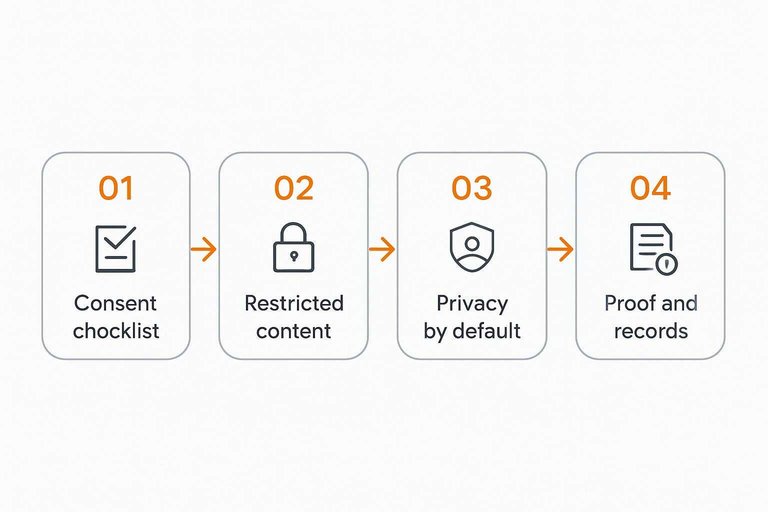
Permission checklist
A good consent block answers “what can you do with this?” in plain language.
- Grant right to publish the testimonial
- Allow light edits for clarity
- Approve name and photo use
- Approve company name and title use
- List channels where it may appear
If any box stays unchecked, treat that testimonial as restricted content. For the compliance baseline, review the FTC’s Endorsement Guides.
Privacy by default
Assume people want control, even when they love your product. Your form should make the safest choice the easiest choice.
Offer an anonymous option or initials. Avoid prompts that invite sensitive details, like health or finances. State what you retain, for how long, and why.
Collect less. You’ll ship more.
Proof and records
Consent only helps when you can prove it later.
- Save a timestamped copy of the consent checkbox state.
- Store the exact submitted text, unedited, as the source record.
- Keep contact details in a separate, access-limited system.
- Create a public-facing copy that matches the granted permissions.
Treat consent like a receipt. You only miss it when you need it.
Automation Options Map
You want testimonials to arrive consistently, without chasing people. Pick an automation path that matches your tools and the moment your customer feels the win.
| Option | Best for | Tooling needed | Watch-out |
|---|---|---|---|
| Email link request | Quick starts | Email tool | Low intent clicks |
| Website popup prompt | High traffic sites | Popup builder | Bad timing risk |
| CRM trigger form | B2B pipelines | CRM automation | Data hygiene gaps |
| Post-purchase flow | Ecommerce receipts | ESP + events | Review fatigue |
Start with one channel, then add the next only after responses feel predictable.
Set Up Your First “Always-On” Testimonial Flow
- Pick one trigger moment to start (e.g., right after a win, renewal, or successful onboarding) and decide who qualifies to receive the form.
- Build a short form around one core question plus 2–3 follow-ups, and reduce effort with multiple-choice prompts and optional long-form space.
- Add a clear permission checkbox (how you can use their words, name, role, and image) and store consent records alongside the submission.
- Connect the form to one automation path—tag, route, and remind—so submissions land in a review queue and approved quotes are ready to publish.
Frequently Asked Questions
- What’s the best tool to build an automated testimonial collection form as a beginner?
- Most beginners start with Google Forms or Typeform and connect submissions to Google Sheets or Airtable, then automate notifications with Zapier or Make. Choose a tool you already use so you can set it up in one sitting and iterate later.
- How do I automatically send a testimonial request after a customer hits a milestone?
- Trigger an email or in-app message from your CRM or email platform when a “milestone” event happens (e.g., project marked complete, onboarding finished), and include a single form link. If you don’t track milestones yet, tag customers manually and use that tag to trigger the send.
- How do I measure whether my automated testimonial collection form is working?
- Track form view-to-submit rate, completion rate by question, and how many submissions are “publish-ready” (clear, specific, permission granted). Also monitor where the best testimonials come from (which trigger, segment, or milestone) so you can double down.
- Can I automate testimonial collection without a CRM or marketing automation tool?
- Yes—use a shareable form link plus a simple workflow like “send link after support ticket resolved” or “send link after invoice paid,” and store responses in a spreadsheet. You can also use calendar reminders or lightweight automations from Gmail/Outlook add-ons to reduce manual follow-up.
- What’s the easiest way to publish testimonials after collecting them with an automated form?
- Use a tool that takes approved testimonials and turns them into embed-ready widgets or a public testimonials page, so you’re not copy-pasting into your site each time. ShowTrust is one option if you want collection plus curation and on-site display in a single workflow.
Turn Feedback Into Social Proof
Once you’ve mapped the right questions, timing, consent, and automation options, the next challenge is collecting and publishing testimonials consistently without extra admin.
ShowTrust gives you a shareable testimonial form, approval workflow, and embeddable widgets so verified customer feedback becomes trust signals that lift conversions.
Written by
ShowTrust
Notes from the ShowTrust team on collecting testimonials and building authentic social proof.
Share: