October 3, 2026
·
9 min read
How to Get Permission to Use Testimonials: 7 Steps
This 7-step guide settles how to get permission to use testimonials without rework later — classifying the asset (review vs testimonial, identity level, channels/placements), securing copyright permission and identity consent, asking in writing and storing a proof package, adding a pre-publish compliance gate, and maintaining/remove permissions over time.

You’ve got a customer email, a glowing DM, or a great video clip—and you want to put it on your site and in ads.
The problem is that “Can we share this?” isn’t one kind of permission. The moment you include a name, face, company logo, edited excerpts, incentives, or performance claims, a casual yes can still leave you exposed to takedown requests, platform headaches, or disclosure problems you only notice after you’ve shipped. This guide gives you a concrete 7-step workflow to request, document, publish, and later update or remove testimonials with the right scope.
Step 1: Classify the asset (before you ask for permission)
Before you ask for permission, classify the exact thing you want to reuse: a platform-hosted consumer review (Google/app store/marketplace), a first-party ad testimonial you collected, or private praise from an email/DM. Then classify how you’ll use it—embed vs republish (quote/screenshot/video)—because a screenshot or clip usually carries identity data (name/avatar/voice) while an embed is just a display method.
Review vs testimonial
| Type | Where posted | Who controls display | Reuse risk | Examples you might use |
|---|---|---|---|---|
| Consumer review | Google / app store / marketplace | Platform | Consent still needed for marketing | Stars + text, screenshot |
| Consumer review (embed) | Platform page | Platform (via embed) | Embed ≠ permission to republish | Embedded card/widget |
| Ad testimonial | Collected by you | You | You set scope/edits | Quote, headshot, video |
| Private praise | Email / support ticket / DM | You (in inbox) | Needs permission to publish | Email quote, screenshot |
Google’s Partner Marketing Hub is explicit: reviews belong to the person who wrote them, and you must get the reviewer’s consent to use their review in your own marketing (website, print, or digital ads) (reviews belong to the person who wrote them). That’s why “we embedded it” isn’t the same as “we have permission.”
Format and identity
Record exactly what you plan to use:
- Exact quote (quotation marks imply exact wording)
- Paraphrase or edited excerpt (allowed, but not out of context or distortive)
- Screenshot (captures more than the words—name, avatar, UI)
- Audio/video clip
Also note what identifies the person: name, photo, voice, job title, and company.
Channels and placements
List every place it will appear:
- Website (landing page, homepage, case study)
- Email (newsletter, nurture, outbound)
- Paid ads (search, social, display)
- Organic social (post, story, profile highlights)
For each, mark whether you’re using copy (text), creative (image), video, or an embed—so your permission matches the placement.
Step 2: Copyright permission (a minimum content license)
You’re not asking them to “give you the copyright.” You’re asking for a narrow license: permission to use their words/media for specific marketing uses.
-
What you can use: name the asset(s) precisely—e.g., the testimonial text, star rating, screenshot, or video/audio clip. If you’ll quote verbatim, say you’ll use the exact wording.
-
Where you can use it: list the placements you actually plan to publish in (website pages, emails, organic social, paid ads, print). If affiliates/partners will reuse it, include that explicitly.
-
How long + where (duration/territory): pick a clear scope (for example, worldwide; until they revoke permission). If your ad implies they use your product, the FTC Endorsement Guides say you can run it only while you have good reason to believe they remain a bona fide user.
-
Allowed edits (without distortion): allow spelling/length edits and formatting, but prohibit meaning changes. The FTC Endorsement Guides also draw a bright line: if you present it as an exact quote (like with quotation marks), it must be their exact words—and you can’t edit in a way that distorts their opinion or takes it out of context.
-
Third-party content inside the asset: if the screenshot/video includes a company logo, platform UI, music, or other third-party material, either strip it—or get explicit permission to use that element too.
Punchline: keep it non-exclusive. The Consumer Review Fairness Act voids form-contract terms that require customers to transfer IP rights in their reviews (beyond a non-exclusive license to use them).
Step 3: Identity consent
You need two permissions: a license to the words (Step 2) and consent to use the person’s identity in marketing.
-
List the identity elements you’ll show: full name, headshot, voice, video, job title, social handle, and any “before/after” images.
-
Get separate “yes” for each identity type: one for name, one for photo, one for video/voice. A screenshot often bundles all of these—treat it as identity use, not just text.
-
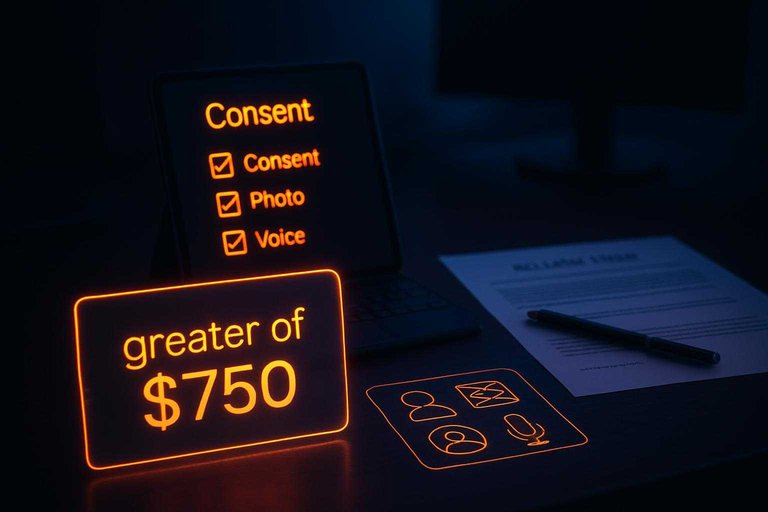
Treat ads as higher-risk than a blog quote. New York Civil Rights Law § 50 requires written consent to use a living person’s name/likeness/voice for advertising or trade (and a parent/guardian for a minor). California Civil Code § 3344 allows liability for knowing use of someone’s name/likeness/voice/photo for advertising without prior consent, with statutory damages of the greater of $750 or actual damages.
-
Don’t forget business identifiers: if you’ll use a company name, logo, or product screenshots as endorsements, get permission from the business owner too.
If you can’t get identity consent, publish it anonymous (or don’t publish it).
Step 4: Ask in Writing
Written permission is only useful if you can prove what they agreed to, when, and for which exact asset.
-
Pick the lowest-friction written “yes” that fits the risk: a reply-YES email for most quotes, a checkbox + typed name for form submissions, or an e-sign flow for higher-stakes uses. Under the E‑SIGN Act (15 U.S.C. § 7001), an agreement can’t be denied legal effect just because it’s electronic.
-
Paste the exact asset in the request: include the quote verbatim (or attach the screenshot/video) so approval is tied to a specific version. If you’re emailing for approval, using a testimonial request email generator can help ensure you include the right details.
-
Match the scope you actually plan to ship: list the channels/placements you’ll use now, and keep the language as permission (a non-exclusive license), not a rights transfer.
-
Make acceptance unambiguous: “Reply: ‘YES, I give permission to use the testimonial and my name/photo as described.’”
-
Log audit details automatically: approver identity (email/account), date/time, the exact permission text shown, and the exact media/text approved.
If there was any discount/freebie/relationship involved, capture it here—FTC Endorsement Guides treat that as a “material connection” that may need clear disclosure.
Step 5: Store Proof Package
A “proof package” is the record you can pull up later and answer, in one place: who said “yes,” when they said it, which exact text/media they approved, and what scope (placements + identity elements + disclosures) you were allowed to run.
-
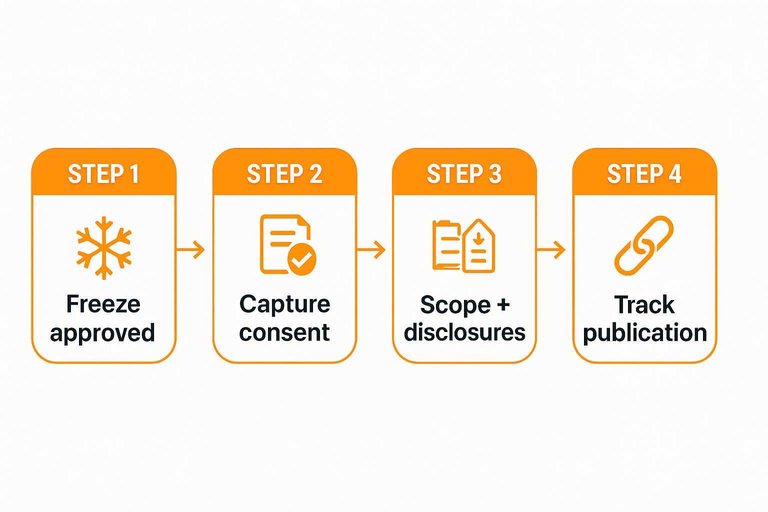
Freeze what was approved: save the exact quote, screenshot, or video file as approved (not the later edited version), plus the final “as-published” creative.
-
Capture the consent artifact: store the reply-YES email, form submission log (checkbox + typed name), or e-sign completion record—whatever produced the written “yes.”
-
Record who/when: approver identifier (email/account), date/time, and the exact permission text they agreed to.
-
Record scope + disclosures: allowed placements/channels and identity elements, plus any required disclosure language—e.g., material connections must be disclosed clearly and conspicuously, and employee/agent testimonials need relationship disclosure when it isn’t otherwise clear.
-
Track publication: list every URL/ad ID/page where it’s live and the first publish date.
ShowTrust’s collection + moderation workflow helps keep “permission” and “published testimonial” tied to the same record instead of scattered across spreadsheets and inboxes (see the FTC’s Consumer Review Rule update).
Step 6: Compliance Gate
Permission is only half the job. Before you publish, run every testimonial through a compliance gate designed to prevent “deceptive advertising” problems later—especially under the Federal Trade Commission (FTC) Endorsement Guides (16 CFR Part 255) and the FTC’s Rule on Consumer Reviews and Testimonials (16 CFR Part 465).
-
Confirm it’s real, accurate, and not distorted
Check your “as-approved” version against the “as-published” creative. If you use quotation marks, it must be their exact words, and your edits can’t change meaning or pull the quote out of context. -
Check for “typical results” risk before you ship performance claims
If the testimonial describes an experience on a central attribute (like savings, revenue, speed, or health outcomes), readers will likely interpret it as representative. If you can’t substantiate that it’s representative, the FTC says you should clearly and conspicuously disclose the generally expected performance—and that disclosure can’t misrepresent what people can expect. -
Don’t rely on “Results not typical” to fix the impression
FTC guidance includes an example where disclaimers like “Results not typical” are not enough if the ad still leaves the net impression that the stated results are what consumers generally can expect. -
Add material-connection disclosures (freebies, discounts, relationships)
A “material connection” is any benefit or relationship that could affect how much people trust the endorsement (including payment or free/discounted products). When it isn’t reasonably expected, the FTC requires a clear and conspicuous disclosure. -
Flag insiders and employees explicitly
If an officer, manager, employee, or agent gives the testimonial and that relationship isn’t otherwise clear, failing to disclose it is a violation under 16 CFR § 465.5.
For therapists and counselors, “consent” doesn’t solve everything: the American Counseling Association’s ethics code says counselors who use testimonials do not solicit them from current or former clients, and the American Psychological Association’s (1992) ethics code similarly prohibits psychologists from soliciting testimonials from current psychotherapy clients/patients or others vulnerable to undue influence. To make this review repeatable at scale, use advanced testimonial approval workflows that capture the “as-approved” version, disclosures, and final placement before publishing.
Step 7: Maintain and Remove
Publish only the approved version, then treat testimonials as living assets with owners, expiry checks, and a removal path.
-
Ship from the “as-approved” file. If you trim, translate, or re-design the creative after approval, treat it as a new version and re-approve before it goes live.
-
Set a recurring claim review. Re-check anything time-bound (“still using,” “since switching,” performance outcomes) when your product, pricing, or onboarding changes—outdated claims are how valid permission becomes misleading marketing.
-
Run a withdrawal playbook. Have one intake address, verify the requestor, then remove it everywhere you listed in your proof package (all URLs, emails, ads, and social). If you’re served with a court order in California, the default clock to remove/recall/cease distribution is two business days.
-
Handle platform reviews differently. An embed is just a display method controlled by the platform; a quote/screenshot is a republication you control—so your takedown work (and your proof of permission) has to match what you actually shipped.
Treat permission as scoped approval
“Can we share this?” only protects you when it’s tied to the exact asset, the exact placements, and the exact identity elements you plan to publish—plus clear rules on edits, duration, and disclosures. Get a non-exclusive content license and separate identity consent in writing, and package the proof so you can show who approved what, when, and where it went live. Then don’t ship on permission alone: run a compliance gate for distortion, performance-claim impressions, and material connections before anything goes public. If you do one thing next, take the testimonial you want to use, write down how you’ll publish it (quote vs screenshot vs embed, named vs anonymous, which channels), and ask for that specific scope—nothing vaguer.
Frequently Asked Questions
- Can I put testimonial permission in my terms and conditions, or do I need separate consent?
- Don’t bury it in T&Cs as a rights transfer—federal law voids form-contract terms that require customers to transfer IP rights in their review content beyond a non-exclusive license to use it. Get separate, explicit permission for the specific testimonial asset and the specific marketing placements you plan to use.
- Does an email reply like “Yes, you can use this” count as written permission to use customer testimonials?
- Yes—an agreement can’t be denied legal effect solely because it’s electronic, so a clear reply-YES email can serve as written permission. Make the “yes” unambiguous by pasting the exact quote/screenshot they’re approving and stating where you’ll use it.
- If someone revokes permission for a testimonial, how fast do I have to take it down?
- If you’re served with a court order in California, the default deadline to remove/recall/cease distribution is two business days (unless the order sets a different requirement). Even without a court order, you still need a repeatable takedown process that removes it everywhere you published it.
- Can therapists legally use client testimonials for marketing?
- Professional ethics rules restrict this: the American Counseling Association’s ethics code says counselors who use testimonials do not solicit them from current or former clients, and the American Psychological Association’s (1992) ethics code similarly prohibits psychologists from soliciting testimonials from current psychotherapy clients/patients or others vulnerable to undue influence. If you’re in a regulated practice, follow your profession’s ethics rules before treating “permission” as a marketing green light.
- What’s the simplest way to collect permission to use customer testimonials at scale (without losing proof)?
- Use a workflow that captures a written “yes” tied to the exact asset and stores the approval record (who approved, when, what text/media, and allowed placements) alongside the testimonial. Tools like ShowTrust can centralize collection and approvals so the published testimonial stays linked to its proof of permission.
Ship testimonials with audit-ready receipts
Turning your checklist into a repeatable workflow means gathering the right assets, capturing approval, and keeping everything searchable when pages get updated later.
ShowTrust gives you a hosted collection page and an embeddable wall of love, with a Pending-to-approved workflow so only the testimonials you’ve cleared are published.
Written by
ShowTrust
Notes from the ShowTrust team on collecting testimonials and building authentic social proof.
Share: