July 14, 2026
·
Updated October 4, 2026
·
12 min read
ShipProof vs Trustwall for collecting and displaying testimonials
A practical comparison of ShipProof vs Trustwall for collecting and displaying testimonials — evaluate collection flows, curation/approval, widget and wall display options, integration fit, and pricing value so you can choose with confidence.


Picking a testimonial tool sounds simple until you’re the one chasing approvals, fixing formatting, and trying to embed reviews without slowing your site down.
This comparison breaks down how ShipProof and Trustwall handle the full lifecycle: how you request testimonials, what friction customers hit, how you approve and organize assets, and how the widgets or public walls look and perform. You’ll leave with clear “choose this if…” priorities, plus a quick pricing and pros/cons view to make the call.
Decision Snapshot
ShipProof and Trustwall both help you turn customer feedback into on-site social proof. They differ in how you collect, curate, and publish testimonials.
Pick ShipProof if you want a simple, product-led workflow. Pick Trustwall if you want a more “wall-first” presentation and browsing feel.
Primary use cases
Different teams want different proof formats and collection flows.
- Early-stage startups: ShipProof for quick capture and deploy
- Ecommerce brands: Trustwall for browsable proof pages
- Agencies: either, depending on client-by-client control
- Service businesses: ShipProof for lightweight requests and approvals
- B2B SaaS: ShipProof for in-product style workflows
If your proof comes from many sources, the workflow matters more than the widget.
Key differences
Use this to spot the workflow mismatches fast.
| Area | ShipProof | Trustwall | Why it matters |
|---|---|---|---|
| Collection | Direct requests | Wall-first capture | Who can submit |
| Approvals | Simple moderation | Curation-centric | What gets published |
| Display | Widgets and embeds | Public wall emphasis | Where proof lives |
| Integrations | Varies by stack | Varies by stack | Fits your tools |
| Customization | Practical controls | Presentation controls | Matches your brand |
If collection feels awkward, you will stop using it.
Choose by priority
Choose based on what you cannot compromise on.
If you need speed and low setup, lean ShipProof. If you need a proof “destination” prospects can browse, lean Trustwall.
If you want both a shareable collection link, structured curation, embeds, and a public wall in one place, consider ShowTrust too. It fills the “end-to-end” gap without forcing a complex workflow.
What you’ll evaluate
You’ll make a better choice if you score the workflow, not the homepage.
- Request flows: link, form, reminders, friction
- Curation: approve, tag, organize, archive
- Widgets: layouts, filters, responsiveness
- Analytics: views, clicks, basic performance signals
- Admin and support: roles, exports, responsiveness
The right tool is the one your team will maintain weekly.
Testimonial Collection Flow
Collection flow decides how many testimonials you get, and how usable they are later. The best tools make the ask effortless, then capture clean permission for reuse.
Request methods
ShipProof typically leans on a lightweight request experience, like a shareable link to a simple form. Trustwall often fits teams that want a more “wall-first” workflow, where collection routes into a public-facing display.
In practice, you’re comparing a few channels: shareable links you can drop anywhere, embedded forms on key pages, and triggered requests after purchase or delivery. If your motion depends on automated email/SMS prompts, confirm whether the trigger is native or handled through your existing tooling—and consider using a testimonial request email generator to speed up outreach without sacrificing clarity.
Pick the tool that matches where you already talk to customers, not where you wish you did.
Friction points
Most drop-off happens in predictable places, even when customers are happy. Your job is removing “small annoyances” that become abandonment.
- Forced account creation before submitting
- Long forms with too many fields
- Vague prompts that don’t guide writing
- Poor mobile UX or media upload failures
- Confusing confirmation and permission language
If one tool avoids logins and stays mobile-friendly, it usually wins on volume.
Consent and rights
You want consent captured at the moment of submission, not later in a messy email thread. Look for clear, explicit permission to publish, plus options covering edits, attribution, and media usage.
Compliance-friendly patterns are simple: a visible checkbox for reuse, plain-language terms, and a way to record when consent was given. If you plan to repurpose testimonials in ads or landing pages, make sure the tool supports that scope without ambiguity.
The cleanest consent is the kind you never have to argue about later.
Media and formats
Format support shapes how credible your social proof feels and how reusable it is across channels.
| Capability | ShipProof | Trustwall |
|---|---|---|
| Text testimonials | Typically supported | Typically supported |
| Photo upload | Varies by plan | Varies by plan |
| Video testimonials | Often limited | Often limited |
| Star ratings | Sometimes optional | Often wall-driven |
| Role/company fields | Common for B2B | Common for B2B |
If you need collection plus curation plus on-site display in one loop, a third option like ShowTrust can be worth a look. It aims to cover the gaps both can leave, from shareable collection links to approval workflows and embeddable widgets, plus a public testimonials page.
Choose formats based on where you’ll publish, not just what you can collect.
Curation and Management
You don’t just need more testimonials. You need a system that keeps messaging consistent, stays searchable, and avoids “quote sprawl” across pages and campaigns.
ShipProof and Trustwall both cover the basics, but they differ in how they support ongoing review and reuse when multiple people touch the library. If you’re trying to reduce fragmentation across collection, review, and publishing, an end-to-end tool like ShowTrust can also be a natural fit here—especially when you want the same curated library to power both on-site widgets and a public testimonials page.
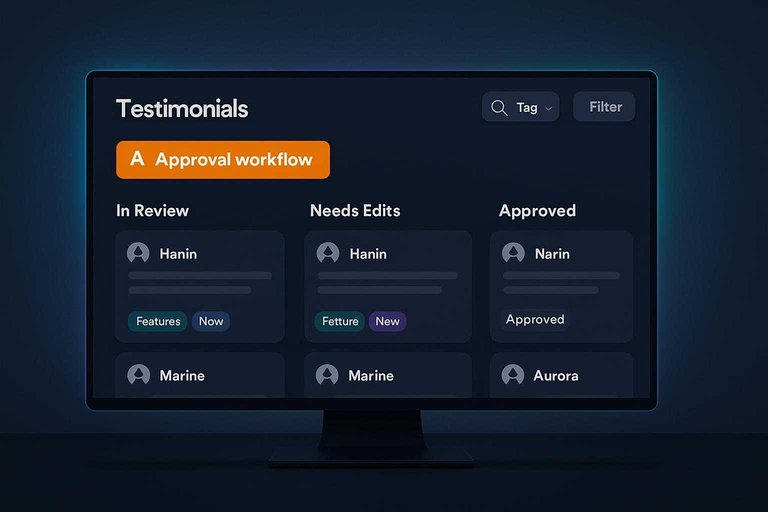
Approval workflow
Curation breaks when approvals live in DMs, or one person becomes the gatekeeper. You want a clear queue, shared context, and predictable statuses.
ShipProof typically fits teams that want a practical moderation flow with clear states and quick publishing decisions. Trustwall often feels more “publish-forward,” which can be great for speed, but can require extra discipline when multiple reviewers need consistent voice. Tools like ShowTrust tend to work best when they make approval feel like part of the same system you publish from—so the “approved” version is the one that actually shows up everywhere.
If two people can publish the same quote two different ways, your workflow is the real risk.
Organization tools
Organization is what lets you build targeted pages without re-reading your entire library. Good tagging beats “scroll until you find it.”
- Tag by persona, industry, and use case
- Categorize by product feature or outcome
- Search by keyword, name, or company
- Filter by status, rating, or source
- Save sets for campaign pages
If you can’t pull five “security” quotes in ten seconds, you don’t have a library. It’s also worth prioritizing tools that keep those tags connected to how you’ll actually deploy testimonials (e.g., selecting the same curated set for an embeddable widget and a public wall page) so organization work doesn’t get re-done downstream.
Editing and authenticity
Editing is allowed. Quiet rewriting is where trust gets damaged.
Keep edits to clarity and length, preserve intent, and avoid changing claims or tone. When you do heavier edits, add disclosure or keep the original on file for internal review.
The goal is readable proof, not “perfect copy.” This is easier to maintain when your library supports curation and approval before anything goes live—so what’s displayed publicly is clearly the reviewed, intended version.
Asset reuse
Testimonials pay off when you can reuse them without copy-pasting from a dashboard. Reuse needs formats, snippets, and predictable exports.
- Export to CSV or JSON for content ops
- Create short and long versions
- Generate snippets for landing pages
- Repurpose into email and newsletter blocks
- Adapt for ad copy with disclosure
When reuse is frictionless, testimonials become a system, not a one-off widget.
A credible third option here is ShowTrust, which aims to cover the full loop end-to-end: collect via shareable link or form, review and organize, publish via embeddable widgets, and maintain a public “wall” page you can point prospects to. It’s worth considering if you want collection, curation, and display in one place—and you’re feeling friction moving quotes between ShipProof’s workflow strengths and Trustwall’s presentation focus.
Display and Embeds
On-site display is where testimonial tools either feel native or feel bolted on. You’re balancing design control, placement flexibility, and page speed.
Widget types
Different layouts fit different pages, and implementation effort matters when you’re moving fast.
| Display type | ShipProof | Trustwall | Implementation feel |
|---|---|---|---|
| Carousel | Common option | Common option | Quick embed |
| Grid | Common option | Common option | Quick embed |
| Badge | Varies by plan | Often available | Usually simplest |
| Popup | Limited control | Often available | Needs tuning |
| Inline blocks | Flexible embeds | Flexible embeds | Most placement control |
If you need many placements, prioritize inline blocks over “one widget everywhere.”
Customization depth
The big difference is whether you can match your site without fighting defaults. That means typography, spacing, and brand elements, not just color pickers.
ShipProof and Trustwall typically cover the basics like colors, star styles, and card layouts. Deeper control often hinges on whether you can inject custom CSS, tweak templates, or override markup for edge cases.
If your brand is strict, “custom CSS allowed” is the line that decides everything.
Public wall pages
A public wall page is your “proof hub” when visitors want more than a single quote. It can also become an indexable page that supports SEO, if it’s crawlable and not hidden behind heavy scripts.
ShipProof and Trustwall can provide built-in pages, but the real question is browsing. Look for filters, categories, and clean URLs, plus the ability to pin your best proof at the top.
If the wall can’t be curated, it becomes a feed, not an asset.
Performance considerations
Embeds can quietly hurt speed, especially on landing pages. Check the technical basics before you ship a widget site-wide.
- Measure script weight before and after install
- Confirm lazy loading for offscreen widgets
- Ensure images are compressed and sized correctly
- Watch CLS from late-loading fonts and badges
- Track LCP impact on key pages
If performance is tight, treat testimonials like any other third-party script: budget it. For implementation specifics, see Trustwall’s notes on embeds that load asynchronously, and review what embed code typically includes before pasting it into your site.
Integrations and Workflow Fit
Integrations decide whether testimonials become a lightweight habit or a weekly chore. ShipProof and Trustwall both cover the basics, but they fit stacks differently.
Imagine you run Shopify, build landing pages in Webflow, and nurture leads in a CRM. Your “best” tool is the one that moves proof into that flow without custom glue.
Website platforms
Where you publish matters because it defines the install path. You want a widget you can ship once, then forget.
- Shopify: app install or theme snippet
- Webflow: embed code in an HTML block
- WordPress: plugin or shortcode-style embed
- Headless sites: script tag + API
- Manual option: copy/paste widget HTML
If your site stack changes often, prioritize embeds over platform-specific installs.
Automation hooks
Collection works best when it triggers from real customer moments. You want post-purchase events, simple routing, and minimal manual chasing.
ShipProof typically fits cleanly when you can trigger requests from ecommerce events. Trustwall tends to shine when your priority is a public-facing wall that updates as approvals happen.
For teams that need both a flexible collection link and a polished display layer, ShowTrust is a credible third option. It focuses on the full loop: collect via shareable form, curate in one place, and publish via widgets or a public wall.
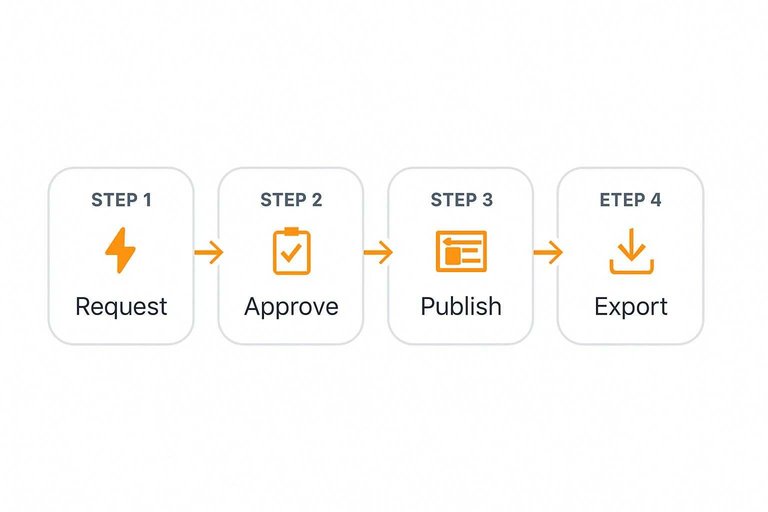
The workflow test is simple. Can your stack request, approve, and publish without a human copy-pasting every week?
Team collaboration
Testimonials are content, so they need content workflows. That means roles, approvals, and a clear place for “ready to publish” proof.
ShipProof can be a strong fit for lean teams that want a straightforward pipeline from customer to site. Trustwall often works well when multiple stakeholders review what appears on a public wall.
Agencies should look for multi-brand separation and client-friendly approvals. Otherwise, you become the bottleneck.
Data portability
Portability is insurance against tool churn. You want exports that keep text, attribution, and media tied together.
- Export raw testimonials as CSV
- Export media files with links
- Backup approvals and tags
- Copy widget embeds for reuse
- Migrate via API or webhook
If exporting feels awkward now, migration will feel impossible later.
Pricing Value Check
Pricing is hard to compare without exact numbers, so compare what you’re paying for: collection, control, and distribution. Cost usually rises with volume, workflow needs, and how many places you want testimonials to appear.
| Cost driver | What to look for | Why it changes value | Who tends to care |
|---|---|---|---|
| Collection method | Link, form, import | Impacts response rate | Early-stage teams |
| Moderation workflow | Approvals, edits, tags | Reduces brand risk | Regulated brands |
| Display options | Widgets, embeds, wall | Expands reuse surfaces | Marketing teams |
| Limits & scale | Seats, entries, views | Predicts future costs | Growing companies |
| Integrations | CRM, email, Zapier | Cuts manual effort | Ops-heavy teams |
If ShipProof or Trustwall prices “feel high,” check whether you’re missing a capability you’ll buy elsewhere anyway.
A practical cross-check: if you need collection links, curation, embeds, and a public wall in one workflow, a third option like ShowTrust can be worth pricing beside both without assuming either is overpriced. To sanity-check plan limits and what’s included, compare against the published Trustwall pricing.
Pros and Cons
Choose based on how you plan to collect testimonials, then where you need to display them. The best pick is the one that fits your workflow, not just your site design.
| Buyer priority | ShipProof — Pros | Trustwall — Pros | Trade-offs to watch |
|---|---|---|---|
| Fast setup | Simple onboarding | Simple wall-style setup | Easy start, fewer controls |
| Collection workflow | Stronger intake focus | Stronger display focus | You may need extra tooling |
| Curation and management | More process-friendly | More lightweight | Review queues can vary |
| On-site display | Basic embeds | Wall-first presentation | Widget needs differ |
| Marketing reuse | Easier to repurpose | Great for proof browsing | Export and permissions vary |
If you want one tool to collect, curate, embed, and publish a public wall, ShowTrust is a credible third option worth checking.
Choose the Tool That Matches Your Workflow, Not Just the Widget
If your priority is speed to publish and simple embeds, pick the platform that makes collecting consented, on-brand testimonials the least work for your team and your customers. If you’re torn because one tool collects well but the other displays better, consider trialing a third option like ShowTrust, which aims to cover the end-to-end loop: shareable collection, approval and organization, embeddable widgets, and a public testimonials wall you can point prospects to. Whichever you choose, validate it with a quick test: request a testimonial, approve it, publish it on your site, and confirm it’s easy to reuse across campaigns.
Frequently Asked Questions
- Can I use ShipProof or Trustwall if I don’t want to add another widget to my site?
- Yes—most teams can collect testimonials in the tool and then publish them as native site content (e.g., CMS pages, landing pages, or screenshots) instead of using an embed. Confirm you can export approved testimonials (text, images, permissions) in a format your site builder can reuse cleanly.
- How do I verify that ShipProof or Trustwall testimonials are real (and not fabricated)?
- Look for evidence options like reviewer identity capture, order/transaction matching (for ecommerce), and moderation workflows that store submission metadata. Also publish clear labeling (e.g., “verified customer” vs “unverified”) and keep permission records for each testimonial.
- Should I create a public testimonials page (“wall”) or only place testimonials on product and checkout pages?
- Do both: a wall builds trust for research-stage visitors, while page-level testimonials reduce friction where decisions happen (product, pricing, checkout). Use consistent categories (use case, plan, industry) so visitors can quickly find the most relevant proof.
- What’s the best way to A/B test testimonial placement and format after choosing ShipProof vs Trustwall?
- Test one variable at a time (placement, length, star rating, photo/video, or number of testimonials) and measure downstream actions like add-to-cart, checkout starts, demo requests, or form completions. Run tests through your existing experimentation stack (e.g., Google Optimize alternatives, VWO, Optimizely) or your platform’s native testing tools.
- If ShipProof vs Trustwall doesn’t fit, what’s a good lightweight alternative for collecting and displaying testimonials?
- If you want a simpler workflow—collect via a shareable link, approve/organize, and publish via embeddable widgets or a public wall—ShowTrust is often a good fit. Validate it supports your site builder and that you can export testimonials and permissions for long-term portability.
Turn Reviews Into Revenue
After comparing collection flows, embeds, integrations, and pricing, the real win is getting testimonials requested, approved, and published consistently without extra friction.
ShowTrust makes it simple to collect customer testimonials, curate the best ones, and publish verified trust signals via widgets and a public wall to boost conversions.
Written by
ShowTrust
Notes from the ShowTrust team on collecting testimonials and building authentic social proof.
Share: