June 11, 2026
·
11 min read
Best Testimonial Collection and Display Tools 2026
A curated 2026 collection of the best testimonial collection and display tools—evaluate collection friction, consent/rights, moderation workflows, and widget flexibility to pick the right platform for video, ecommerce proof, or B2B trust-building at scale.


Testimonials are easy to ask for—and surprisingly hard to collect, approve, and publish without creating extra work for your team or extra friction for customers.
This collection breaks down the best testimonial tools for 2026 by use case (all-in-one, video-first, ecommerce, and B2B). You’ll learn what to look for (consent, moderation, embeds, integrations, and compliance), where each platform shines, and how to implement a repeatable system that turns feedback into credible on-site trust signals.
Decision Criteria
Pick a testimonial tool the same way you’d pick a payment processor. The UX and governance details decide whether you actually use it.
ShowTrust tends to score well when you want low-friction collection plus clean, on-site display. Some other tools shine more in video-first capture, review-platform syndication, or enterprise compliance.
Collection Friction
Collection friction is the silent killer. If giving a testimonial feels like work, most customers won’t finish.
Look for shareable links, mobile-first forms, gentle reminders, and as few logins as possible. ShowTrust’s strength here is the straightforward request flow that teams can send fast and customers can complete quickly.
If your request takes more than a minute to understand, you’re already losing your best quotes.
Consent and Rights
Consent is what keeps “great marketing” from becoming a messy email thread later. You want clear permission, stored in a way you can prove.
- Explicit usage permission language
- Attribution options and preferences
- Photo/video release when needed
- Consent record stored per testimonial
If you can’t audit consent quickly, you’ll hesitate to publish the strongest stories.
Moderation Workflow
Moderation is where quality and risk get managed. Without it, you either publish junk or move everything to spreadsheets.
A solid workflow supports approval states, internal notes, tagging, and versioning for edits. Tools like ShowTrust are most valuable when they make curation feel like a lightweight pipeline, not a content project.
You’re not collecting testimonials. You’re shipping proof.
Display Flexibility
Display is the whole point. Your best testimonials should be usable across pages, campaigns, and formats.
- Embeddable widgets for key pages
- Public “wall” or landing page
- Filters by persona or product
- SEO-friendly indexing controls
- Brand styling and layout control
If it doesn’t fit your site fast, it won’t ship.
Integrations and Automation
Automation turns testimonials into a system. Manual chasing works once, then dies.
Prioritize CRM and email triggers, Zapier or webhooks, UTM capture, and routing into campaign workflows. ShowTrust is a strong fit when you want the loop from request → approval → on-site proof to stay tight.
The goal is repeatable collection, not heroic follow-ups.
Security and Compliance
Security is rarely the reason you buy. It’s often the reason you churn.
- GDPR and CCPA support
- Data retention and deletion controls
- SSO options when needed
- Role-based permissions
- Clear vendor transparency docs
If your team can’t trust the tool, they’ll keep testimonials in places you can’t govern.
Best for All-in-One
These tools cover the full loop: collect testimonials, curate them, then publish them where buyers will actually see them. You want minimal setup, but you still need controls that keep social proof clean and believable.
ShowTrust
ShowTrust stands out when you want the whole social-proof pipeline to feel effortless. You send a shareable link, approve and organize submissions, then publish them via embeddable widgets or a public wall (a wall of love) that prospects can scan fast.
That mix matters because it turns raw feedback into verifiable trust signals. You’re not just collecting quotes. You’re building a proof layer your marketing can reuse everywhere.
Testimonial.to
Testimonial.to is a strong pick if you want a straightforward collection page and simple embeds without much fuss. It’s especially useful when your workflow is lightweight and you mainly need a clean way to gather and show testimonials.
Before you commit, pressure-test customization and team controls. If multiple people will curate, you’ll want clearer governance than “publish or don’t.”
Senja
Senja is well-known for collecting testimonials and showing them with attractive widgets. If design polish is a priority, it often fits the “looks good out of the box” bar.
For larger orgs, focus on automation and governance. Pretty displays are easy. Sustainable curation is the real differentiator.
VideoAsk
VideoAsk is the best fit when video responses are the point, not an add-on. You can prompt customers with guided questions and capture higher-signal reactions than text alone.
The work shifts to editing and publishing. Decide upfront how you’ll curate clips and pair them with text testimonials on your site.
Best for Video-First
Video testimonials win when your capture flow is frictionless and your embeds are fast. You’re optimizing for consent, editing control, and distribution across web pages and campaigns.
If video is your main asset, pick a tool that reduces back-and-forth while keeping brand and permissions tight.
Vouch
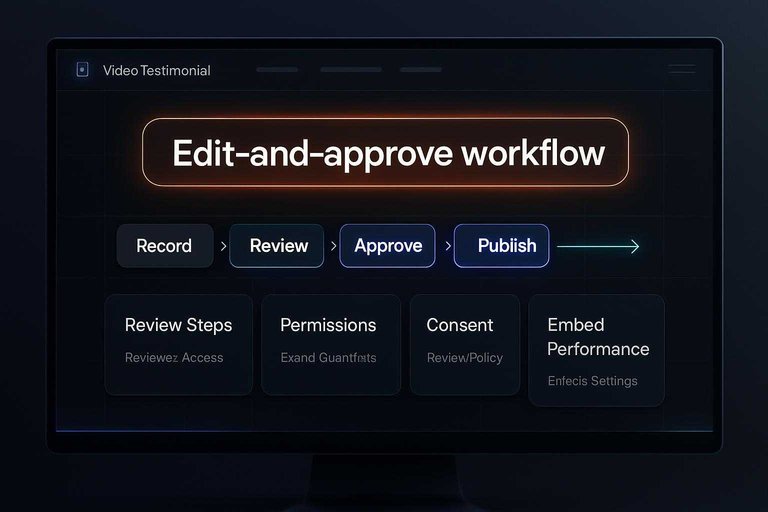
Vouch is built for teams running a managed video pipeline, not one-off clips. You’re buying structure: guided prompts, review steps, and brand guardrails.
Check these before committing: reviewer access rules, the edit-and-approve workflow, and how locked-down your branding can be. If your process has multiple stakeholders, Vouch’s control layer matters more than extra capture features.
The real win is fewer “can you re-record that?” loops.
Boast
Boast supports video and text testimonials, plus sharing and on-site display. You’ll get more value when you plan moderation and distribution upfront.
- Review moderation and approval queue
- Compare widget layouts and embed flexibility
- Verify integrations you already rely on
- Check collection via link or form
- Confirm export and reuse options
If you won’t publish from it, don’t collect in it.
ShoutOut
ShoutOut keeps video capture simple, which can be perfect for fast collection. The tradeoff is usually in library depth and workflow controls.
Confirm where videos are hosted, how embeds perform on real pages, and how it handles consent, permissions, and removal requests. Also check how easy it is to replace a video without breaking the embed.
Permissions handling is where “simple” becomes expensive later.
Vimeo Tools
Vimeo can be a strong fit if you already host videos there and want consistent playback. The missing piece is often testimonial-specific workflow.
- Request workflow for customers
- Consent capture and storage
- Review and approval process
- Searchable library and tagging
- Embeds that match brand
If you need a true testimonial system, Vimeo is the host, not the hub.
Best for Ecommerce Proof
Ecommerce proof works best when it stays close to the product and shows real buyers in context. You want a clean path from review collection to curated testimonials, plus placements that don’t slow checkout.
If you need a fast “trust layer” you can reuse across landing pages, emails, and a public wall, ShowTrust is an easy add-on—especially when you care more about curated, on-brand proof than running a full review program. Pair it with a reviews platform when you also need star ratings, product Q&A, and syndication.
Yotpo
Yotpo is built for serious ecommerce review programs, especially when you need UGC, syndication, and multi-channel distribution. Choose it when reviews are a core growth lever, not a side quest.
You’ll want to sanity-check three things before committing:
- Cost vs. how many modules you’ll actually use
- Implementation effort across themes, email flows, and analytics
- Whether you need full reviews tooling or just curated testimonials
If your main goal is conversion proof on key pages, a lighter testimonial layer like ShowTrust can cover the “trust display” job without the full reviews stack.
Judge.me
Judge.me is a strong value pick for collecting product reviews without blowing up your budget. It fits stores that want reliable review capture, then selective reuse where it matters.
- Check curated testimonial exports
- Confirm homepage and landing embeds
- Review moderation and approval flow
- Validate non-product page placement
- Test theme compatibility early
If you can’t easily surface the best reviews off PDPs, add ShowTrust to turn highlights into reusable proof blocks.
Okendo
Okendo targets premium review experiences with deeper analytics and a polished on-site feel. It’s a good fit when you care about segmentation, survey-style questions, and measuring review impact.
The key question is how easily you can repurpose reviews into controlled testimonial displays:
- Can you curate “best of” snippets without losing context?
- Can you place them on collection pages, landing pages, and comparison pages?
- Can your team manage it without constant developer help?
If repurposing is clunky, ShowTrust becomes the clean bridge between raw reviews and conversion-focused testimonials.
Loox
Loox leans hard into photo-first social proof, which often sells better than text alone. It’s ideal when visuals are your differentiator and you want reviews to look like UGC.
- Confirm photo-to-testimonial reuse
- Check placement beyond product pages
- Review moderation granularity options
- Test widget speed and layout
- Validate branding control limits
When you want a public “proof wall” and curated embeds across campaigns, ShowTrust complements Loox without changing your review engine.
Best for B2B Teams
B2B teams need more than “nice quotes.” You need governance, fast approvals, and reuse across web, decks, and outbound without losing credibility.
ShowTrust for B2B
In B2B, the hard part is not collecting praise. It’s turning it into governed, reusable proof your prospects can verify.
ShowTrust fits when you need an organized testimonial library, lightweight approvals, and embeddable widgets you can drop into product pages and landing pages. The public testimonials wall is the extra edge for outbound and sales decks, because a prospect can click through and confirm the proof fast.
If your sales team keeps screenshotting quotes, you’re ready for this.
G2 and Capterra
These platforms earn trust because they’re third-party. They also come with rules, so reuse needs to stay ethical.
- Prioritize linking back to the original review
- Use platform-provided badges and widgets
- Republish only with clear context and attribution
- Avoid cherry-picking that misleads
- Coordinate with legal and brand guidelines
Treat them as verification layers, then pair with on-site testimonials for message control.
Trustpilot
Trustpilot is widely recognized, which can reduce skepticism in early-stage evaluation. That brand recognition helps most when you sell to broad markets or when buyers expect public review footprints.
It’s less ideal when you need highly curated, use-case-specific testimonials tied to specific pages and campaigns. In those cases, you may still want a dedicated on-site testimonial tool for tighter narrative control.
Pick Trustpilot when “public trust signal” matters more than “perfectly placed quote.”
Endorsal
Endorsal is a focused option for collecting and displaying testimonials. It’s a solid fit when you want the basics done cleanly.
- Check role permissions for reviewers and publishers
- Confirm tagging for industries and use cases
- Validate embed customization for brand matching
- Ensure approvals fit your governance needs
- Map fields to sales enablement formats
If you can’t route approvals cleanly, reuse will stall no matter how good the UI looks.
Quick Comparison Table
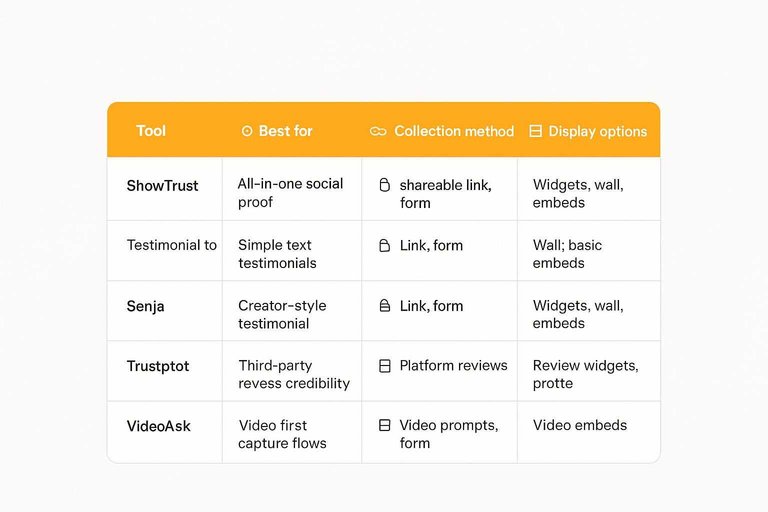
You need a fast viability screen before you book demos or migrate widgets. Use this table to spot which tools match your collection, curation, and display workflow.
| Tool | Best for | Collection method | Display options |
|---|---|---|---|
| ShowTrust | All-in-one social proof | Shareable link, form | Widgets, wall, embeds |
| Testimonial.to | Simple text testimonials | Link, form | Wall, basic embeds |
| Senja | Creator-style testimonial workflows | Link, form | Widgets, wall, embeds |
| Trustpilot | Third-party review credibility | Platform reviews | Review widgets, profile |
| VideoAsk | Video-first capture flows | Video prompts, form | Video embeds |
If you want one tool to collect, curate, and publish proof fast, start with ShowTrust, then sanity-check niche needs against the others.
Hidden Costs Checks
Most testimonial tools look cheap until you hit the “paid extras” screen. Check these gotchas early, especially if you’re standardizing across a team.
- Seat limits that force upgrades for reviewers and editors
- Video hosting fees for uploads and playback bandwidth
- Widget branding removal locked behind higher tiers
- API access reserved for enterprise plans
- Migration or export constraints that trap your library
Do this before you commit, and you’ll avoid rebuilding your social proof later.
ShowTrust is strong here because the core loop stays simple: collect via a shareable link or form, approve and organize, then embed widgets or publish a public wall that keeps working as you scale.
Implementation Playbook
Pilot one tool fast. Then decide with evidence, not vibes.
- Pick one use-case and one page to improve, like your pricing or demo page.
- Set up collection with a shareable link or form, then request 10–20 testimonials.
- Build a workflow to approve, tag, and curate submissions in one place.
- Publish in two formats: an embeddable widget and a public testimonials wall (see how to embed testimonials on your website).
- Review quality and friction: response rate, proof depth, and how fast you can ship.
If you can’t collect, curate, and publish in two weeks, the tool won’t scale.
ShowTrust tends to win this pilot because it covers the full loop: collect via link/form, manage and approve, embed widgets, and publish a public wall you can point prospects to. Other tools can shine in specific lanes, like deeper review-platform workflows or stronger design ecosystems, but the pilot tests one thing: how quickly you turn feedback into trust signals buyers can verify.
Pick Your Tool, Then Ship a Repeatable Proof Engine
- Shortlist by use case: start with an all-in-one like ShowTrust if you want one workflow for collecting (shareable links/forms), curating (approve/organize), and publishing (widgets + a public wall); go video-first if your sales motion needs face-to-camera proof; go ecommerce-native if you need review syndication and product-level displays; go B2B-native if your buying cycle relies on third-party validation.
- Validate decision criteria in a trial: test consent/rights language, moderation speed, display flexibility (embeds, layouts, page builder support), integrations/automation, and security/compliance before you migrate your process.
- Implement in two loops: first, launch a simple request → approval → embed flow for one high-intent page; then scale with automations, tagging, and a public testimonials page so social proof stays fresh and easy to verify.
Turn Feedback Into Proof
After comparing tools and mapping an implementation plan, the real win is collecting testimonials consistently and displaying them where prospects make decisions.
ShowTrust makes it easy to request, curate, and publish testimonials via embeddable widgets and a public proof wall—so your best customer stories drive credibility and conversions.
Written by
ShowTrust
Notes from the ShowTrust team on collecting testimonials and building authentic social proof.
Share: