August 8, 2026
·
11 min read
What Is “No Credit Card Required” and How Does It Work?
An explainer on what “no credit card required” really means in SaaS—and how it’s implemented through entitlements, trial access patterns, billing-stack separation, conversion UX, and abuse controls so you know what to expect and what to watch for.

“No credit card required” sounds simple: sign up, try the product, decide later. But depending on the company, it can mean anything from a generous full-feature trial to a tightly limited demo that blocks the moment you hit a key action.
This explainer shows you the promise versus the actual mechanism. You’ll learn how access is granted (time, usage, features, sandboxes), how billing is kept separate from product entitlements, how upgrades should happen without surprise charges, and what controls teams use to prevent abuse.
Promise vs Mechanism
“No credit card required” is a billing posture: you can start using the product without providing a payment instrument. It’s a promise about onboarding friction and default billing risk, not a promise about what features you get forever.
Mechanically, it’s true when access, usage limits, and lifecycle events are controlled without touching payment rails. It’s misleading when payment happens elsewhere, or when “no card” quietly becomes “you still owe us.”
User-intent taxonomy
Different users show up with different jobs to do. Your trial design should match the job, or you’ll add friction in the wrong place.
- Evaluation-only: validate fit, ignore workflows, avoid commitments
- Light production: ship a small thing, need reliability, accept limits
- Procurement prep: assess security, pricing, and approvals, want documentation
Design for the intent you want most, or your “no card” flow becomes random friction.
What’s actually prevented
“No credit card required” can block different parts of the payment lifecycle. Those differences change your legal exposure and your technical obligations.
Blocking charges means no payment method exists to bill. Blocking holds means no card exists to pre-authorize. Blocking renewal means you might bill later, but only after explicit opt-in.
If renewal can happen without a fresh consent moment, the promise starts to smell like a dark pattern.
Core system components
To make “no card” real, you separate access control from billing. The product must know who you are, what you’re allowed to do, and when limits apply.
Identity tracks the account and actors. Entitlement encodes plan and trial state. Metering records usage for limits and future billing. Billing stays dormant until a payment method is added.
If billing is the source of truth for access, you’ll keep “needing a card” even when you say you don’t.
Where it breaks
The promise fails when money moves through a different rail than your signup flow. It also fails when a sales path overrides self-serve assumptions.
- App stores: purchase rules replace your promise
- Enterprise invoicing: credit checks replace cards
- Regional flows: local methods require upfront verification
- Resellers: third-party billing bypasses your checkout
If payment can happen off-platform, you need the disclaimer on the page, not in the footer.
How access is granted
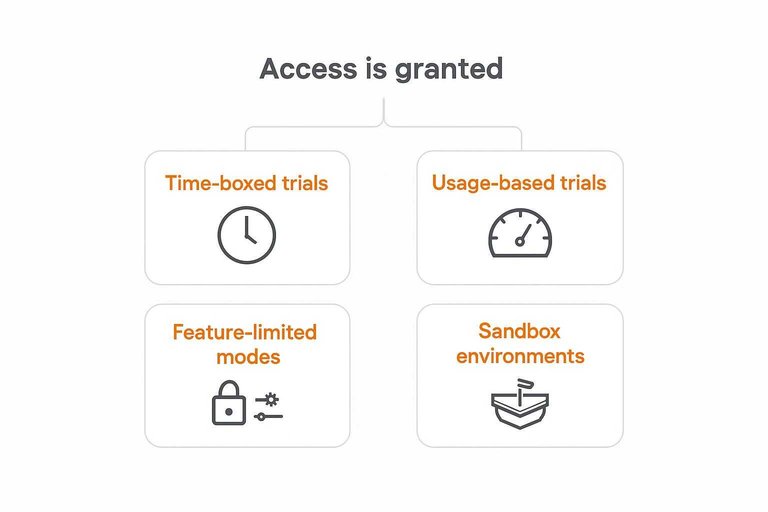
“No credit card required” still needs a gate. You’re choosing a control surface: time, usage, features, environment, or a human approval step.
Time-boxed trials
You grant full or near-full access for a fixed window, then flip entitlement off unless the user upgrades. It’s simple to explain, but it creates a hard edge you must design for.
Common mechanics:
- Entitlement starts at signup, first login, or first project creation
- Renewal path converts to paid, pauses to read-only, or downgrades features
- Grace periods handle weekends, invoices, and support delays
- Expiry behavior blocks new actions, preserves data, and prompts upgrade
Your real product decision is what “ends” at expiry: capability, access, or momentum.
Usage-based trials
You grant access until a meter hits a cap, often with a free allowance per account. It maps to value, but it forces you to define metering and edge cases early.
Key design points:
- Choose the billable event: requests, seats, runs, rows, or storage
- Handle delayed events: queue lag, offline clients, and retries
- Support backfills: replays, imports, and retroactive corrections
- Decide “overage” behavior: hard stop, soft stop, or throttling
- Keep users informed: in-app meter, alerts, and exportable logs
If your meter can’t be explained in one sentence, support becomes your pricing team.
Feature-limited modes
You keep the product always on, but restrict premium capabilities instead of time or volume. This reduces deadline pressure, but you must avoid making users feel trapped.
- Lock advanced features, not basic workflows
- Preserve export, API access, and deletion controls
- Show upgrade paths at the point of intent
- Separate “admin” from “power user” gates
- Avoid blocking access to user-owned data
If users can leave cleanly, they trust you more when deciding to stay.
Sandbox environments
Use a separate sandbox so users can try safely without touching production. It prevents accidents, but it adds operational complexity.
- Create a distinct org or project with a clear “Sandbox” label.
- Constrain permissions, integrations, and outbound connectors by default.
- Isolate secrets, webhooks, and data stores to prevent leakage.
- Add guardrails that block “production-like” usage patterns.
- Provide a one-click promote or export path into production.
A sandbox isn’t a demo. It’s a safety boundary you must enforce everywhere.
Sales-led exceptions
You override the default rules for specific accounts through manual extensions, pilots, or contractual access. It can win high-intent deals, but it risks turning into inconsistent shadow pricing.
Controls that keep it sane:
- Define who can approve, and what they can change
- Require a reason code and an end date for every exception
- Track extensions in CRM and product entitlement logs
- Tie pilots to a written success criterion and next step
- Review exceptions monthly and retire stale ones
Exceptions are fine. Untracked exceptions become your real plan tiers.
The billing stack separation
“No credit card required” works when evaluation access lives in its own lane. Your product grants capabilities via entitlements, while billing only changes what those entitlements should be.
That separation keeps trials simple and upgrades safe. It also prevents payment bugs from becoming access bugs.
Entitlements first
Your entitlement service should be the source of truth for what a user can do. Billing should read and propose entitlement changes, not gate requests directly.
When entitlements sit in front of every feature check, you can run a trial with zero payment objects. Then an upgrade becomes a controlled entitlement update, not a rewrite of access logic.
Keep access decisions boring and centralized. Billing can be fancy later.
Metering as ledger
You need trustworthy usage records even when the user never adds a card. Treat metering like accounting: append-only, auditable, and reconcilable.
- Emit immutable usage events from product actions
- Use idempotency keys to prevent duplicates
- Run a pipeline to aggregate into usage totals
- Reconcile totals against raw events
- Keep corrections as new entries
If usage is clean before payment exists, billing becomes a lookup, not a detective story.
Upgrade handshake
Upgrades fail when systems switch in different orders. Make the move from free to paid a single, well-defined handshake.
- Attach a payment method to the billing customer.
- Create or update the subscription with the target plan.
- Write the new entitlements with an effective timestamp.
- Re-evaluate access using only the entitlement service.
- Record the upgrade event for audit and support.
Aim for one switch point. Anything else creates “double access” or “paid but locked out.”
Cancellation semantics
Users say “cancel,” but they mean different things. Your system needs distinct states for cancel trial, cancel subscription, and delete account.
Cancel trial should remove trial entitlements at the end of the trial window. Cancel subscription should keep paid entitlements until the paid period ends, then fall back to free. Delete account should revoke everything and trigger data lifecycle rules.
Name states like contracts. Support, product, and finance will thank you.
Conversion without surprises
“No credit card required” works when your product sells itself before billing enters the room. You’re removing friction, but you’re also taking on a promise: no accidental charges, no bait-and-switch, and no support tickets from confused users. Treat the billing moment like a value milestone, not a trap door. One practical way to make that milestone feel earned is to reinforce proof of value right before pricing appears—e.g., surfacing a small set of verified customer outcomes (via a lightweight social-proof layer like ShowTrust) so the upgrade reads as the next logical step, not a sudden demand. If you’re deciding between a cardless trial and a card-upfront flow, see which trial model converts better.
Subsections: [
{
“subheading”: “Nudges vs gates”,
“content”: “Use nudges when the user can still learn and win. Use gates when continuing would create cost, risk, or irreversible commitment.\n\n- Nudge at value moments, not day counts\n- Gate only when cost or risk starts\n- Explain the "why" in one line\n- Offer a path forward or workaround\n- Keep pricing visible near prompts\n\nTie every prompt to a real payoff, and users will self-select into paying. If you want to improve your <a href="https://showtrust.to/glossary/conversion-rate">conversion rate with credible customer proof, this is also a good place to use it sparingly: a short, relevant testimonial snippet near an upgrade nudge can reduce hesitation without turning the prompt into a hard sell.\n\n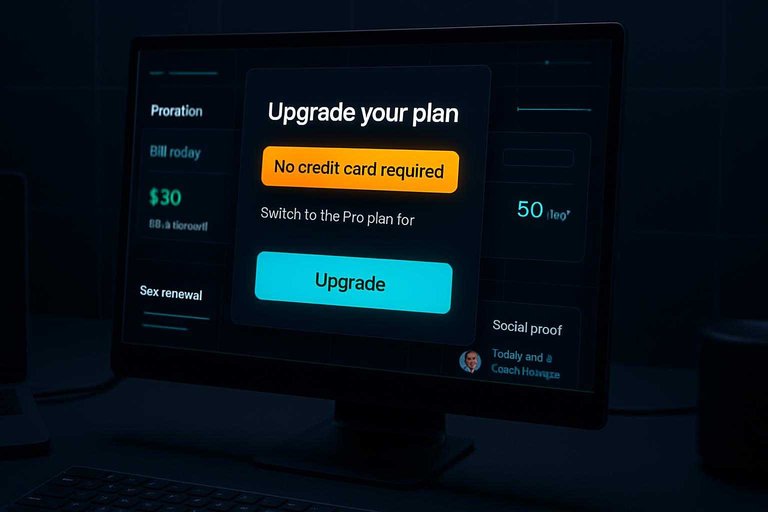 \n\n”
\n\n”
},
{
“subheading”: “Proration and timing”,
“content”: “Billing edge cases create most "you charged me" tickets. Fix them in the model first, then in the UI.\n\nMake these rules explicit in your product and terms:\n- Mid-cycle upgrades: charge the difference, or start a new cycle\n- Trial-to-paid overlap: trial ends first, then billing starts\n- Start-date choice: "bill today" versus "bill at renewal"\n- Downgrades: effective now versus next cycle\n\nIf your team can’t explain your proration in 10 seconds, users will assume the worst.”
},
{
“subheading”: “Plan selection defaults”,
“content”: “Defaults steer behavior, so they need guardrails. Pick defaults that are easy to undo and hard to misread.\n\n1. Preselect the most common plan, not the most expensive.\n2. Show monthly and annual side-by-side, with the same feature set.\n3. Keep seats and add-ons unchecked until the user touches them.\n4. Confirm the first charge amount and date right before purchase.\n\nOptimizing for clarity beats optimizing for one-click revenue when chargebacks are on the line. If you use social proof on the pricing screen, keep it curated and specific—approved testimonials that map to the plan’s core promise tend to build confidence, while generic praise can feel like decoration.”
},
{
“subheading”: “Data continuity”,
“content”: “A cardless start feels safe until the trial ends and work disappears. Preserve effort, and you preserve goodwill.\n\nDesign for continuity:\n- Keep read-only access after expiry\n- Preserve projects for a defined retention period\n- Offer export for core artifacts\n- Support import or reactivation without loss\n\nWhen people trust you with their work, they trust you with their wallet next. Maintaining that trust also means making verification easy—whether that’s transparent billing or publicly visible, approved customer testimonials that prospects can sanity-check quickly. For consumer expectations around free trials and avoiding surprise renewals, see the FTC’s guidance on getting in and out of free trials.”
}
]
Abuse and risk controls
“No credit card required” removes a powerful identity signal. That’s great for adoption, but it invites bots, scrapers, and free-tier miners. You can keep signup friction low and still make abuse expensive.
Identity hardening
You need higher-confidence identity without forcing payment details. The goal is to raise certainty quietly, not block real teams.
- Combine device fingerprint and cookie continuity
- Score email domains using heuristics
- Prefer verified email before granting API keys
- Use SSO signals when available
- Allow safe retries and re-verification
Treat identity as a score, not a gate, and you’ll catch abuse without punishing shared offices.
Rate and quota design
Quotas are your throttle, not your wall. Done well, they stop extraction and mining without breaking evaluation flows.
Use a layered model:
- Per-user limits for interactive actions and API calls.
- Per-org limits to stop “invite farming” and key sprawl.
- Per-IP limits for obvious bot bursts and scraping.
- Burst limits for spikes, sustained limits for steady drains.
- Tighter caps on costly endpoints like exports or embeddings.
If a feature costs you real money, it deserves its own limit.
Resource isolation
One abusive trial should never degrade everyone else. Isolation keeps evaluation predictable while you enforce real ceilings.
- Put trial tenants on separate pools or lower-priority queues.
- Enforce storage caps at object, row, and bucket layers.
- Enforce compute caps via concurrency, CPU, and job timeouts.
- Enforce API caps at gateway and service levels.
- Add circuit breakers for cascading failures.
If you enforce in only one place, attackers will route around it.
Abuse response playbook
Abuse handling works best when it is predictable and reversible. You want progressive enforcement with clean logs for later review.
Start gentle:
- Warn on suspicious patterns and explain what changed.
- Throttle specific endpoints instead of killing accounts.
- Temporarily suspend when signals stack up.
- Offer an appeal path with re-verification.
- Keep audit trails for actions, signals, and decisions.
Make enforcement boring and consistent, and your support team stays sane.
Use “No Credit Card Required” as a Clear Expectation Checklist
- Identify the access model: is the trial time-boxed, usage-based, feature-limited, or a sandbox—and what action triggers the first real gate?
- Look for stack separation clues: can you use core features without adding billing info, and is the upgrade a deliberate handshake (explicit plan + payment) rather than an automatic rollover?
- Confirm “no surprises”: check proration/timing language, plan defaults, and whether your data persists if you don’t upgrade.
- Notice the guardrails: expect identity checks, quotas, and isolation; if limits feel arbitrary or unclear, assume the offer is more demo than trial.
Frequently Asked Questions
- Is “free no credit card required” the same as a free plan, or is it usually a trial?
- Not necessarily. “Free no credit card required” can mean a permanent free tier, a time-limited trial, or a limited demo—check the pricing page for what happens at the end (limits, expiration, or upgrade prompts).
- If no credit card is required, what information do I still have to provide to sign up?
- Most products still require an email address and password, and many also ask for company name, role, or a phone number for verification. Look for whether email verification, SSO (Google/Microsoft), or identity checks are required before you get access.
- How can I tell if a “no credit card required” offer will auto-charge me later?
- It usually won’t auto-charge without you entering payment details, but you should confirm in the terms and in-app upgrade screen whether billing can start from an invoice, app store subscription, or previously saved payment method. Also check whether “start trial” buttons are actually “start subscription” flows in disguise.
- Why do some “no credit card required” signups ask for a work email instead of Gmail?
- Work email requirements are often used to reduce abuse, discourage throwaway accounts, and improve sales qualification for B2B tools. If you only have a personal email, look for options like SSO, manual approval, or a sandbox/demo mode.
- How do I increase conversions from a free no credit card required offer without adding payment friction?
- Use clear upgrade triggers (usage limits, feature gates, or team workflows) and strengthen trust signals like verified testimonials and case studies on the upgrade path; tools like ShowTrust can help collect and display testimonials where prospects decide to upgrade. Keep the upgrade CTA explicit (“Add payment method to upgrade”) to avoid surprise-billing concerns.
Turn Free Trials Into Trust
“No credit card required” reduces friction, but it also raises skepticism about what happens next and whether the offer is real and safe.
ShowTrust helps you capture and publish verified testimonials so prospects can confirm you’re legit—building confidence and improving conversions without adding surprises to the signup flow.
Written by
ShowTrust
Notes from the ShowTrust team on collecting testimonials and building authentic social proof.
Share: