June 1, 2026
·
Updated June 2, 2026
·
7 min read
Video Testimonial Requests Getting Ignored? Debug the Flow
A practical troubleshooter for video testimonial requests that get ignored—triage the symptom, fix deliverability and timing, sharpen message clarity and CTAs, reduce recording friction, and resolve consent/legal blockers so replies start happening.

You send a video testimonial request to happy customers… and nothing happens. No “sure,” no “not now,” just silence—making it hard to tell whether your ask is wrong, your timing is off, or your message never got seen.
This troubleshooter helps you debug the flow end to end. You’ll map the request path, check deliverability and channel fit, tighten targeting and timing, rewrite the ask into one clear CTA, remove recording hurdles, and handle consent without scaring people away.
## [0] Triage the Situation
“Ignored” can mean four different failures. Each one needs a different fix.
Treat this like debugging. Find where people fall off, then test one clean hypothesis first.
Confirm the symptom
Before you rewrite the request, confirm what actually happened. “No response” could be delivery, attention, or friction.
Check these signals:
- Delivery: bounce, spam placement, domain blocks
- Attention: opens, preview-only, link never clicked
- Intent: reply arrives but avoids commitment
- Stall: “Saw it” then goes quiet after the link
If you can’t name the failure mode, you’ll keep changing the wrong variable.
Map the request path
List every step between your ask and their upload. Tiny gaps hide in handoffs.
- Choose channel and sender identity
- Pick timing and trigger moment
- Write CTA and commitment level
- Send to landing page or email reply
- Capture consent and usage rights
The first unclear step is usually the real “ignore” point.
Set a baseline window
Pick one evaluation window and stick to it. Consistency beats precision here.
Define success for that window, such as a reply, a scheduled recording, or a completed upload. Then track outcomes the same way for every request.
Once you have a baseline, you can change one thing and trust the signal.
## [1] Deliverability and Visibility
If customers never see your request, the best copy in the world won’t matter. Debug visibility first, then tweak wording.
Check spam indicators
Start here because spam filtering is silent failure. One bad signal can bury every request.
- Inspect message headers for authentication and routing clues.
- Test sending domains and content in a deliverability tool.
- Verify SPF, DKIM, and DMARC alignment for your sending domain.
- Remove risky links, heavy images, and unexpected attachments.
- Re-send from a warmed, consistent domain if needed.
Treat deliverability like plumbing: you only notice it when it breaks.
Reduce inbox friction
Even delivered emails get ignored when they look unfamiliar or demanding. Make the message easy to trust at a glance.
- Shorten the subject to the core ask.
- Offer a plain-text version alongside HTML.
- Use a sender name they recognize immediately.
- Keep one primary link and remove the rest.
You’re not writing a newsletter here; you’re earning a click in a crowded inbox.
Verify channel fit
Pick the channel your customers already use with you, because behavior beats preferences. If they reply to texts but ignore email, your “email flow” is the wrong tool.
Avoid switching channels mid-flow without context, like emailing first and then texting a cold link. Anchor the switch with a quick reminder of the prior touch and the exact next step.
Match the channel to the habit, and the response rate usually follows.
## [2] Targeting and Timing Errors
You can write a perfect request and still get silence. Most ignores come from two bugs: asking the wrong customers, or asking at the wrong moment.
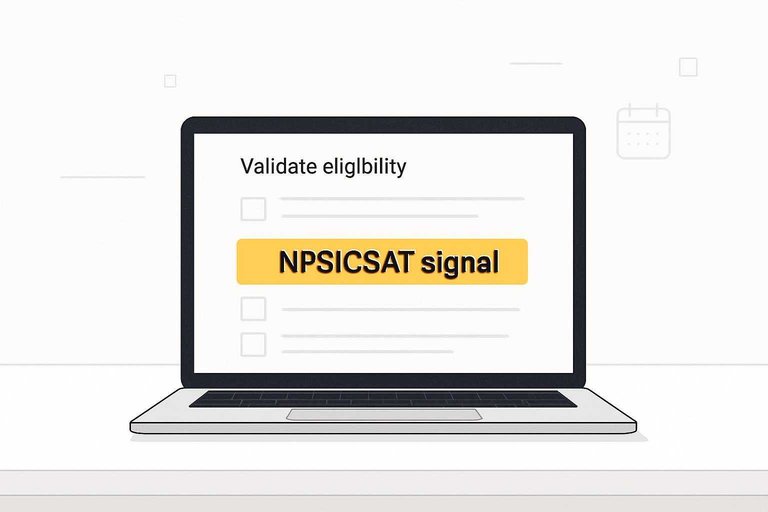
Validate eligibility
Before you hit send, confirm you’re targeting customers who can say something real.
- Recent success moment captured
- Clear product fit confirmed
- Positive NPS/CSAT signal present
- Renewal status stable
- Support tickets quiet
If two or more are missing, you’re not “unlucky.” You’re underqualified.
Pick the right moment
Time your ask to the customer’s calendar and your product’s value curve.
- Tie the request to a trigger event they just completed.
- Wait until they’ve realized value, not just started setup.
- Avoid week one of onboarding unless they had a clear win.
- Skip known busy cycles like renewals, launches, or quarter-end.
Catch them while the story is fresh, or you’ll be chasing a faded feeling.
Respect emotional context
People don’t ignore you only because they’re busy. They ignore you when the request clashes with how they feel.
Ask after a win, not after a churn scare or an escalated ticket. Acknowledge their effort and frame the request as recognition, not homework.
If it feels like labor, they’ll postpone forever. Make it feel like a moment worth marking.
## [3] Message Clarity Audit
Requests get ignored when they feel like homework. Your job is to make the next action obvious, small, and safe. If you need a fast starting point, try this testimonial request email generator to keep the ask simple and clear.
One-sentence value
I’m collecting short videos so your peers can choose faster and avoid the same mistakes.
Strip to one CTA
Cut anything that makes the ask feel like a project.
- Remove multiple links and attachments
- Remove multiple format options
- Remove long question lists
- Remove unclear next step
One clear action beats five “helpful” choices every time.
Provide a script starter
Give them a tiny ramp so they never face a blank page.
- Offer 3 prompts: problem, what changed, advice for others.
- Set a 30–60 second target length.
- Give permission to be informal and imperfect.
The easier it feels to start, the faster you’ll get a reply.
## [4] Friction in Recording —
Willing customers still skip recording when the path feels fiddly or risky. Your job is to make the next click feel obvious, safe, and fast.
Minimize tool choices
Too many recording options creates hesitation, even for happy customers. Standardize on one default flow, then quietly support edge cases.
Pick a primary recorder and frame it as the only choice. Offer a simple mobile fallback and a simple desktop fallback only when needed, like an auto-detected link.
Decision fatigue looks like silence.
Remove setup hurdles
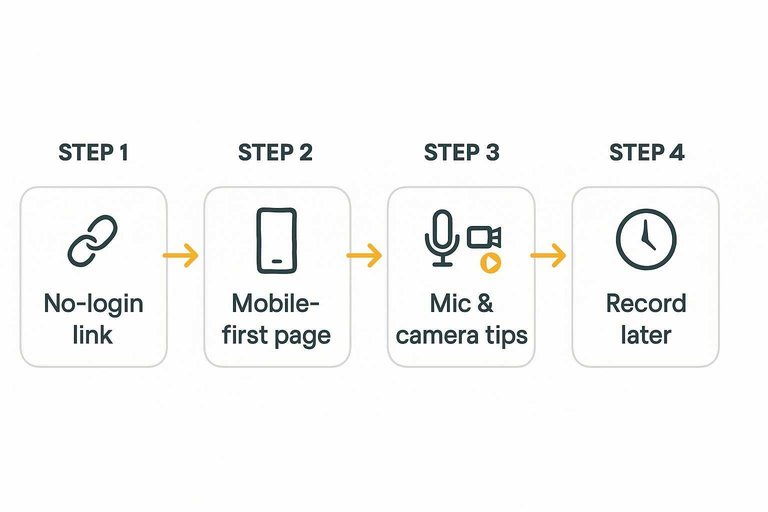
Strip the steps down until “record” is the first real action. Optimize for phones, because that’s where most people are when you ask.
- Send a no-login upload and recording link.
- Land them on a mobile-first page with one primary button.
- Show one-screen mic and camera tips with a quick test.
- Add a visible “Record later” option that triggers a reminder.
If they can’t start in one tap, they won’t start at all.
Address privacy upfront
Recording feels like risk, even when customers like you. Reduce that risk before they see the camera preview.
- Offer an approval step before publishing.
- Define allowed topics and off-limit areas.
- Ask for no sensitive data, ever.
- Support simple redactions on request.
- State exactly where it will be used.
Trust isn’t a vibe. It’s a checklist.
For guardrails on consent, disclosures, and compliant testimonial use, review the FTC’s guidance on endorsements, influencers, and reviews. For how to present the finished videos in a way that earns confidence (not skepticism), see a customer testimonials landing page guide.
## [5] Consent and Legal Snags
Consent should feel like a simple yes, not a surprise contract. Your job is clarity without friction, so people keep moving.
Right-size the release
Use plain-language consent that matches the moment. People bail when they see dense legal text before they even decide to participate.
Keep it lightweight:
- A one-paragraph summary of what you’ll use
- One clear checkbox for permission
- A link to the full terms and conditions for details
Save the heavier clauses for the linked page, not the main flow. That’s how you get real consent without triggering “too much hassle” vibes.
Place consent wisely
Ask for interest first, then collect consent when they actually submit. Timing matters more than wording.
- Ask for intent: “Open to a quick video testimonial?”
- Collect consent at submission, right next to the upload form.
- Send a confirmation email with a copy of their consent.
If consent arrives after the emotional “yes,” it feels like housekeeping, not a trap.
Offer safe alternatives
Some customers love you and still won’t go on camera. Give them options that keep the relationship easy.
- Audio-only clip
- Anonymous attribution
- Written quote approval
- Internal-only testimonial
When the default feels safe, participation stops being a personal risk decision.
## [6] Follow-Up Sequencing (Without Being Annoying)
Most “ignored” testimonial requests aren’t a rejection. They’re a stall.
People see the ask, intend to do it later, then the moment disappears. A good follow-up sequence doesn’t pressure them—it rescues them from forgetting and makes re-starting feel effortless.
Segment the follow-up by where they stalled
Don’t send the same reminder to everyone. Follow up based on the last observable step.
- No open / no click: assume visibility or timing. Re-send with a simpler subject and a shorter body.
- Click but no submission: assume friction. Re-send with “one-tap” instructions and a reassurance about length and approval.
- Replied “yes” but didn’t record: assume they need scheduling or a smaller commitment. Offer a 10-minute live record or a calendar option.
- Started recording but didn’t finish: assume anxiety or environment. Normalize retries and offer an “audio-only is fine” fallback.
This keeps your reminders relevant instead of repetitive.
Use a light, predictable cadence
You’re trying to catch a better moment, not win an argument.
A simple pattern that works:
- First follow-up: short nudge + the link again.
- Second follow-up: reduce commitment (“30 seconds is perfect”) and include the 3-prompt script.
- Final follow-up: graceful exit (“If now’s not a good time, no worries—I’ll stop here.”) plus an easy alternative (written quote or audio-only).
Stop after your final follow-up unless they re-engage. Endless nudges teaches customers to ignore you.
Make every reminder a fresh start (not a guilt trip)
Avoid “Just checking in…” energy. Give them a clean restart with everything they need above the fold.
Include:
- The one-line purpose
- The expected time (“under a minute”)
- The single link
- The approval/privacy reassurance
If they have to scroll to remember what this is, you’ve added friction.
Provide an off-ramp that still collects proof
Some customers won’t record, even when they’re happy. Don’t let the follow-up sequence end with nothing.
Offer a last-step alternative they can complete in one reply:
- “Reply with 1–2 sentences on what changed after using X, and I’ll turn it into a draft quote for your approval.”
You’ll still collect usable testimonial material, and you protect goodwill while improving your overall completion rate.
Run the Fix in One Pass
- Map the path: identify where the request is sent, who sends it, and what “ignored” means (no opens, no replies, no clicks) within your baseline window.
- Make it visible: reduce spam triggers, simplify the email/screen, and confirm you’re using the channel the customer actually checks.
- Tighten targeting and timing: ask only eligible, satisfied users at the right moment—avoid emotionally loaded moments (incidents, billing issues, rushed renewals).
- Rewrite for clarity: lead with a one-sentence value, use a single CTA, and include a simple script starter they can follow.
- Remove recording friction and risk: offer one easy tool, minimize setup, address privacy and consent up front, and provide a safe alternative (audio-only, anonymized, or written quote) if they hesitate.
Frequently Asked Questions
- What’s the best tool to collect video testimonials if customers don’t want to download an app?
- Use browser-based recording tools that work on mobile and desktop, such as VideoAsk, Boast, or Vocal Video. Send a single link that opens the recorder immediately and lets them re-record before submitting.
- Do I need to offer an incentive to collect video testimonials, and what incentives are allowed?
- You usually don’t need an incentive, but a small thank-you (gift card, swag, account credit) can increase participation. If you do incentivize, disclose it and follow the rules of the platform where you’ll publish the testimonial.
- How do I measure whether my video testimonial request flow is working?
- Track each step: message delivered, link clicked, recording started, recording submitted, and permission granted. Use UTM-tagged links plus tool analytics (or a simple spreadsheet) to see exactly where drop-offs happen.
- Can I collect video testimonials via SMS instead of email?
- Yes—SMS often gets faster attention, especially right after a positive support or success moment. Keep it compliant (opt-in, clear business identity, easy opt-out) and link to a mobile-first recording page.
- Can I repurpose Zoom calls or customer interviews into video testimonials instead of asking them to record?
- Yes, if you get explicit permission to use the recording as a testimonial and confirm how it will be edited and where it will appear. Pull short clips that highlight a specific outcome, then send the customer the cut for approval before publishing.
Turn Requests Into Recordings
Once you’ve debugged deliverability, timing, messaging, and recording friction, the last hurdle is executing a repeatable testimonial flow without constant follow-ups.
ShowTrust makes it easy to request, approve, and organize video testimonials, then publish them via embeddable widgets and a public wall so prospects can verify trust fast.
Written by
ShowTrust
Notes from the ShowTrust team on collecting testimonials and building authentic social proof.
Share: