August 5, 2026
·
10 min read
Testimonial Management Software vs CRM: Which Fits Agencies?
A clear comparison to help agencies decide between testimonial management software and a CRM—clarify core purpose fit, workflow ownership across teams, capture/consent needs, publishing and repurposing options, integrations, and reporting that actually supports decisions.

If your testimonials live in a messy mix of emails, Google Docs, and “we’ll add it later,” you’re not alone—and a CRM often won’t fix the parts that break. The question is whether you need a system for proof, or a system for pipeline.
This comparison helps you choose the right tool for your agency by mapping each option to ownership (marketing vs sales vs accounts), consent and capture workflows, publishing and reuse across channels, automation and integrations, and reporting you can trust when leadership asks, “Is proof helping us win?”
Decision Snapshot
Testimonial management software helps you collect, approve, organize, and publish client proof across pages, proposals, and campaigns. A CRM manages contacts, deals, and pipeline activities, then ties them to sales and account workflows.
If your bottleneck is proof creation and reuse, testimonial software fits. If your bottleneck is revenue coordination across many people, a CRM fits.
What Each Is
Testimonial management software is a proof workflow. Your primary users are marketers, account managers, and anyone shipping case studies or landing pages.
A CRM is a relationship and revenue system. Your primary users are sales, leadership, and client success teams managing pipelines and renewals.
Testimonial tools run on “ask, approve, tag, publish.” CRMs run on “capture, qualify, track, follow up.”
Quick Winner Map
Choose testimonial management software when proof is the product, not a byproduct.
- You need fast review requests and approvals
- You publish proof to site, decks, proposals
- You run many similar offers and pages
- You want tags, snippets, and reuse
Choose a CRM when relationships drive coordination across a longer sales cycle.
- You manage complex pipelines and stages
- You need forecasting and deal hygiene
- You track multi-stakeholder buying groups
- You rely on tasks, sequences, and routing
If your team argues about “where the latest quote lives,” you need the proof system.
Agency Use Cases
Agencies hit proof problems and pipeline problems. They are not the same.
- Lead-gen pages needing fresh social proof
- Retention plays needing ROI narratives
- Reputation building across niches or locations
- Case studies needing searchable snippets
- Referral asks needing lightweight prompts
If proof must ship weekly, treat it like production.
How To Choose
Start with the outcome you need next.
- Pick your primary goal: proof publishing or revenue coordination.
- Identify your source of truth: testimonials library or contact/deal records.
- Define the publishing surface: website, proposals, ads, partner pages.
- Decide the automations: request cadence, approvals, reminders, routing.
Choose the tool that owns the workflow you can’t afford to drop.
Core Purpose Fit
Agencies buy these tools for different jobs. One is built to capture and publish social proof, while the other is built to manage relationships and revenue flow. Tools like ShowTrust sit firmly in the first category: they streamline how you request testimonials and turn them into trust signals you can actually display, without relying on manual copy-paste. If you want a clear definition of what counts as a testimonial in this context, it helps to align the tool to the job.
A quick mapping makes the split obvious.
| Job to be done | Testimonial management software | CRM | Winner |
|---|---|---|---|
| Capture proof | Intake forms, requests (e.g., shareable links/forms) | Notes, activities | Testimonial software |
| Publish proof | Widgets, embeds, pages (including a public wall) | Manual copy-paste | Testimonial software |
| Track pipeline | Limited, if any | Deals, stages, forecasts | CRM |
| Manage relationships | Light contacts | Accounts, tasks, reminders | CRM |
| Report performance | Proof usage metrics | Revenue, activity metrics | Depends |
Buy for the job you actually need next, not the one you might need later.
Workflow Ownership
Someone has to run the system every day. The best fit is the one with the fewest cross-team handoffs.
If marketing owns proof, a testimonial tool stays tidy. If sales owns revenue, a CRM stays honest.
Marketing-Led Proof
Marketing runs a proof workflow because it never really “finishes.” You’re collecting, cleaning, and shipping assets on a weekly cadence.
A testimonial tool usually fits the actual loop: request → collect → approve → tag → publish. It keeps approvals, permissions, and reuse close to the content, not buried in deal notes.
If marketing is chasing quotes inside a CRM, you’ll feel it in missed follow-ups and messy fields.
Sales-Led Pipeline
Sales needs a system that forces sequence and accountability. Without that structure, “pipeline” becomes a shared guessing game.
A CRM is built for stages, activities, next steps, and hygiene rules. It makes forecasting possible because every deal has an owner, a stage, and a latest touch.
If you’re trying to run pipeline out of a testimonial tool, you’re choosing convenience over control.
Account Team Handoffs
Account teams live in transitions. Each transition creates a new “ask” and a new place to lose context.
- Onboarding kickoff: CRM for record; testimonial tool for future proof plan
- Renewal prep: CRM for timeline; testimonial tool for fresh quotes
- Upsell discovery: CRM for opportunity; testimonial tool for relevant proof
- Review requests: testimonial tool for collection; CRM for task reminders
- Success milestones: testimonial tool for tagging; CRM for account notes
Map each handoff to one owner and one system, or you’ll duplicate work forever.
Single Source Need
You need one system of record when money or contracts are involved. You can tolerate two systems when one is clearly “content,” not “truth.”
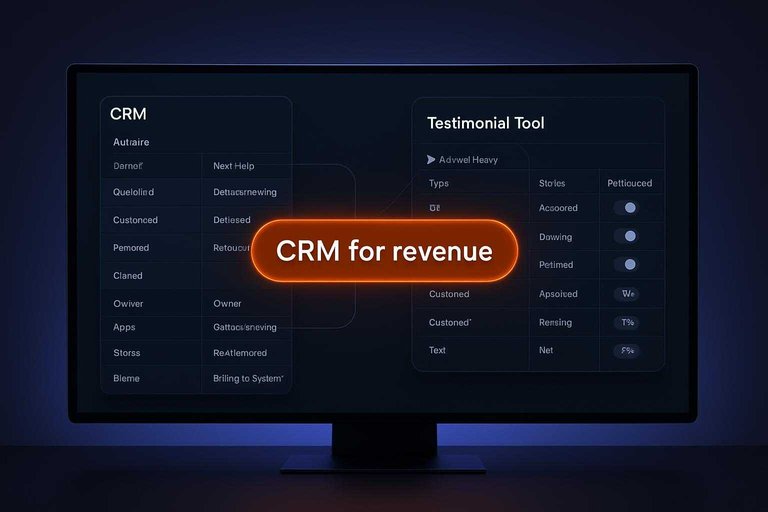
Use the CRM as the authority for accounts, opportunities, and renewals. Let a testimonial tool own the proof library, with links back to the CRM when needed.
The clean model is “CRM for revenue, testimonial tool for assets,” and you enforce it with naming and linking rules.
Capture And Consent
You need two things to ship testimonials safely: a reliable request flow and provable permission. Agencies also need speed, because chasing approvals steals billable time.
| Task | Testimonial management software | CRM | Safer/Faster bet |
|—|—|—|
| Request collection | Purpose-built forms | Email + fields | TMS faster |
| Automated reminders | Built-in nudges | Workflows to build | TMS faster |
| Approval tracking | Approve/reject states | Custom pipeline stage | TMS safer |
| Legal consent proof | Consent checkbox + log | Notes or attachments | TMS safer |
| Asset permissions | Usage rights fields | Manual documentation | TMS safer |
If you publish publicly, testimonial software is usually both safer and faster because consent is the product, not a workaround.
Publishing And Repurposing
You don’t collect testimonials to admire them in a database. You collect them to ship proof everywhere your agency sells.
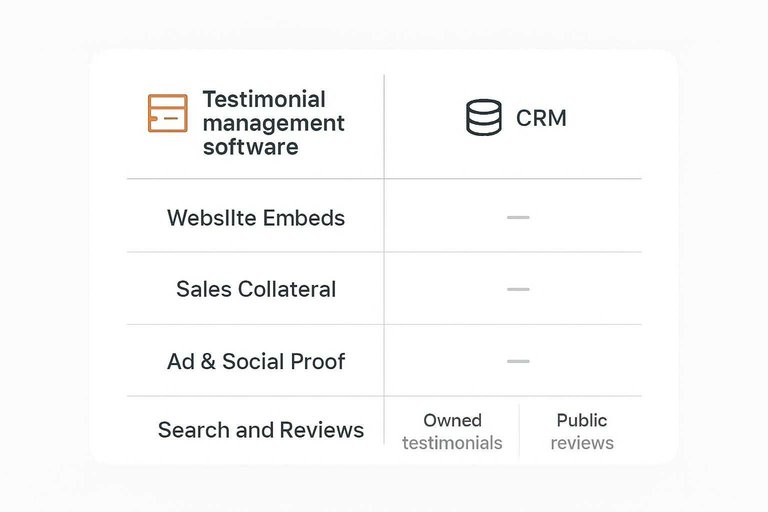
Website Embeds
Fresh proof on your site dies when publishing is manual. The question is whether your tool can push updates without design thrash.
Testimonial management software usually wins on embeds: copy-paste widgets, tag filters, and automatic rotation. You can keep a “Homepage” set, a “Service page” set, and a “Industry” set without rebuilding sections. Most also give you light design controls, like layout, theme, and which fields to show.
A CRM can store the text, but it rarely ships it. You end up copying snippets into your CMS, then forgetting to refresh them.
Winner: testimonial management software for web updates, because it’s built to publish, not just record.
Sales Collateral
Your sales assets need proof that’s searchable, consistent, and easy to paste in. Speed matters more than “perfect organization.”
- Proposals: drop-in quote blocks with client, role, and service tags
- One-pagers: curated sets by offer or vertical
- Pitch decks: slide-ready formatting and short versions
- Case studies: pull approved quotes tied to outcomes
- Email snippets: one-liners for follow-ups
Quicker workflow: testimonial management software, because it’s optimized for finding and exporting approved quotes fast.
Ad And Social Proof
Paid and social reuse breaks when approvals are unclear. Formatting breaks it again.
Testimonial management software tends to handle approvals as a first-class step, with explicit permissions and “approved for public use” states. It also helps you generate variants, like short quotes for ads and longer quotes for landing pages, without losing the source context.
A CRM can track consent in notes or custom fields, but distribution is still manual. You’ll rewrite, reformat, and re-check approvals every time.
Tool that minimizes rework: testimonial management software, because it keeps approval and publishable formats tied to the same record.
Search And Reviews
Public reviews matter when you need marketplace trust, local visibility, or third-party validation. Internal testimonials matter when you need controlled, on-brand proof.
A CRM is not a review engine. It can remind your team to request reviews and store links, but it won’t manage listings or respond across review platforms. Testimonial management software usually focuses on sourcing and curating owned testimonials, then publishing them to your channels.
If your priority is generating and managing public reviews, you’ll need a dedicated review tool or platform features. If your priority is a clean internal library you can repurpose everywhere, testimonial management software fits better.
Choose based on where trust is won for your agency: third-party profiles, or your own pages and decks.
Automation And Integrations
Automation is where these tools either disappear into your stack or fight it daily. Agencies need reliable triggers, clean handoffs, and integrations that match how work actually moves.
Here’s the comparison that usually decides it.
| Capability | Testimonial Management Software | CRM | Agency stack impact |
|—|—|—|
| Triggers | review approved, request sent | stage change, activity | CRM fits workflows |
| Sequences | request, reminder, publish | multi-step nurture | CRM runs longer chains |
| Webhooks | sometimes limited | usually robust | CRM connects easier |
| Integrations | CMS, forms, widgets | email, calendar, support | CRM spans more tools |
| Data routing | to pages, blocks | to pipelines, tickets | CRM centralizes truth |
If your stack revolves around a CRM already, the CRM wins on automation depth and integration breadth—especially when you rely on webhook-based automations and integrations to keep systems in sync. For example, CRMs are built around pipeline stages and deal movement like how a deal moves through stages.
Reporting That Matters
Agencies need two different reporting truths. CRMs report pipeline health. Testimonial management tools report proof performance.
Proof Coverage
You need coverage reporting because “we have testimonials” is not the same as “we have the right ones.” Coverage shows whether your proof actually matches what you sell and who you sell to.
Track coverage with a few simple dimensions:
- Service-line tags: which offerings have strong proof
- Persona match: buyer roles represented in quotes
- Industry match: verticals you can credibly speak to
- Recency: proof that reflects current delivery
- Format diversity: quotes, video, case studies, snippets
A testimonial management system usually gives the cleanest visibility here because it treats proof like an indexed library, not a note field. When coverage is visible, you stop guessing and start filling the obvious gaps.
Pipeline Clarity
You need pipeline reporting because revenue dies in the gaps between stages. Clarity means you can see what’s stuck, why it’s stuck, and what happens next.
Measure pipeline reality with a few operational signals:
- Stage aging: time spent per stage
- Activity quality: meetings, follow-ups, decision-maker access
- Conversion checkpoints: stage-to-stage movement triggers
- Next steps: dated commitments, not vague intentions
A CRM is the reliable source here because it is where deals live and where activity is logged. If it’s not in the CRM, it’s not real.
Attribution Reality
You can connect testimonials to revenue without pretending you can “prove” causality. Use methods that survive scrutiny and still guide decisions.
- Capture qualitative feedback after calls: “What made this feel safe?”
- Track proposal usage: which proof blocks were included
- Log sales enablement touches: links shared, videos sent
- Note deal influence: champion forwards, stakeholder reactions
- Review win-loss notes for proof mentions
You’re not chasing perfect attribution. You’re building a repeatable evidence trail.
Executive Dashboards
Leadership wants one dashboard when decisions require trade-offs across teams. They want to see whether growth is blocked by demand capture or credibility.
Keep it clean by summarizing two lanes with clear ownership:
- Pipeline lane (CRM-owned): coverage by stage, aging hotspots, next-step integrity
- Proof lane (proof-tool-owned): coverage gaps by service line, recency, format mix
Combine them in one view, but don’t merge the underlying systems into one definition of truth. One dashboard is fine. One owner per metric is non-negotiable.
Choose the system that matches who owns “proof” in your agency
- Start with ownership: if marketing needs a library to capture, approve, tag, and publish proof, lean testimonial management; if sales needs deal stages, forecasting, and activity tracking, lean CRM.
- Validate the risky bits: check consent/audit trails, how quickly proof can be repurposed (web embeds, decks, ads), and whether integrations fit your stack.
- Decide your source of truth: choose one primary home for proof and set the other to sync or link, so teams don’t duplicate, lose permissions, or argue over “latest version.”
- Pilot on one workflow: run a two-week trial using a real campaign or pipeline segment, then pick the tool that reduces handoffs and makes reporting clearer—not just more detailed.
Frequently Asked Questions
- Should an agency use testimonial management software alongside a CRM, or replace the CRM?
- Most agencies keep the CRM for deal and account tracking and add testimonial management software for agencies to handle collection, approvals, and publishing. Use both when you want social proof to run as a repeatable marketing workflow without cluttering pipeline data.
- Can testimonial management software for agencies sync testimonials into a CRM like HubSpot or Salesforce?
- Often yes, via native integrations or automation tools like Zapier/Make, sending key fields (client name, quote, permission status, asset links) into CRM records. Keep the testimonial system as the “source of truth” for consent and media files, and push only the fields sales needs.
- What should agencies look for in testimonial management software to avoid compliance and permission issues?
- Look for explicit consent capture (usage rights, name/company display, media permissions), an approval workflow, and an audit trail showing when permissions were granted. Also ensure you can quickly remove or update a testimonial everywhere it’s published.
- How do agencies measure whether testimonials are actually improving marketing and sales performance?
- Track where testimonials are deployed (landing pages, ads, proposals) and measure downstream signals like form completions, demo requests, and sales-cycle friction (fewer objections, faster approvals). Use UTM-tagged pages and call recordings/notes to link “proof assets used” to outcomes.
- What’s the easiest way for agencies to publish testimonials to their website without developer help?
- Choose a tool that provides embeddable widgets or a hosted “wall” you can link from proposals and emails, then reuse approved testimonials across pages. Tools like ShowTrust are built specifically for collecting and displaying testimonials with minimal setup.
Turn Proof Into Pipeline
CRMs are great for tracking relationships, but social proof needs its own workflow—capture, consent, publishing, and reporting without constant manual follow-up.
ShowTrust helps agencies collect, curate, and publish client testimonials fast with embeddable widgets and a public wall—so your proof is always ready to boost trust and conversions.
Written by
ShowTrust
Notes from the ShowTrust team on collecting testimonials and building authentic social proof.
Share: