July 11, 2026
·
Updated August 19, 2026
·
7 min read
Testimonial Approvals Stalling? 7 Workflow Mistakes
A troubleshooter for stalled testimonial approvals—triage the bottleneck, assign a clear approver, define pass/fail criteria, prevent wrong-version reviews, and send context-rich requests that move feedback forward.

When testimonial approvals stall, it’s rarely because people “don’t care.” It’s usually a workflow problem: unclear ownership, fuzzy standards, missing context, or reviewers looking at the wrong version.
This troubleshooter helps you pinpoint where approvals are actually getting stuck and fix it without reinventing your whole process. You’ll map handoffs, set concrete approval criteria, tighten review requests, and simplify who needs to weigh in—so testimonials can move from draft to approved with fewer loops.
Triage the Bottleneck
Before you change your workflow, find the exact spot where approvals stop moving. You’re looking for three things: the stalled handoff, the next owner, and the missing input.
Map the handoffs
Start with a simple map of every approval stage. You want to see where work waits, not where it gets done.
| Approval stage | Owner | Expected inputs | Typical turnaround |
|---|---|---|---|
| Draft created | Writer | Brief, source links | Same day |
| Compliance review | Legal/Compliance | Claims list, citations | 1–3 days |
| Brand review | Marketing | Tone notes, examples | 1–2 days |
| Customer approval | Customer/Champion | Final copy, context | 2–7 days |
| Publish sign-off | PM/Owner | Final version, checklist | Same day |
When one row routinely stretches, you’ve found the handoff that needs redesigning.
Confirm real blockers
“Busy” still replies with a date or a question. “Blocked” can’t move because something essential is missing.
Check for these blockers:
- Missing context: no goal, audience, or claim boundaries.
- Missing authority: reviewer can’t approve final wording.
- Wrong version: comments split across docs or threads.
- Unclear ask: review vs approve vs suggest edits.
Fix the blocker, not the person.
Set a restart point
Stalled approvals often restart at the beginning by accident. Define the exact step where work resumes.
- Label each request with a single workflow state.
- Record the last completed step and link the approved artifact.
- Define the next action as one verb and one owner.
- If changes are requested, restart at the smallest affected step.
If you can’t point to “next action + owner,” you don’t have a restart point.
Pick one fix first
Don’t patch every leak at once. Choose one change that targets the highest-volume stall point.
Imagine most requests die at “customer approval.” Test one fix this week: a tighter approval packet, a single approval link, or a pre-approved claims menu.
Ship one fix fast, then measure whether the stall moves elsewhere.
No Clear Approver
You can’t approve a testimonial if nobody owns the final call. When authority is vague, requests bounce between people until they die quietly.
- Name one “final approver” role for every testimonial request.
- Put that name on the request form, not in someone’s head.
- Require a backup approver for vacations and end-of-quarter chaos.
- Define what the approver can decide without escalation.
- Reject any request that ships without an assigned approver.
If more than one person can say “yes,” you’ve built a stall into the process.
Vague Approval Criteria
Vague standards create endless rounds because each reviewer invents their own bar. Set one bar, write it down, and approvals stop feeling like opinion debates.
Define pass-fail rules
Reviewers stall when they are asked to “use judgment” with no shared definition. Give them simple rules that decide yes or no fast.
- Factually accurate and verifiable by the customer
- Matches your brand voice and level of polish
- Avoids regulated, medical, or performance guarantees
- Fits the product and use case being promoted
- Has clear permission and usage scope
If a testimonial fails one rule, it’s not “almost approved.” It’s a rewrite.
Provide examples
People align faster on concrete samples than on abstract guidelines. Keep a small set of approved and rejected examples with one-line reasons.
Imagine a rejected sample that includes a sweeping claim you can’t support. Next to it, show an approved rewrite that keeps the sentiment but removes the claim.
Your goal is calibration, not inspiration. Reviewers should recognize patterns in seconds.
Use a checklist
Make the requester do the first pass so reviewers don’t play detective. A short checklist turns “review” into “confirm.”
| Check | What to confirm | Owner |
|---|---|---|
| Customer identity | Name or anonymous reason | Requester |
| Claim type | Opinion vs factual claim | Requester |
| Permission scope | Where you can use | Requester |
| Brand fit | Product and audience match | Requester |
If the checklist is incomplete, don’t review. Send it back.
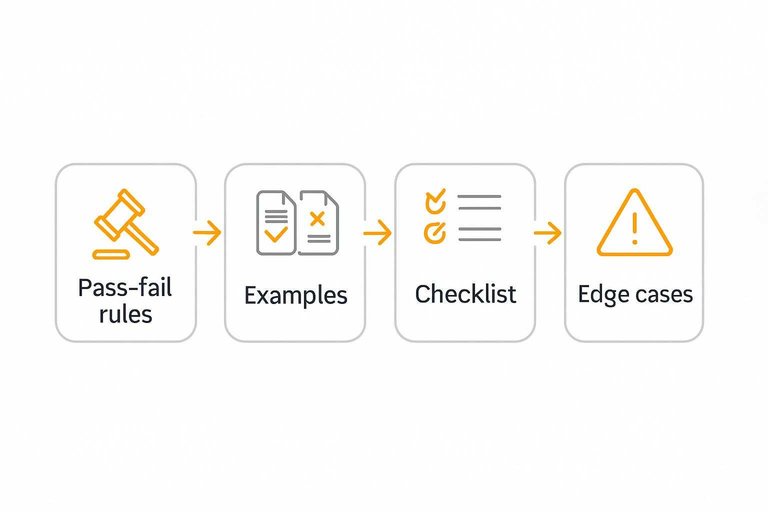
Handle edge cases
Edge cases derail approvals because everyone re-argues the same risks. Write a short policy for sensitive industries, regulated claims, and anonymity.
For regulated categories, define what wording is always blocked and what wording is allowed with qualifiers. For anonymous testimonials, define what proof you require and how you label the quote.
Once it’s documented, reviewers enforce policy instead of negotiating it. For a baseline on what regulators expect, use the FTC’s endorsements and testimonials guidance.
Wrong Version Reviewed
Approvals stall when reviewers comment on different drafts. You need one source of truth and version labels that can’t be misunderstood.
| Mistake | What it looks like | Fix | Quick check |
|---|---|---|---|
| Drafts in many channels | Email, doc, chat copies | Single shared doc | One link only |
| Unlabeled versions | “Final_v3” chaos | Semantic labels | Date + status |
| Offline edits | Tracked changes lost | Edit-in-doc rule | No attachments |
| Link reuse | Old URL reused | New link per version | Link matches label |
| Mixed reviewer sets | Different people, different files | One review round | Same roster |
If two people reference different lines, you’re not “reviewing,” you’re reconciling—and that’s especially risky with assets like quote card review versions.
Review Requests Lack Context
Approval stalls when reviewers must hunt for basics. Package the details once, in the same place, every time.
A weak request sounds like: “Can you approve this quote?” with no customer context. A strong request reads like a mini-brief that makes approval the default.
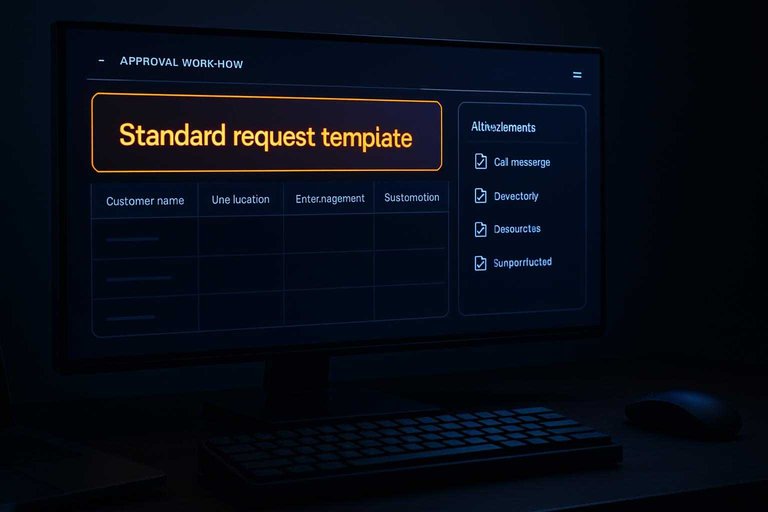
Standard request template
Use one form so every request arrives complete and comparable.
| Customer name | Use location | Edits requested | Substantiation | Deadline |
|---|---|---|---|---|
| Avery Chen | Homepage hero | Shorten sentence | case study substantiation link | Fri EOD |
| Northwind IT | Sales deck | Add industry | CRM note link | Wed noon |
| Priya S. | G2 snippet | Fix grammar | Call recording | Mon EOD |
| Blue Peak Ops | Email footer | Remove claim | Support ticket | Thu EOD |
When every request looks the same, reviewers stop asking “what is this?” and start deciding.
Attach proof quickly
Reviewers delay when they must verify claims across tools.
- Link the source call or transcript
- Link the case study or draft
- Link the product screenshot
- Link the support ticket history
- Link the consent record
If proof is one click away, legal becomes a checkpoint, not a scavenger hunt. For a plain-language standard, see the FTC on truthful and substantiated advertising.
Write the reviewer summary
Reviewers need the “why now” in plain language. Give them the decision in one line.
Example: “This testimonial supports the new pricing page, and it reduces buyer risk.” “Approve the edited wording today, or flag any claim you want removed.”
If your summary can’t be two sentences, your request isn’t ready yet.
Pre-answer objections
Most delays are predictable and repetitive. Address them before the review even starts.
Add a note like: “Consent is on file, attribution matches the signed release, and we only changed grammar.” “Any performance claim was removed, and the remaining wording is literal.”
You’re not arguing. You’re clearing the runway.
Too Many Reviewers
When everyone can approve, no one feels responsible. Bloated review chains also create silent queues and contradictory feedback.
- Assign one accountable approver for the final decision.
- Limit reviewers to roles with clear, unique expertise.
- Sequence reviews: accuracy first, then brand, then legal.
- Set a default rule: no response means approved after a defined window.
- Route “nice-to-have” comments into a separate backlog, not the approval.
If two people can block a publish, you built a veto system, not a workflow.
Approve and Organize Testimonials Compliantly
Sometimes approvals don’t stall because the quote is “bad”—they stall because no one is comfortable signing off on the legal/privacy risk. Build compliance into your workflow so reviewers can approve faster, and so you can approve and organize testimonials without scrambling later.
Start by treating every testimonial like a permissioned asset with a traceable source, clear usage rights, and a defined lifecycle. If that information is missing, the safest answer is “pause,” which is exactly the bottleneck you’re trying to eliminate.
Get explicit permission (and document it) before you request approval
Make permission a required field, not a follow-up task. At minimum, capture:
- Who is granting permission (name, role, company) and how to contact them if needed
- What they approved (the exact quote, video, screenshot, or case summary)
- Where it can be used (website, ads, email, sales decks, app store listing, social, partner co-marketing)
- Whether edits are allowed (light edits for grammar/length vs. no edits)
- Whether attribution is allowed (full name/company/logo, first name only, initials, anonymous)
Keep the proof of consent attached to the testimonial record (not buried in someone’s inbox). If consent came via email or form submission, store the message or submission details alongside the asset so approvers don’t have to hunt for it.
Add disclosures for incentives, relationships, and typical-results concerns
Approvals often stall when reviewers aren’t sure whether a testimonial needs a disclosure. Create a checklist that flags situations like:
- The customer received an incentive (gift card, discount, free month, swag)
- The testimonial comes from an affiliate, partner, investor, employee, or friend of the company
- The quote implies outcomes (time saved, revenue impact, performance claims) that may not be typical or may require clarification
When a flag is triggered, include a ready-to-use disclosure line that can travel with the testimonial wherever it’s published. This gives approvers confidence that publishing won’t create compliance debt later.
Anonymize and de-identify when needed (without gutting credibility)
If full attribution is risky or impossible, set standards for partial attribution so teams don’t improvise:
- Remove or generalize personal identifiers (full names, email handles, faces, signatures)
- Avoid sharing sensitive details the customer didn’t explicitly approve (internal metrics, client names, unique screenshots)
- Use consistent formats like “Operations Lead, Mid-market SaaS” or “Director of IT, Healthcare”
If you’re using screenshots (reviews, emails, chat messages), treat them as higher-risk assets: redact identifiers and confirm the customer understands the screenshot may contain metadata or context beyond the highlighted line.
Define storage, retention, and expiry so assets don’t become liabilities
Even approved testimonials can become unusable if they’re outdated, the customer changes roles, or permissions expire. Reduce re-approval churn by setting a simple lifecycle policy:
- Store a source-of-truth record (final approved text + original source + consent proof + disclosure + attribution level)
- Tag each item with an expiry or review-by date based on your internal risk tolerance
- Archive older testimonials instead of deleting them, so you keep auditability without accidentally republishing them
- Track where each testimonial is used (pages, ads, decks) so you can update or pull it quickly if needed
When reviewers know there’s a plan for governance, they’re more willing to approve today.
Create a “ready for approval” compliance checklist reviewers can trust
Give approvers a consistent gate that prevents last-minute questions:
- Consent captured and attached
- Attribution level confirmed (full/partial/anonymous)
- Required disclosures prepared (incentive/relationship/results)
- Redactions complete for screenshots or sensitive references
- Usage channels listed (and any restricted channels excluded)
- Storage location and expiry/review-by date set
This turns compliance from a subjective debate into a repeatable pass/fail step, which shortens the approval cycle and keeps your testimonial library publish-ready.
Restart Approvals with One Clean Pass
- Freeze the current draft and label it clearly (e.g., “v3—READY FOR REVIEW”), then share one canonical link.
- Name a single accountable approver and list any contributors as “input only,” with a deadline.
- Send a context-rich request: goal, audience, where it will be used, what changed since last round, and exactly what decision you need.
- Include pass/fail criteria as a checklist, plus 1–2 examples and how edge cases should be handled.
- Timebox the review window; if feedback conflicts, the approver resolves it and you restart from the last agreed checkpoint—not from scratch.
Frequently Asked Questions
- What’s the best way to approve and organize testimonials across multiple channels (website, ads, email)?
- Create one central testimonial library with consistent fields (source, permission status, product/use case tags, and approved quote) and pull channel-specific “shortlists” from it. This prevents re-approving the same testimonial in different places and keeps messaging consistent.
- How do I track testimonial approval status without messy spreadsheets?
- Use a simple pipeline (Requested → Received → Needs edits → Approved → Published) inside your project tool or a dedicated testimonial manager so every quote has a single status and owner. ShowTrust can work here by letting you collect testimonials and then approve and organize them in one place before publishing.
- Do I need written permission to publish customer testimonials and logos?
- Yes—get explicit permission to publish the testimonial, and treat customer logos as a separate permission unless your agreement already covers it. Store consent evidence (email, form checkbox, or contract clause) alongside the testimonial record so it’s audit-friendly.
- How should I tag and categorize testimonials so they’re easy to reuse later?
- Tag by use case, industry, persona/role, product feature, and outcome type (e.g., speed, reliability, ROI) so marketers can quickly assemble relevant proof for each page. Keep tags standardized (a controlled list) to avoid duplicates like “SaaS” vs “Software.”
- How do I measure whether organizing testimonials actually improves marketing performance?
- Track usage and outcomes: which pages/emails/ads include testimonials and compare conversion-related metrics in your analytics or A/B testing tool. You should usually see clearer movement over weeks as enough traffic accumulates, especially on high-intent pages like pricing and signup.
Unblock Testimonial Approvals Fast
When approvals stall due to unclear owners, messy versions, and too many reviewers, great customer proof never makes it to your site.
ShowTrust helps you collect, approve, and organize testimonials in one place—then publish them as embeddable widgets or a public wall that turns feedback into conversion-ready trust signals.
Written by
ShowTrust
Notes from the ShowTrust team on collecting testimonials and building authentic social proof.
Share: