September 14, 2026
·
Updated September 28, 2026
·
8 min read
How to Display Google Reviews on Your Website: 9 Checks
This checklist settles what it really takes to display Google reviews on your website without policy headaches or SEO wishful thinking — choosing a source (Maps embed vs Places API vs Business Profile APIs vs a vendor), accepting review limits and the “all reviews” reality, avoiding scraping and rehosting, meeting author attribution and per‑review link-back requirements, disclosing selection/ordering, and setting honest SEO expectations.


You want customer feedback on your site so visitors trust you faster and convert with less hesitation. But the obvious “just paste a reviews widget” route can quietly turn into policy violations, misleading displays, or weeks spent chasing stars in search results that never show up.
This checklist gives you nine pre-flight checks to pick a defensible source, understand what you can’t show, avoid scraping and rehosting traps, add the attributions and per-review link-backs people need to verify, disclose filtering, and set realistic SEO expectations before you ship.
Check 1: Choose source
Decide what you’re trying to achieve before you paste any code: quick on-page trust, “live” Google verification, or an attempt at SEO stars.
If you need live review text, you’ll be choosing between APIs. Places API (New) (Google Maps Platform) can return place details (rating/count) and up to 5 reviews for a place. A place_id is a stable identifier returned by Google Maps Platform APIs, and Google explicitly allows storing it indefinitely.
| Source | What it displays | Review completeness | Setup / access | Pick this when… |
|---|---|---|---|---|
| Maps Embed API | Map + place UI | Not a review feed | Paste an embed | You want a free, zero-build proof point |
| Places API (New) | Rating/count + reviews[] | Max 5 reviews | Build a Place Details call using place_id | You want a lightweight “top reviews” block |
| Business Profile API | Reviews list for a location | “List all reviews” | Must be a verified location | You need a complete, paginated feed |
Maps Embed API requests are available at no charge with unlimited usage.
Don’t choose a source hoping it will “unlock” star snippets: Google says pages using LocalBusiness/Organization markup are ineligible for review stars when the business controls the reviews about itself—even if those reviews come from an embedded widget.
Check 2: Accept review limits
If your plan is to display Google reviews on your website via the Places “Place” resource, design for a hard ceiling: it returns at most 5 reviews, and they’re sorted by relevance (Google’s “most helpful” pick, not “latest”).
- If you just need on-page trust: a “Top reviews” block can work, because you’re explicitly showing a small, relevance-sorted sample.
- If you need freshness: Places can’t guarantee “newest first” as the default; the legacy Place Details endpoint exposes a
reviews_sortoption (most_relevantornewest). - If you need completeness (“show everything”): you’re in Business Profile API territory, where
accounts.locations.reviews.listpaginates withnextPageToken(and supportspageSizeup to 50), but it’s only valid for a verified location. - Whatever you choose: Places policies require a clear notice describing how reviews are ordered/filtered (default is relevance).
If “5 relevance-sorted reviews” isn’t acceptable for your page, Places isn’t the right source—plan on Business Profile API access to a verified location.
Check 3: “All reviews” reality
“All reviews” is not a display preference—it’s an access requirement. Decide whether you’re trying to prove legitimacy on-page, mirror Google “live,” or just show a persuasive sample.
- Define “all.” If your goal is completeness (not “best of”), commit to an API-backed feed, not a widget that quietly curates.
- Validate you can legally retrieve a full list. The only official path to a complete review list is the Business Profile API, and it works only when the requesting account is an authorized manager/owner for a verified Business Profile location.
- Use the right endpoint. Call Business Profile API
accounts.locations.reviews.list—a Google API that verified business accounts use to list reviews for a specific Business Profile location, page by page. - Paginate like you mean it. Request
pageSize: 50, store thenextPageToken, and loop until there’s no token left. - Pick an honest fallback. If you can’t meet the verified-location requirement, choose an embed (often via an iframe embed) or a limited “top reviews” display and label it as a subset.
If you can’t pass the access check, you don’t have an “all reviews” project—you have a sampling project.

Check 4: No scraping allowed
If your plan to display Google reviews on website involves “pulling them from the Google Maps page,” stop. The Google Maps Platform Terms of Service prohibit exporting/extracting/scraping Google Maps content—explicitly including copying and saving user reviews.
- Vendor check: Where does the review text come from? If the answer is “we crawl Maps” or “we parse the place page HTML,” walk away.
- Vendor check: Do you store the reviews anywhere? If they “sync and save,” ask what’s stored and why; Places API policies prohibit pre-fetching/caching/storing Places content except narrow allowances.
- Build check: Are you tempted to run a headless browser + cron job? That’s scraping-by-default, even if you call it “automation.”
- Build check: What can you store safely? Google explicitly allows storing
place_idindefinitely; treat everything else as API-fetched display data, not a database—use official API integration basics instead.
If a vendor can’t plainly say “we use an official Google API (not Maps-page crawling) and we don’t keep a stored copy of reviews,” treat it as a scraping approach and skip it.
Check 5: Don’t rehost data
Rehosting is when you pull Google review content once, store it in your own database/CDN, and then serve it from your site like it’s your content. That’s the line that breaks a lot of “easy” implementations.
- Build check: no “sync” job. Don’t prefetch reviews on a cron, import them into your CMS, or cache them indefinitely “for speed.” Google’s Maps Platform terms include a No Caching rule except where the Maps Service Specific Terms allow it, and the examples explicitly warn against copying and saving user reviews.
- Know the one safe keep-forever. Google explicitly allows storing place_id indefinitely. Store the identifier; fetch the display content when you render.
- Vendor check: ask for the data path. “Do you fetch from an official Google API at request time, or do you maintain your own stored copy?”
- Vendor check: force a refresh model. “What do you store, where, and for how long?” and “What triggers refresh (every page view vs scheduled), and what happens when refresh fails?”
For the contractual details behind these restrictions, see the Google Maps Platform Terms Of Service.
Check 6: Attribute authors
Author attribution—showing who wrote each review (at minimum their avatar, ideally also their name and a profile link)—isn’t optional if you display Google reviews on your website.
- Show the reviewer’s identity. Places policies require author attribution alongside displayed reviews; if your card layout is tight, the minimum is the author’s avatar.
- Add more when you have room. When space allows, include the reviewer’s name and a link to their profile.
- Don’t “anonymize” for design. Google’s user-generated content rules allow reviews to be publicly attributed to the contributor’s profile name/picture.
- Include Google Maps branding. Your reviews UI must show the Google Maps logo at 16–19 dp height.
If a review can’t be tied to a real author, it reads like a graphic—not a verifiable trust signal.
Check 7: Link back per-review
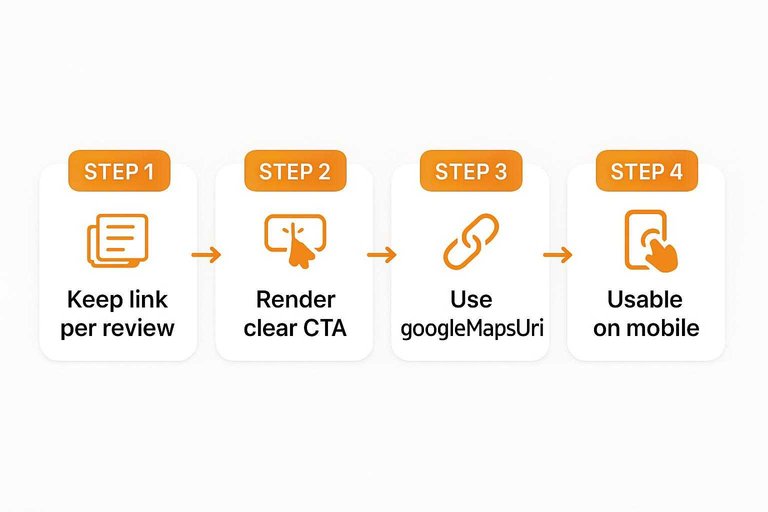
Each review you display needs a direct way for a user to verify it on Google. Use googleMapsUri—a URL returned by Google APIs that links back to the original review content on Google Maps.
- Keep the link per review. Store
googleMapsUrialongside each review item, not as a single “See all reviews” footer link. - Render a clear CTA. Add something like “View on Google Maps” on every review card.
- Don’t swap in your own Maps URL. Policies require end users always have access to the individual source review via the provided
googleMapsUri(see Places API policies). - Make it usable on mobile. The
googleMapsUrilink should be visible and tappable on each review card (not buried behind one shared footer link).
Check 8: Disclose selection
Your reviews block should never imply “everything, unedited.” Add an ordering/filtering disclosure (a visible notice that says how reviews are sorted and what filters/criteria you applied; Places API policies require this when you display reviews).
- State the default order, in plain text. If you’re using the common default, say “Sorted by: Relevance.”
- Disclose every filter and rule. Examples: “Showing: 5-star reviews,” “Only reviews with text,” “Only reviews from the last 12 months,” or “Pinned by our team.”
- If you translate review text, say so. Label it as your translation so readers don’t mistake it for the reviewer’s exact wording.
- France / French territories: if the API returns
visitDate(month/year visited), display it alongside the review content. - If you show
reviewSummary: that’s an AI-generated summary of the place based on user reviews, so add the extra attribution/disclosure elements required for that feature.
If you’re curating for conversion, curate openly—don’t let “we show our Google reviews” quietly become a completeness claim.
Check 9: Set SEO expectations
If you’re trying to display Google reviews on your website for SEO, run this check before you touch schema.
- Know what you’re chasing. A review snippet is Google’s term for Schema.org
Review/AggregateRatingstructured data that can make a page eligible for star-rich results—if it meets Google’s rules. - Spot “self-serving” pages. Self-serving reviews are Google’s term for a business/organization showing (or marking up) reviews about itself, which makes certain pages ineligible.
- LocalBusiness/Organization pages don’t get stars for self-serving reviews. Google’s guidelines say pages using
LocalBusinessor otherOrganizationmarkup are ineligible for review stars when the reviewed entity controls the reviews about itself—even if the reviews are shown via an embedded third-party widget (example: a Google Business reviews widget) (see Google’s review snippet structured data rules). - Ignore widget “rich snippet markup” promises. Some vendors advertise that their Google review widgets include rich snippet markup, but markup can’t override Google’s self-serving review policy.
If the stars are the real goal, stop spending time on this path; use Google reviews for on-page trust, or switch to first‑party testimonials (ShowTrust can collect testimonials and embed a Wall of Love widget via a simple script + container).
Ship a verifiable reviews block
Start by deciding what you’re building for—on-page trust, live verification, or SEO—because that choice determines whether an embed, Places API (New), or the Business Profile API is even valid. If your implementation relies on scraping Maps, rehosting review text, hiding author attribution, or skipping per-review googleMapsUri links and ordering/filtering disclosure, it’s not a trust signal—it’s a liability. Design around the hard constraints (including the “up to 5 reviews” ceiling in Places) and be explicit when you’re showing a curated subset. And if star snippets are the real goal, stop trying to force them onto self-serving LocalBusiness/Organization pages—use Google reviews for conversion proof on-page, not as a markup hack.
Turn feedback into on-page trust
Once you’ve ruled out scraping and rehosting, the next bottleneck is execution: collecting fresh proof, approving it, and keeping what you show consistent across pages.
ShowTrust gives you a hosted testimonial collection page and an embeddable wall of love widget, so you can request, approve, and publish credible social proof with a single snippet.
Written by
ShowTrust
Notes from the ShowTrust team on collecting testimonials and building authentic social proof.
Share: