September 12, 2026
·
Updated October 1, 2026
·
8 min read
How Testimonials on Pricing Pages Work: Advanced Trust Cues
Use testimonials for pricing page as verifiable proof: map objections to reviews, show the right metadata, follow FTC/Google constraints, and avoid trust-breaking UX.

You’re rewriting a pricing page and you need proof that makes a buyer feel safe committing money, not a block of flattering quotes. When testimonials look curated, anonymous, or too perfect, visitors start second-guessing the offer, cross-checking elsewhere, and hesitating right where your conversion should peak.
This explainer shows how pricing-page testimonials work as advanced trust cues: how to map objections to proof, govern the “proof chain” behind each quote, decide what verification metadata to display, account for 2026 constraints, and avoid UI patterns that quietly undermine credibility.
Pricing-Page Reality
On a pricing page, testimonials for pricing page aren’t brand decoration—they’re decision-stage evidence. They work when they answer purchase hesitation at the moment someone is about to commit money, time, and reputation—not when they sound inspirational. That means aiming them at “moment of decision” objections like ROI, switching effort, and whether you’ve worked with similar-sized companies.
Objection-to-proof map
| Objection (price/risk/fit) | Testimonial claim type | Fastest verifiability cue | Common skepticism trigger |
|---|---|---|---|
| “It’s expensive” | ROI or cost offset | Specific before/after context | “Sounds like ad copy” |
| “Switching will hurt” | Migration effort + timeline | Mentions tools/process used | No date or details |
| “Not for my use case” | Fit for segment | Clear segment match | Vague “works for everyone” |
| “Will it actually work?” | Outcome + limits | Links to external proof | Only perfect quotes |
Buyers also cross-check. Nielsen Norman Group notes people can be leery of on-site quotes because they assume you curated only favorable ones—and they compare what you show against third-party review sites anyway. An isolated page with no credible external references can look like it has something to hide.
Aggregate rating / star average—meaning a summarized rating number like 4.6/5—often outweighs any single quote. Spiegel’s guidance puts the purchase-likelihood “sweet spot” in a 4.0–4.7 range, and explicitly recommends embracing negative reviews because they establish authenticity.
Trust-signaling language
- Reviews: implies a broader set, not just highlights.
- Endorsements: implies a person is staking reputation.
- Customer stories: implies narrative and context, not a one-liner.
- Feedback: implies you collect criticism too.
- Case studies: implies attributable, checkable detail.
The line you’re walking is simple: pricing-page “trust” isn’t vibes—it’s how quickly a claim can be checked, and whether your curation is honest under rules that forbid fake reviews and deceptive suppression.
Proof Chain Governance
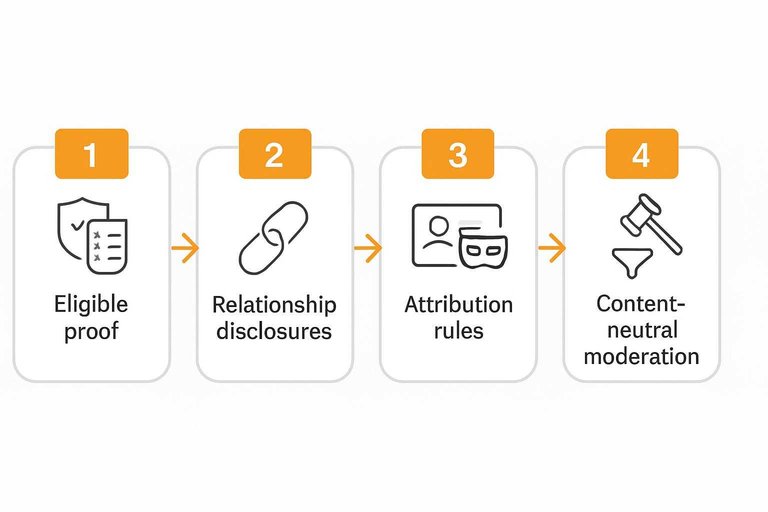
A pricing-page quote is only as credible as its proof chain: how you sourced it, what you disclose about the person behind it, how you moderate it, and what your display implies about what’s missing.
-
Define “eligible proof” before you collect. Decide who can submit (customer, partner, employee), what counts as a real experience, and ban anything that would misrepresent that the reviewer exists, used the product, or accurately describes their experience—because 16 CFR Part 465 prohibits businesses from purchasing or disseminating that kind of misrepresentation.
-
Disclose relationships where they change how buyers weigh it. A material connection (payment, employment, gifts, etc. that could affect an endorsement) must be paired with a clear and conspicuous disclosure (shown so people will actually notice and understand it, not buried) when officers, managers, employees, or agents are providing testimonials and the relationship isn’t otherwise obvious.
-
Choose attribution rules explicitly. Attribution (public vs anonymized) is whether the reviewer’s identity is shown publicly or kept anonymous while still being verified internally; some review platforms allow anonymity without changing acceptance, while still moderating against conflicts.
-
Write moderation rules that are content-neutral. ISO 20488:2018 frames moderation as a defined process; the FTC rule gives examples of neutral reasons to withhold reviews (defamatory/abusive content, personal info, clearly false/misleading, unrelated, or reasonably believed fake).
-
Be honest about curation—and avoid implying completeness. Review suppression is hiding or making reviews non-displayable based on rating/negative sentiment while implying the set shown represents most or all reviews; that implication is the compliance and trust failure line.
If you can’t point to your sourcing, disclosures, and moderation rules in one pass, your testimonial block reads like selective marketing—even when every quote is real.
Verification Metadata
Treat each pricing-page testimonial as a record a buyer can interrogate, not a pretty quote. A Verified buyer / verified current user badge—a label indicating the reviewer’s identity/usage was verified by a platform or process—only works as a trust cue when it’s paired with the fields that make the claim traceable (who said it, when, in what context, and where the original lives) and supported by third-party validation.
| Metadata field (show it) | Skepticism it prevents | Verification label examples | What a “good” example looks like |
|---|---|---|---|
| Name, role, company | “Could be invented” | Public attribution, or anonymized | “[Name] — [Role], [Company]” |
| Segment + use case tag | “Not like me” | “SMB / Mid-market / Enterprise” | “B2B SaaS, 20–50 seats” |
| Date (and version/plan) | “Too timeless to trust” | “Reviewed on YYYY‑MM‑DD” | “Reviewed after upgrade to Pro” |
| Verification badge | “Did they really use it?” | Verified current user / buyer | “Verified current user” |
| Source link + balancing signal | “Cherry-picked perfection” | Link to original review | “One drawback + why it stayed worth it” |
If you can’t verify identity publicly, you can still publish anonymized but verified testimonials. For example, on G2 reviewers can choose review attribution on (public) or off (anonymized), and that choice does not affect whether a review is accepted or rejected—while moderation can still see the reviewer’s information either way (see review attribution (public vs anonymized)).
A strong, verifiable pricing-page example reads like: “[Role], [Company] (Mid-market, 50 seats) — Verified current user — Reviewed 2026‑03‑14 — Source: [link]. ‘Implementation took longer because [constraint], but we stayed because [decision-stage outcome].’
Constraints in 2026
Some “verification” tricks are simply off the table now, because platforms and regulators define what counts as credible proof.
Start with Google. Self-serving reviews—reviews about your own business published on your own site (even through embedded third-party widgets)—don’t earn the same treatment as independent review sources. Google has said these self-serving reviews will no longer generate review rich results for LocalBusiness and Organization schema types when the reviewed entity controls the reviews (see Google’s review rich results update). So adding schema.org Review / AggregateRating markup to your pricing page isn’t an SEO shortcut to star snippets when you’re the publisher.
Then there’s the FTC. The Consumer Reviews and Testimonials Rule (16 CFR Part 465) took effect October 21, 2024, and the prohibitions are aimed at business conduct; ordinary consumers aren’t the target of liability under the rule. The practical constraint for a pricing page is simple: your collection and curation workflow has to be designed so you’re not buying, manufacturing, or selectively hiding reality.
Finally, incentives are a two-layer problem: what the FTC allows vs. what platforms allow. FTC guidance says incentives aren’t categorically banned if you’re not requiring positive sentiment, but paying incentives specifically for 5‑star reviews on third-party platforms violates Section 465.4. Separately, platform policies can be stricter—Trustpilot says you shouldn’t provide incentives (discounts, gifts, points, coupons, referral bonuses) when asking for reviews.

UX Integrity Patterns
On a pricing page, your testimonial UI is part of the evidence. If the interaction feels slippery—auto-advancing quotes, motion you can’t stop, or a widget that janks the page—you lose the trust you were trying to borrow.
Start by treating motion as an accessibility contract. WCAG Success Criterion 2.2.2 (Pause, Stop, Hide)—an accessibility requirement that auto-moving content lasting more than 5 seconds must be pausable/stoppable/hideable under common conditions—kicks in fast on marquees and carousels. If you insist on motion, ship explicit Pause/Play controls, make them keyboard-focusable, and honor reduced-motion preferences; otherwise, use a static grid/list and let the reader scroll.
Then protect performance on the one page that matters most. Prefer rendering that doesn’t block your pricing table or CTA: reserve space so the testimonial block can’t cause layout shift, keep embeds below the fold if they’re non-essential, and avoid third-party scripts that compete with your checkout analytics. A widget that lazy-loads and renders cached HTML is the right shape here because it reduces main-thread work while still showing real content quickly.
Linking out is a trust pattern, not a navigation failure—when it’s earned. If a testimonial implies “verified,” show a clear “Source” link next to it so the claim is checkable, and open it in a new tab so the pricing decision stays anchored; it’s one of the simplest trust signal best practices you can implement.
ShowTrust on pricing
- Collect reviews via the hosted collection link.
- Approve submissions in the dashboard, and pin the few you want anchored on pricing.
- Embed the widget snippet (script + container) on the pricing page.
- Pick a layout and filtering that matches how buyers self-identify (segment/use case).
- Style it to match your UI (including a CSS escape hatch) and avoid marquee mode unless you’re implementing WCAG 2.2.2 controls; note the widget script is claimed to be under 5kb gzipped and to lazy-load while rendering server-cached HTML, and video is not shipped yet.
What to Call “Testimonials” on a Website (and Why the Label Changes Trust)
People search for alternatives to the word testimonials because the term has become overloaded—especially on pricing pages, where buyers treat every claim as “marketing until proven otherwise.” If you rename the block without matching the underlying proof standard, you can accidentally lower perceived verifiability.
Here’s a practical taxonomy you can use on a pricing page. The goal isn’t wordsmithing—it’s aligning the label with what you can actually substantiate, disclose, and not imply.
Testimonials
Another way to say it: customer quotes, customer feedback, what customers say, customer stories.
A testimonial is typically a curated statement you chose to feature. That curation is not inherently bad, but it changes what the buyer assumes:
- They expect selection (highlights, best-fit segments, strongest outcomes).
- They will look for verification metadata (who said it, when, what they used, and what relationship they have to you).
- If you present testimonials as if they represent most or all customer sentiment, you drift into “review-like” territory and increase the risk of implying completeness you can’t support.
Use “Testimonials” when the unit of proof is a quote and you can attach identity/relationship clarity (even if attribution is anonymized, be transparent about what is and isn’t verified).
Reviews
Another way to say it: customer reviews, ratings and reviews, product reviews.
A review implies a broader pool and a more standardized format (often a star rating plus text). It also carries stronger expectations:
- Buyers expect to see distribution, not just highlights.
- They look for negative and mixed sentiment to establish credibility (Medill Spiegel Research Center explicitly recommends brands “Embrace negative reviews” as a credibility signal: https://spiegel.medill.northwestern.edu/how-online-reviews-influence-sales/).
- If you suppress lower ratings while implying the set is representative, that’s exactly the kind of misrepresentation the FTC’s Consumer Reviews and Testimonials Rule targets (16 CFR § 465.7(b): https://www.law.cornell.edu/cfr/text/16/465.7).
Also note the SEO misconception: even if you embed third-party widgets, Google has said “self-serving” reviews on an entity’s own site won’t generate review rich results for LocalBusiness and Organization when the reviewed entity controls the reviews (https://developers.google.com/search/blog/2019/09/making-review-rich-results-more-helpful). Don’t label a curated pricing-page block “Reviews” as an attempt to borrow third-party credibility unless you’re prepared to meet the user expectation that reviews are more complete and less curated.
Endorsements
Another way to say it: endorsements, recommended by, trusted by, experts recommend.
An endorsement is a recommendation where the relationship between endorser and brand becomes the trust fulcrum. This label raises immediate buyer questions:
- Is this person a customer, a paid partner, an advisor, an investor, an employee, or an affiliate?
- Is there a material connection that needs clear and conspicuous disclosure?
Under the FTC’s rule, it’s prohibited for officers/managers to write reviews/testimonials without clear and conspicuous disclosure of their relationship (unless it’s otherwise clear), and for businesses to disseminate employee/agent testimonials without the required disclosure when the relationship isn’t otherwise clear (16 CFR § 465.5: https://www.law.cornell.edu/cfr/text/16/465.5).
Use “Endorsements” only when you can (1) disclose relationships plainly and (2) make it obvious whether the endorser is speaking as a customer, partner, or insider.
Case studies
Another way to say it: customer case studies, success stories, how teams use [Product].
A case study is not a synonym for testimonial—it’s a different evidence object.
- Testimonials are usually single-claim proof (a quote, a rating, a short experience statement).
- Case studies are chain-of-proof proof (context → baseline → implementation → outcome → constraints).
On a pricing page, “Case studies” signals a higher verification burden: named company (or transparent anonymization), scope, time frame, and the reader’s ability to judge whether the scenario matches them. If all you have is a quote, call it a testimonial; if you have the full narrative and can support the specifics, call it a case study.
If you do have both, separate them: a pricing-page testimonial block handles rapid objection control, while a case-study link handles deeper due diligence (and helps satisfy the NN/g expectation that credible sites can be corroborated via external or more detailed sources: https://www.nngroup.com/articles/trustworthy-design/).
A simple naming rule for pricing pages
Pick the label based on what you’re implicitly promising:
- “Testimonials / Customer Quotes” → “These are selected highlights.” (Then make selection and verification cues explicit.)
- “Reviews / Ratings” → “This is a broader set, including negatives.” (Then don’t imply completeness if you’re curating, and don’t suppress by sentiment.)
- “Endorsements” → “This person is recommending us.” (Then disclose material connections clearly.)
- “Case studies / Success stories” → “We can show the full context.” (Then provide the context.)
If your current block is curated quotes with star icons, the most honest label is usually Testimonials or Customer Quotes—and the most trust-building move is to strengthen the verification metadata rather than rebrand the section header.
Make testimonials checkable evidence
On a pricing page, a testimonial only earns trust when it behaves like evidence: it answers a specific decision-stage objection and gives the buyer fast ways to verify who said it, when, in what context, and where the original lives. If your block can’t survive a quick cross-check—or it looks like you filtered reality—people treat it as self-serving marketing and hesitate right at the commit point. Your first move is to pick the objection you’re trying to neutralize on pricing, then attach one review whose proof chain (sourcing, disclosures, moderation, and non-suppression) you can defend in a single pass, with the metadata and source link visible beside it. If you want that workflow to stay lightweight in the UI, use a collection + approval flow and a performance-safe embed (e.g., ShowTrust); if you already have a credible third-party review presence, prioritize linking and mirroring verifiable records over designing prettier quotes.
Frequently Asked Questions
- Should testimonials for a pricing page link out to third-party review sites like G2 or Trustpilot?
- Yes—add a clear “Source” link to an external, unbiased page when you can, because an isolated site with no outside references can look like it has something to hide. Include a mix of sentiment (not just perfect quotes), since negative reviews increase credibility and authenticity.
- Is it bad to show negative reviews in testimonials for a pricing page?
- No—include some negatives (or balanced quotes that mention a drawback) because negative reviews build credibility and authenticity. Use them to set expectations and reduce “too-good-to-be-true” skepticism.
- Can I use a testimonial carousel or marquee on my pricing page without hurting accessibility?
- Only if auto-moving testimonials that run longer than 5 seconds have a clear Pause/Stop/Hide control that works with keyboard focus. If you can’t meet that requirement, use a static list or grid instead.
- What process should I follow to moderate pricing-page testimonials without looking like I’m suppressing reviews?
- Use an explicit, documented moderation workflow with content-neutral rules, aligned to ISO 20488:2018’s guidance for collecting, moderating, and publishing online reviews. Publish (or link) your moderation criteria so readers understand what gets removed and why.
- How do I embed verified-looking testimonials for my pricing page without building a custom system?
- Use a tool that provides a hosted collection page and an embeddable widget so you can display approved testimonials consistently across pages. With ShowTrust, you embed a single script plus a container div, and its API uses the https://api.showtrust.to/v1 base URL with x-showtrust-account-id and x-api-key headers for authenticated endpoints.
Ship checkable proof on pricing
Knowing what makes a testimonial credible is one thing; implementing sourcing, approvals, and fast verification cues without slowing your page down is the hard part.
ShowTrust gives you a hosted collection page plus an embeddable wall of love widget, so you can approve, pin, and publish testimonials prospects can sanity-check at the commit point.
Written by
ShowTrust
Notes from the ShowTrust team on collecting testimonials and building authentic social proof.
Share: