June 28, 2026
·
Updated August 3, 2026
·
15 min read
How Testimonial Management Software Works: Advanced Agency Workflows
A pillar guide to how agency-grade testimonial management software works—from intake to publish—covering pipeline architecture, verification/compliance, editing and approval ops, integrations, governance, and measurement so you can run repeatable cross-client workflows.

Testimonials should be easy: ask, collect, publish. In an agency, that “simple” flow turns into approvals, legal releases, brand checks, localization, and multiple clients—each with their own rules and stakeholders.
This guide breaks down the real machinery behind testimonial management software so you can build workflows that don’t collapse under scale. You’ll see how data models and lifecycle states keep everything orderly, how ingestion and verification reduce risk, and how integrations and reporting turn testimonials into a governed, measurable program.
Agency-grade architecture
Agencies win or lose on coordination, not features. A testimonial system is a layered pipeline that turns messy inputs into reusable proof across many client properties.
Pipeline components
You need clear modules because agencies run many sources, formats, and publishing endpoints. Split the system so each layer scales independently.
- Capture forms and landing pages
- Importers for CSV and CRM exports
- Review sync from third-party platforms
- Media processing for images and video
- Approvals, widgets, syndication, analytics
If one module fails silently, you ship broken social proof everywhere.
Data model essentials
Your data model decides what you can automate later. Treat testimonials like governed content, not loose quotes.
Model the core entities and relationships:
- Testimonial: the canonical claim and metadata
- Author: identity, company, role, enrichment fields
- Consent: scope, channel, expiration, revocation
- Source: where it came from, sync lineage
- Placement: where it renders, with formatting rules
- Campaign: why it exists, how it gets measured
- Asset versions: edits, crops, transcripts, translations
- Permissions and audit log: who changed what, when
When the model is clean, distribution becomes configuration, not heroics.
State and lifecycle
Lifecycle states prevent accidental publishing and broken compliance. Define transitions and guards so humans approve intent, not mechanics.
- Set to Pending when captured or imported.
- Move to Verified after identity and source checks pass.
- Mark Edited when content or media is modified.
- Advance to Approved after consent and brand review.
- Apply Embargoed, Expired, or Archived based on rules.
If you cannot explain the state in one word, you cannot govern it.
Multi-tenant boundaries
Agencies need separation without duplicating everything. Multi-tenancy must isolate client data while letting you reuse patterns safely.
Use strict tenancy keys for every record and query. Share templates and rendering components, not raw client assets. Scope roles to client workspaces, then add explicit allowlists for cross-client reuse.
Cross-client reuse is powerful only when it is deliberate and auditable.
Capture and ingestion
Capture breaks when your sources multiply. Email, events, sales calls, and old spreadsheets all compete. Your job is to make every path land in one clean, auditable record — especially if you plan to publish that proof later, not just store it. Tools like ShowTrust tend to work best when capture is centralized early, because what you collect can move straight into a curated, display-ready library without losing context.
Request orchestration
You want more testimonials without spamming the same person twice. Orchestration sequences asks across tools, then enforces global rules.
- Pick a system of record for “request sent” status (whether that’s your CRM or a dedicated testimonial workflow).
- Define channels per segment: email, SMS, in-app, or CSM-led.
- Add throttles by account, domain, and contact role.
- Schedule follow-ups with a hard stop after no response.
- De-dupe by contact and deal across client systems.
If you’re using a shareable request link or form (as in ShowTrust), the “system of record” decision matters even more: one place should clearly show who was asked, when, and through which channel. Your best automation is the one that prevents the second ask.
Form and prompt design
Good prompts don’t “collect praise.” They collect usable statements that survive legal review.
Use patterns like:
- “Before / after / measurable change,” with optional ranges or qualifiers.
- Conditional branches based on role, product, or regulated industry.
- Persona routing so admins and end-users get different questions.
- Language selection up front, with locale-specific consent text.
If your collection method is a single shareable form, keep it short but structured so submissions arrive already sortable (role, company, product, approval). That’s the difference between a quote that can be curated and embedded quickly (e.g., in ShowTrust widgets) and one that becomes a follow-up thread. A quote is only valuable when it’s specific enough to publish safely.
Imports and normalization
Legacy testimonials arrive messy because they were never meant to be a database. Normalize them once, then never touch the raw source again.
- Parse spreadsheets into rows and canonical fields.
- Split docs and email threads into atomic quotes.
- Map fields: author, role, company, product, approval.
- De-dupe using text similarity and source identifiers.
- Preserve provenance: source file, timestamp, collector.
If you’re moving into a tool that supports curation and public display (like ShowTrust), this normalization step is what prevents your “testimonial wall” from becoming a grab-bag of half-attributed quotes. Provenance is your insurance when someone asks, “Where did this come from?”
Rich media intake
Rich media fails on boring details. Aspect ratio mismatches, missing captions, and unlabeled speakers kill reuse.
Set intake rules like:
- Accepted aspect ratios and framing guides for webcams.
- Caption requirements, plus language and punctuation standards.
- Bitrate and format targets for editing and web delivery.
- Speaker labels, especially for panel clips.
- Transcript alignment so quotes deep-link to exact timestamps.
Even if your primary output is written testimonials, getting media standards right up front keeps future reuse simple when you want to add richer proof alongside text in your marketing or on-site embeds. If you standardize media at capture, editing becomes a quick trim, not a rescue.
Verification and compliance
Trust dies in procurement, not in your pitch. Testimonial management software keeps proof, consent, and edits tied together, so a brand review can’t poke holes later.
Identity verification
Verification is how you stop “sounds true” from becoming “prove it.” Agencies need fast checks for most testimonials, plus strict rules for risky ones.
- Confirm via work email domain
- Match contact to CRM record
- Validate profile via social links
- Require purchase or project reference
- Escalate high-risk claims to review
If you can’t verify the person, you can’t safely amplify the claim.
Consent and releases
Consent is a workflow, not a checkbox. Good systems capture exactly what was approved, for each asset type.
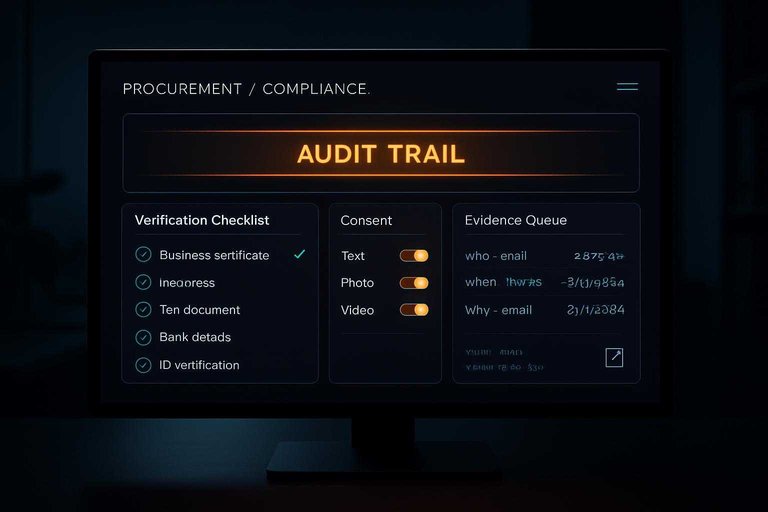
Text, photo, and video releases usually split into separate toggles with separate language. Minors trigger guardian approval, employee quotes trigger employer policy checks, and incentives require disclosure fields.
Revocations get handled as a state change, not a deletion, with an immutable snapshot of what they consented to. That snapshot is what survives legal and brand scrutiny.
Claims and substantiation
Risky claims slip in through casual wording. Your workflow should catch them early and attach proof before publishing.
- Flag superlatives and absolute terms automatically.
- Route flagged quotes to an evidence request queue.
- Attach substantiation artifacts and link to the source.
- Add qualifiers that keep meaning but reduce legal exposure.
- Store the original text version beside the approved edit.
You’re not censoring the story. You’re making it defensible.
Audit and retention
Auditability is what turns “we’re careful” into “here’s the record.” Strong tools log who changed what, when, and why, without relying on memory or screenshots.
Retention schedules keep you from storing consent forever by accident, while legal holds freeze relevant records during disputes. Client export features matter too, because procurement often demands portable audit trails—and they’ll also scrutinize practices like what counts as review gating.
If your trail can’t be exported, it won’t count when the review gets serious.
Editing and approval ops
High-throughput agencies treat testimonials like governed content, not loose quotes. You protect brand voice while keeping the customer’s meaning intact. The trick is separating “what they said” from “what you can publish.”
Versioning strategy
You need speed without losing provenance. Versioning keeps edits reversible, reviewable, and defensible.
Keep a simple version model:
- Verbatim capture: store the original text, unchanged, with source context.
- Working draft: polish for clarity, length, and brand voice.
- Publish version: lock the exact copy that ships, with a timestamp.
- Change trail: use redlines and comments for every meaningful edit.
- Rollback path: revert to any prior publish, not just the last draft.
If you cannot show the verbatim next to the polish, authenticity becomes an opinion.
Review routing
Parallel review avoids the “one inbox at a time” trap. You route by risk, not by org chart.
- Send to client brand and account in parallel, with clear acceptance criteria.
- Route to legal only when claims, regulated terms, or releases are involved.
- Add subject-matter review when technical accuracy could be questioned.
- Enforce SLAs with reminders, then auto-escalate to a named backup.
- Flag bottlenecks by queue age, not by who “usually responds late.”
When routing is rule-based, approvals become predictable instead of political.
Localization workflow
Localization breaks when everyone translates “their way.” A workflow keeps meaning consistent across languages and markets.
- Reuse phrasing with translation memory for repeated themes.
- Enforce glossary terms for products, features, and slogans.
- Require locale-specific approvals for tone and cultural fit.
- Support mixed-language blocks inside one placement when needed.
- Record per-locale exceptions, with the approver and rationale.
Your best safeguard is consistency at the phrase level, not the page level.
Brand safety checks
Testimonials can introduce risk fast. You need automated screening plus human judgment for edge cases.
Run checks before any stakeholder review:
- Automated: profanity, slurs, competitor names, and sensitive categories.
- Automated: PII patterns like emails, phone numbers, and addresses.
- Manual: implied claims, medical or financial promises, and ambiguous attribution.
- Manual: context mismatches, like a quote implying endorsement.
Keep an exception playbook with three moves:
- redact specific strings, request a rewrite, or block publication.
Brand safety is less about catching everything and more about handling misses consistently.
Publishing and placement
Shipping testimonials is a deployment problem, not a copy problem. You need fast rendering, stable layouts, and controls that survive handoffs across teams.
Imagine your agency updating one quote for a landing page, a retargeting ad, and a sales deck. One change should propagate, with the same approvals, everywhere.
Embed patterns
You need one publishing model that fits marketing sites, product pages, and campaign landers. Choose based on control, speed, and how often content changes.
- Script embed with hydration
- Iframe embed with isolation
- API render in your frontend
- Headless CMS as content source
- Edge caching with revalidation
If you see flicker or layout shift, your embed choice is already costing trust—make sure everyone on the team understands the basics of embed code before shipping.
For a deeper look, follow these best practices for using third-party embeds.
Placement governance
Placement is where governance becomes real. Without rules, testimonials drift into pages and campaigns you never approved.
Define a placement map that ties each asset to constraints. Use page rules by URL pattern, campaign windows with start and end dates, and device targeting when the creative differs on mobile. Block reuse by requiring placement IDs, enforcing expiration, and logging every render event.
If a testimonial can be copied with one snippet, it will be copied.
Personalization rules
Personalization should help the user decide, not trap them. You need clear segmentation, predictable fallbacks, and tests that stay honest.
- Define segments by industry, persona, and funnel stage.
- Set priority rules for collisions across segments.
- Add a safe fallback set for missing attributes.
- Run holdouts and A/B tests with consistent disclosures.
- Audit for exclusion patterns that hide negative signals.
If your rules are hard to explain, they are hard to defend.
Performance hardening
Testimonials often bring rich media and third-party code. That combination can quietly wreck Core Web Vitals.
Lazy load below the fold, and serve media through your CDN with responsive formats. Use preconnect for known origins, index transcripts so video testimonials still contribute to on-page relevance, and isolate third-party scripts behind async loading and strict budgets.
Fast testimonials don’t feel like “widgets.” They feel native.
Integration mesh
Integration is where testimonial programs either scale cleanly or slowly rot. Your goal is a tight mesh: one identity, one source of truth, and predictable event flow. If you’re still deciding what should live in a CRM versus a dedicated system, see testimonial software vs CRM for agencies.
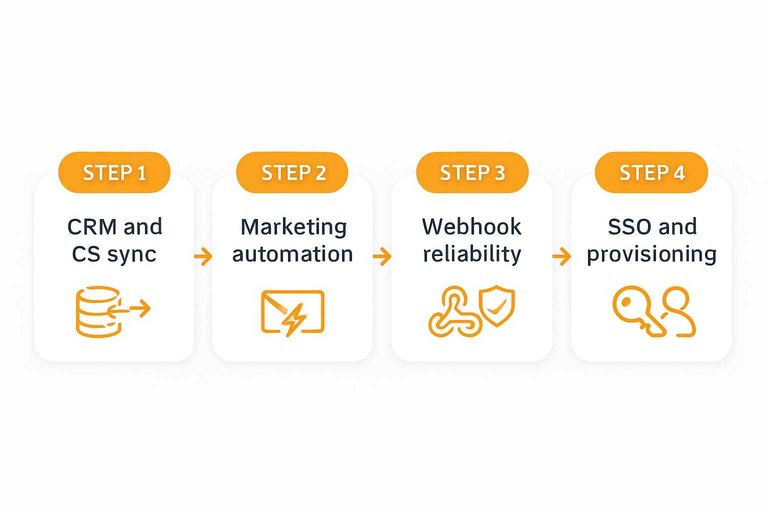
CRM and CS sync
You need bidirectional sync so teams trust the same customer record. You also need hard rules, or you’ll create circular updates and mystery duplicates.
- Pick a system of record per field, then lock ownership.
- Define merge rules for email, domain, and account hierarchy.
- Use an external ID to map records across systems.
- Add loop guards using “last written by” and version stamps.
- Route conflicts into a review queue, not silent overwrites.
If you can’t explain one field’s owner in one sentence, drift is already shipping.
Marketing automation
Automation should ask at the right moment and route assets fast. It should also prevent over-asking and misattribution.
- Trigger requests on lifecycle milestones, not calendar schedules
- Stamp every request with campaign and source tags
- Suppress contacts with open cases or recent asks
- Route approved assets into the right nurture streams
- Sync preference and consent flags before sending
Suppression is the quiet feature that keeps your brand from sounding desperate.
Webhook reliability
Webhooks fail in normal ways, then fail in weird ways. Reliability comes from designing for repeats, gaps, and late arrivals.
Idempotency keys stop duplicates when retries hit your endpoint twice. Retries need jitter and limits, plus a dead-letter queue for poison events. Add replay windows and backfills so you can reprocess missed events without manual cleanup.
If you can’t replay last week safely, you don’t have an integration. You have a hope.
SSO and provisioning
Agencies live in many client accounts, so identity sprawl is your main risk. SSO and provisioning keep access consistent while reducing human error.
Use SAML or OIDC for sign-in, then SCIM for lifecycle changes. Start with least-privilege role templates, and require explicit elevation for admin actions. Offboarding should revoke sessions, remove group access, and rotate shared secrets tied to that user.
The real win is speed: onboarding in minutes, offboarding in seconds.
Cross-client governance
Agencies win when every client gets the same disciplined system, without sharing anything accidentally. Governance is your operating model for standardization, delegation, and hard boundaries between accounts.
Role design
Role design sets who can see, change, and publish across clients. Safe defaults prevent the quiet failure mode: one person “helping” in the wrong workspace.
| Role | Core access | Can publish | Common pitfall |
|---|---|---|---|
| Agency admin | All clients, settings | Optional | Too much default scope |
| Client admin | One client, settings | Yes | Adds users without review |
| Editor | Drafts, assets | No | Edits live placements |
| Reviewer | Comment, approve | No | Approves without consent check |
| Publisher | Schedule, push live | Yes | Publishes unverified quotes |
| Analyst | Read-only, exports | No | Exports without masking |
Set “publish” to opt-in, not assumed. That one toggle prevents most cross-client damage.
Template libraries
Template libraries keep your outreach and consent language consistent across clients. You want one source of truth, with narrow client overrides when branding or legal demands it.
A practical library setup looks like this:
- Ask templates: short, long, and follow-up variants.
- Consent snippets: region-specific, product-specific, and “minor” blocks.
- Tag taxonomy: use-cases, industries, proof types, and funnel stages.
- Placement components: card, carousel, quote block, and full story.
- Versioning rules: global v1, client override v1.1, audit trail.
Centralize the base. Override at the edge.
SLA workflows
SLAs stop testimonial work from becoming a slow, invisible queue. You need intake rules, escalation paths, and coverage plans that survive vacations.
- Define intake targets per source, like forms versus sales-submitted requests.
- Timebox approvals with a default window and an auto-reminder schedule.
- Add an escalation path from reviewer to client admin to agency admin.
- Set holiday coverage with delegated approvers and a pause mode for outreach.
- Log SLA breaches with a reason code, then review weekly.
If you can’t measure the queue, you can’t defend the timeline.
Data residency controls
Data residency controls keep client content where it’s contractually allowed to live. Your software should enforce region pinning, limit cross-border transfers, and expose subprocessor routes.
Look for controls like:
- Region pinning per client workspace.
- Storage and backups aligned to that region.
- Transfer gates for exports, integrations, and support access.
- Subprocessor transparency, with change notifications.
- Client-level residency policies that block noncompliant features.
If residency is a policy, not a setting, you avoid “oops” migrations during scaling. For EU transfers, it helps to align with Standard Contractual Clauses guidance.
Measurement and experimentation
You can’t improve testimonial performance without clean measurement. You also can’t claim credit for revenue without careful attribution. Instrument first, experiment second, and report like you expect questions.
Event taxonomy
You need a shared event language across web, landing pages, and sales tools. Without it, every dashboard becomes an argument.
- Track view with clear viewport threshold
- Track scroll exposure by percent bands
- Track play and completion for video
- Track click, copy, and share actions
- Dedupe by session, respect consent
When definitions match, debates turn into decisions.
Experiment design
Testimonial placement experiments fail when traffic is messy or you stop too early. Your goal is learning, not crowning a fragile winner.
A/B works for stable pages and clear variants, like above-the-fold versus mid-page cards. Bandits fit rotating placements, but they need guardrails against novelty spikes.
Decide stopping rules before launch, or you’ll optimize for confidence theater.
Qualitative feedback loop
Numbers tell you what moved. Sales and CS tell you why it mattered.
- Add a quick “asset helpful?” field in CRM notes.
- Tag moments: objection handled, risk reduced, feature clarified.
- Review tags weekly and flag missing themes.
- Feed gaps into capture prompts and request scripts.
- Publish updated prompts and retire low-signal ones.
Your best prompts come from real friction, not brainstorms.
Reporting to clients
Client reporting should show what you measured, what changed, and what you still don’t know. Dashboards should separate testimonial asset performance from the channel delivering traffic.
Include event funnels, placement-level comparisons, and confidence cues like “early” versus “stable” readouts. Call out uncertainty plainly, especially when traffic sources shifted during the test.
If you blur asset impact with channel swings, you’ll sell certainty you can’t defend.
Security, privacy, and vendor risk (agency checklist)
“Compliance” is what you prove. “Security” is what you survive. For agencies, testimonial management software for agencies has to hold up under client security questionnaires, procurement reviews, and the day-to-day reality of many accounts, many users, and many integrations.
Treat security as an operating checklist, not a slide.
Access control and tenancy enforcement
Multi-tenant apps fail at the seams: shared templates, shared integrations, shared admin roles. You need hard controls that prevent accidental cross-client exposure.
- Enforce workspace-scoped roles by default, with explicit elevation for cross-client tasks.
- Require step-up authentication for high-risk actions (exports, deletions, publishing, role changes).
- Separate “view” from “export” and “publish” permissions—most teams overgrant export.
- Log every admin action (role edits, API key creation, SSO changes) with actor + timestamp.
If an agency staffer can accidentally view or export the wrong client’s library, your governance model isn’t real yet.
Data protection for testimonial content
Testimonials often contain more than you expect: names, titles, emails in signatures, faces in video, background screenshares, and attachments that were never meant to be public.
- Encrypt data in transit and at rest, including backups.
- Support field-level redaction or masking for sensitive attributes in exports.
- Add automated PII detection for free-text fields and transcripts, then route to a cleanup queue.
- Keep separate storage policies for raw uploads versus finalized publish assets.
The goal isn’t “store less.” It’s “store deliberately,” with clear defaults that don’t surprise clients.
Secure integrations and API hygiene
The fastest way to leak data is through integrations that everyone assumes are “set and forget.” Agencies also rotate client tools constantly, so you need clean key management.
- Prefer OAuth connections where possible; if API keys are used, scope and rotate them.
- Limit webhook payloads to what the receiver needs; don’t broadcast full testimonial bodies by default.
- Validate webhook signatures and pin allowed callback URLs per client workspace.
- Use environment separation (dev/stage/prod) so test events can’t pollute production placements.
If you can’t rotate credentials without downtime, you’ll delay rotation until it’s too late.
Incident readiness and client reporting
Agencies get pulled into incidents even when the vendor is at fault. You need clarity: what happened, what data was involved, what you did, and what clients need to do next.
- Maintain an incident playbook that maps to your testimonial lifecycle states (pause publishing, revoke embeds, invalidate keys).
- Make “kill switches” practical: disable a placement, unpublish a widget, or freeze exports fast.
- Provide exportable audit trails that clients can attach to their own incident reports.
Your best incident response is one that can be executed by the on-call person, not the person who built the system.
Vendor risk signals procurement will ask for
Procurement teams tend to evaluate the vendor as much as the workflow. You can reduce back-and-forth by knowing what will be requested.
Expect questions like:
- What data is collected, where is it stored, and who can access it?
- How do you handle subprocessor access and support access to client workspaces?
- What’s the retention policy for uploads, transcripts, and consent records?
- How do you handle deletion requests versus revocations and legal holds?
If your answers depend on “we’ll do it manually,” your client will hear “we can’t guarantee it.”
Operationalize Testimonials as a System, Not a Folder
- Start with the backbone: define your data model, lifecycle states, and tenant boundaries so every testimonial has an owner, status, and audit trail.
- Standardize intake and proof: use request orchestration, normalized imports, identity/consent verification, and retention rules to reduce rework and compliance risk.
- Build an approvals assembly line: add versioning, review routing, localization, and brand-safety checks so publishing is predictable across clients.
- Close the loop with placement + measurement: govern embeds and personalization, harden performance, connect CRMs/automation via reliable webhooks and SSO, then report with a consistent event taxonomy and experiments.
Frequently Asked Questions
- Is testimonial management software for agencies the same as review management software?
- No—testimonial management software focuses on first-party stories you request, approve, and publish across channels, while review management centers on third-party platforms (like Google or G2) and reputation monitoring. Agencies often use both, but they solve different workflow and compliance problems.
- Do agencies need a separate testimonial management tool if they already use a CRM like HubSpot or Salesforce?
- Usually yes, because CRMs store customer data but don’t handle end-to-end testimonial intake, consent tracking, approvals, and multi-channel publishing in an agency workflow. A dedicated tool reduces manual copy/paste and keeps publish-ready assets organized by client and campaign.
- How do I choose testimonial management software for agencies when managing multiple client brands?
- Prioritize strict client separation (permissions, workspaces), approval workflows, reusable templates, and flexible publishing options (embeds, landing pages, exports) that match how you deliver work. Also check for clean integrations with your CRM, CMS, and analytics stack so testimonials don’t drift or duplicate.
- How do you measure whether testimonials are actually improving conversions without misleading attribution?
- Track testimonial placements as distinct components (e.g., page sections or modules) and run controlled tests like A/B or holdouts where feasible, using your existing analytics (GA4, tag manager, experimentation tools). Focus on directional lift and downstream quality signals (demo requests, pipeline) rather than claiming a single-touch cause.
- What’s the best way to publish testimonials on client websites without engineering bottlenecks?
- Use embeddable widgets or CMS-friendly blocks so strategists can place and update testimonials without redeploys, while still keeping approvals centralized. Tools like ShowTrust can help by providing embeds and a public testimonial page that agencies can deploy quickly and keep consistent across campaigns.
Operationalize Testimonials Across Clients
Agency-grade testimonial workflows are only valuable when capture, approvals, compliance, publishing, and measurement stay consistent across every client account.
ShowTrust centralizes testimonial collection, curation, and embeddable displays so your team can publish verified social proof faster and keep conversion-focused placement consistent.
Written by
ShowTrust
Notes from the ShowTrust team on collecting testimonials and building authentic social proof.
Share: