July 2, 2026
·
Updated August 4, 2026
·
12 min read
Build a Customer Testimonials Landing Page for SaaS
A practical guide to building a high-converting SaaS customer testimonials landing page—from clarifying the page’s goal and audience objections to choosing the right page type, sourcing credible quotes, adding trust signals, and laying out persuasive sections with clean testimonial copy.

You can have great customers and still ship a testimonials page that feels vague, outdated, or too “marketing.” When that happens, visitors don’t doubt your product—they doubt the proof.
This guide shows you how to plan testimonials for the objections your buyers actually have, collect specific stories without distorting what customers said, and assemble trust signals that hold up to scrutiny. You’ll also get a layout blueprint and copy patterns so your page reads like evidence, not hype.
Plan for impact
A testimonials landing page isn’t a scrapbook. It’s a conversion asset that removes risk at the exact moment buyers hesitate.
Treat every block of proof as an answer to a specific objection. When your proof matches your buyer’s doubts, your CTA stops feeling like a leap.
Primary page goal
Pick one primary conversion, then support it with one secondary action. Two equal CTAs create indecision fast.
- Choose one primary goal: signup or demo request.
- Choose one secondary goal: pricing view or case study download.
- Assign one CTA style to the primary goal: button, high-contrast, repeated.
- Assign one CTA style to the secondary goal: link, lower-contrast, fewer placements.
- Remove any CTA that doesn’t map to a goal.
Make the primary CTA the obvious path, and everything else a confident detour.
Audience objections
Your best testimonials are rebuttals in disguise. List the objections first, then collect proof that answers them.
- “Will this integrate?” → Theme: setup ease and real workflows.
- “Will my team adopt it?” → Theme: day-one usability and onboarding.
- “Is it secure?” → Theme: trust, controls, and approvals.
- “Will it deliver value?” → Theme: outcomes described without numbers.
- “Is support responsive?” → Theme: fast fixes and clear ownership.
If you can’t map a quote to an objection, it’s decoration.
Proof you need
SaaS buyers trust layered proof more than any single glowing quote. Mix formats so the page feels verifiable, not persuasive.
Use short quotes for speed and scanning. Add video for emotion and authenticity, but keep it optional. Include customer logos only when you have explicit permission and a clear relationship. Ratings and review snippets work best when they link to the source platform. Outcome snapshots should describe the before-and-after qualitatively, unless you can substantiate exact numbers.
Aim for “credible and specific,” not “loud and impressive.”
Compliance boundaries
Testimonials can create legal and trust risk when they drift into promises. Set rules early so you can publish confidently.
- Get written permission for the exact quote, name, title, and logo use.
- Confirm what’s covered by NDA, including metrics and internal process details.
- Offer anonymization options: role only, industry only, or first name only.
- Remove absolute claims and guarantees, especially performance and security promises.
- Keep source records: email approvals, contracts, and review links.
Trust compounds when your proof is both compelling and clean.
Pick a page type
Different traffic sources arrive with different questions. Your job is to match the testimonials format to the buyer’s skepticism and where they are in the funnel.
| Situation | Best page type | What it includes | When to use |
|---|---|---|---|
| Cold ads traffic | Proof-first wall | Logos, short quotes, outcomes | High skepticism |
| Blog/SEO traffic | Problem-to-proof page | Use case, quote, feature tie-in | Mid-funnel evaluation |
| Product-led users | In-app social proof page | Reviews, snippets, integrations | After activation |
| Sales-led prospects | Deal support page | Industry proof, objections, ROI notes | Late-stage calls |
Pick the format that answers their first objection, not your favorite layout. If you want a practical way to operationalize third-party validation, see G2’s guidance on review widgets & reference pages.
Source strong testimonials
Strong testimonials are collected, not hoped for. You want credible voices and specific stories, using a workflow your team can repeat.
Imagine a user who just hit a milestone with your product. That moment is when details are fresh, and praise is easiest to turn into proof.
Who to ask
Start with people who already show belief through behavior. You’re looking for signal, not politeness.
- Power users with consistent usage
- Customers after a clear win
- Renewal or expansion accounts
- Internal champions who refer others
- Target-segment users you want more of
If you can name the moment they’d brag about, you’ve found your best ask.
Ask the right way
Keep outreach short, specific, and easy to say yes to. A gentle cadence beats a single long email.
- Send a 6–8 line email with one clear ask.
- Include two options: written reply or 10-minute call.
- Add a draft bullet or two they can correct.
- Follow up once in 3–5 business days, no guilt.
- Close the loop with a thank-you and approval step.
Your job is to reduce effort, not increase obligation.
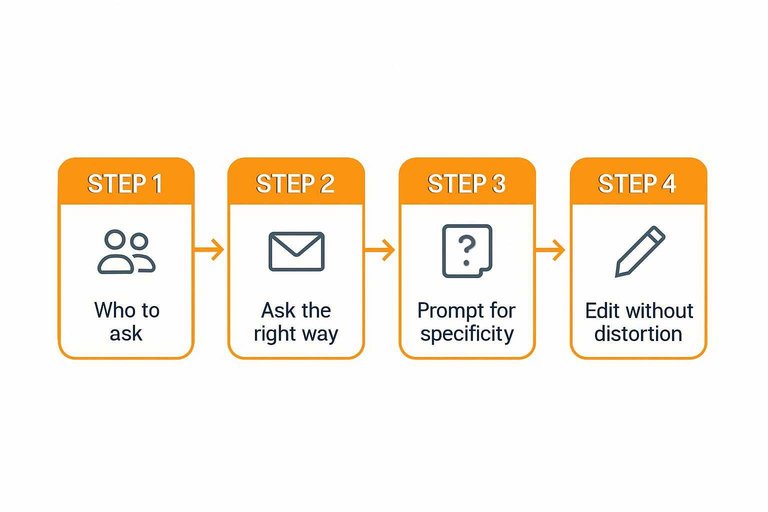
Prompt for specificity
People default to vague praise unless you guide them. Prompts should pull out context, contrast, and consequences.
- What was happening before you switched?
- What did you try instead, and why?
- What was the “this isn’t working” moment?
- What do you do now, step by step?
- What result feels most meaningful to you?
If you want help structuring your prompts, try this testimonial question generator.
The best quote is usually hiding behind the second question.
Edit without distortion
Most testimonials need tightening, not rewriting. Cut filler words, remove tangents, and keep the customer’s intent intact.
When you need clarity, add context blocks around the quote instead of changing the outcome. Use short labels like role, company type, use case, and environment, so the reader can map the story to themselves.
If you can’t preserve meaning, don’t edit it. Ask for a revision.
Capture video options
Async video works when it feels low-stakes and guided. Make it easy to record, easy to approve, and safe to share.
- Send three prompts and a 60–90 second target length.
- Suggest simple tools they already have, like Loom or Zoom.
- Provide consent language covering use on your site and ads.
- Ask for one clean take, quiet room, and eye-level camera.
- Trim only for pauses and repetition, then request approval.
Video is trust on fast-forward, but only when consent is airtight.
Build trust signals
Cautious SaaS buyers assume testimonials are cherry-picked until proven otherwise. Your job is to make each quote verifiable, specific, and easy to place in context.
A short quote without credibility details reads like marketing copy. Add the right signals and it reads like evidence.
Attribution essentials
Minimal attribution answers four questions fast: who said it, what they do, where they work, and what kind of customer they are. Without that, even a great quote feels anonymous and low-stakes.
Use full name + role + company + segment when the customer is comfortable being identified and their brand carries weight. Use initials or an industry label when there’s a real privacy constraint, like regulated roles, sensitive projects, or a strict comms policy.
If you must anonymize, compensate with specificity elsewhere, like stack, use case, or team size.
Logo and brand use
Logos amplify trust, but misuse creates legal and relationship risk. Treat logos like borrowed credibility.
- Do follow each company’s published logo guidelines
- Do use the current logo mark, not an old variant
- Don’t imply endorsement beyond the quoted statement
- Don’t add logos without explicit permission when unclear
- Do request written approval for prominent placement
The moment a logo looks like a partnership claim, you’ve crossed the line.
Third-party validation
Third-party proof works when it’s scannable and subordinate to the testimonials. You’re adding verification, not building a badge museum.
- Pick one primary review source to embed or link.
- Place badges near the trust break, not above the hero.
- Use one compliance row with icons and short labels.
- Link each badge to a verification page or policy.
- Remove duplicates that restate the same claim.
If visitors can’t find the quotes quickly, you’re signaling insecurity, not confidence. If you want those reviews to show up cleanly in search results too, use a review schema generator to format them correctly.
Freshness and relevance
Stale testimonials feel like a dead product, even when you’re shipping weekly. Date-stamp quotes and add light metadata so buyers can map the story to their situation.
Tag each testimonial by segment, use case, and plan tier, then rotate which ones appear by default. Keep older favorites available behind filters, but lead with recent, similar customers.
Relevance beats volume, because buyers trust peers more than praise.
Page layout blueprint
Assemble a testimonials landing page that answers questions fast and stays scannable. Use modular blocks so buyers can skim, then zoom in—especially when you’re turning real customer feedback into clear, verifiable trust signals (the kind tools like ShowTrust are built to collect and present consistently).
Above-the-fold block
Lead with the buyer’s desired outcome, not your brand story. Your goal is clarity in five seconds.
Write a benefit-led headline, like “Ship reports faster with fewer manual checks.” Add a subhead that names who it’s for and the context, like “For ops teams consolidating data across tools.” Place a proof strip under it with recognizable signals: customer logos, roles, star ratings, or short review snippets. Use one CTA with a specific verb, like “See testimonials by use case,” not “Get started.” If you’re already collecting testimonials via a dedicated workflow (for example, with ShowTrust), this is where those curated, on-brand snippets earn their keep—fast reassurance without forcing a long read.
If the top block reads like a pitch deck, expect bounce, not belief.
Testimonial grid
A grid works when every card answers the same questions in the same order. Design for scanning first, reading second.
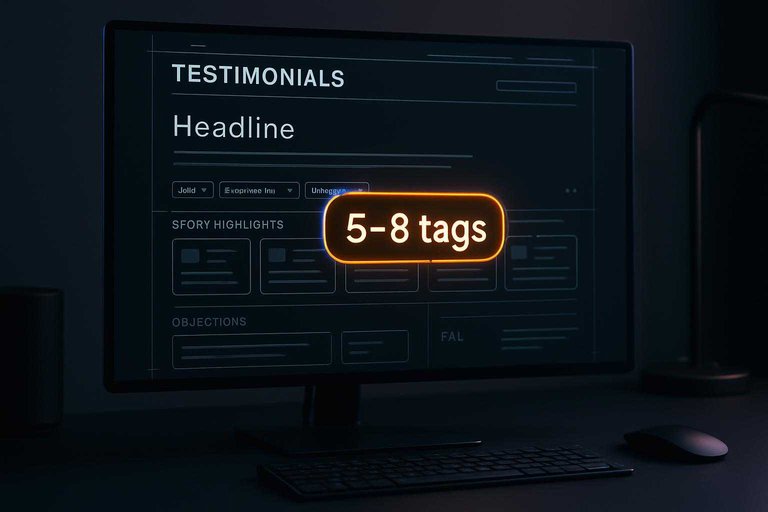
- Define 5–8 tags that match buyer intent, like “Migration” or “Support.”
- Add filters for role, company size, and use case, plus a “Most relevant” default.
- Standardize card anatomy: who, context, claim, proof detail, and link.
- Keep quote text short, then expand on click to a full review.
- Add one “View story” link for deeper narrative modules.
Consistency turns a wall of quotes into a decision tool—and it’s much easier to maintain when testimonials are centrally managed (approved, organized, and ready to publish) rather than living across docs and inboxes.
Story highlights
Some buyers need more than a soundbite. Give them a few longer modules they can jump to.
- Problem: what was broken or slow
- Why chosen: what beat the alternatives
- Implementation: steps, timeline, ownership
- Outcome: measurable or observable change
- Quote pullouts: one sharp line per section
These modules do the heavy lifting when the grid creates interest but not conviction.
Objection sections
Group testimonials by the objections you hear on sales calls. It lets skeptical readers self-serve reassurance.
Create sections with plain-language headings like “Onboarding without chaos” or “Reliability under load.” Under each, stack 3–6 testimonials that speak to the same fear, with one sentence of context before the quotes. Cover themes that usually block sign-off: onboarding, reliability, support quality, ROI confidence, and switching costs. Keep each section tight, then link to related stories or filtered grid views. This structure is simplest when you can quickly curate and approve quotes by theme—so your “proof by objection” stays current as new feedback comes in.
When you organize by doubt, you stop forcing buyers to translate your praise into their risk.
CTA placement rules
CTAs should feel like exits, not ambushes. Place them where intent naturally spikes.
- Repeat the main CTA after the grid, after objections, and after story highlights.
- Use a sticky CTA only on desktop, with a low-friction label.
- Pair each CTA with a micro-choice, like “Talk to sales” or “See pricing.”
- End with an end-cap CTA that restates the buyer outcome, not features.
- Keep the CTA text consistent across the page to reduce cognitive load.
If your CTAs match the reader’s momentum, they won’t feel pushy.
FAQ mini-panel
A small FAQ block catches last-mile concerns before they become tab-switching. Keep it short and specific.
- Pricing fit: who it’s best for
- Security: data handling and access
- Migration: effort and support
- Integrations: must-have systems
- Contract terms: billing and cancellation
Answering these here prevents “I’ll check later,” which usually means never.
For conversion-focused guidance on structure and placement, see CXL’s breakdown of how & why to get testimonials.
Write testimonial copy
Your job is translation, not polishing. You’re turning raw customer language into copy that’s readable, believable, and still theirs.
Keep the customer’s intent and cadence. Remove only what blocks clarity, like filler words or missing context.
Headline patterns
Headlines work best when they sound like something a customer would actually say. Aim for outcomes and moments of relief, not hype.
- “Finally, a way to ____ without ____”
- “We stopped ____ and started ____”
- “From ____ chaos to ____ clarity”
- “The simplest way we’ve found to ____”
- “Now we can ____ with confidence”
If it reads like ad copy, rewrite it until it reads like a customer note.
Quote formatting
Most testimonials fail on mobile because they’re dense. Formatting is your credibility tool, not decoration.
Use short lines, with a hard break every 8–14 words. Bold one concrete phrase, then add a context label like “Use case,” “Team,” or “Before/After.”
When the quote is skimmable, the reader trusts it enough to actually read it.
Microcopy dos/don’ts
Microcopy carries the legal and trust load. It also sets expectations when your testimonials are persuasive.
- Write buttons as actions, not adjectives: “Read more stories,” not “See why we’re best.”
- Add captions that anchor context: feature, workflow, or decision stage.
- Use disclaimers for variability: “Results vary by team and setup.”
- Remove vague superlatives: “game-changing,” “world-class,” “revolutionary.”
- Delete unverifiable claims unless you can cite them on-page.
Your safest copy is specific, modest, and easy to verify.
Consistency checklist
Inconsistency makes testimonials feel curated, even when they’re real. Set style rules once, then enforce them everywhere.
- Use one capitalization style for job titles
- Standardize roles: “Head of,” “VP,” “Director”
- Keep product names identical site-wide
- Use one tense per quote block
- Use one format for company names
Polish is persuasion, because it signals care without saying a word.
Measure and optimize performance over time
A customer testimonials landing page isn’t “done” when it’s published. To know whether it’s actually building trust (and not just looking credible), you need a simple measurement plan, a testing cadence, and a system for keeping proof current. The goal is to connect on-page engagement with downstream outcomes—then continuously sharpen what prospects see first, what they believe, and what they do next.
Define success: primary and supporting metrics
Start with one primary conversion that matches the page’s role in your funnel, then add supporting metrics that explain why performance changes.
- Primary conversions (choose one): demo request, free trial start, pricing page click-through, contact form submit, or “talk to sales” click.
- Supporting metrics: scroll depth, time on page, clicks on testimonial filters/tabs, interactions with video testimonials, outbound clicks to review sites, and CTA click distribution (top vs mid vs bottom).
If the page is used in outbound or partner flows, also track performance by audience segment (industry, company size, use case) so you can see which proof resonates.
Set up analytics that answers real questions
Instrumentation should map to decisions you’ll actually make.
- Event tracking: track CTA clicks (by placement), testimonial expand/collapse, video plays, carousel navigation, “show more” clicks, and review badge clicks.
- Attribution context: add UTM discipline to campaigns that drive traffic to the page so you can compare intent levels and avoid misreading results.
- Heatmaps and session recordings (as a supplement): use them to spot confusion (e.g., people hovering on logos but not reading quotes) and friction (e.g., searching for industry-specific proof and not finding it).
Keep reporting lightweight: a dashboard that shows conversion rate plus the handful of behavioral metrics most predictive of conversion for your page.
Run A/B tests that reduce risk and increase trust
Tests work best when they’re focused on the trust narrative—what visitors need to believe before they click.
High-leverage test ideas:
- Hero proof framing: swap a generic headline for one anchored in outcomes (without making claims you can’t support) or a specific audience (“For IT teams managing…”, “For agencies that need…”).
- Testimonial order and grouping: top-performing by relevance (industry/use case) vs by brand recognition (logos) vs by format (video first).
- CTA placement and style: single CTA vs repeated CTAs; “Get a demo” vs “See it in action”; sticky CTA vs static.
- Proof density: fewer, stronger testimonials vs many shorter snippets; adding/removing a “wall of quotes.”
- Format mix: video vs text-first; adding a short “why they chose us” snippet next to the quote.
- Trust signals near the CTA: placing security/compliance badges, review site badges, or implementation assurances close to the action.
Guardrails so tests stay valid:
- Change one core variable at a time.
- Keep variants consistent in promise and tone; you’re testing clarity and credibility, not inventing new positioning every week.
- Evaluate results by segment (new vs returning, paid vs organic, enterprise vs SMB) because the “winning” version can differ.
Keep proof fresh so the page stays believable
Even strong testimonials lose power when they feel outdated or overly polished. Freshness is a credibility signal.
Build a lightweight freshness system:
- Add context: include role, company type, and (when appropriate) timeframe (“after onboarding,” “in the first month”) so quotes don’t read like generic praise.
- Rotate and retire: periodically replace underperforming or redundant testimonials; keep a “bench” of approved quotes to swap in without redesigning the page.
- Update proof after product changes: if onboarding, pricing, or key features shift, revisit testimonials that mention old workflows or discontinued features.
- Balance recency and authority: newer quotes show momentum; longstanding customers signal durability. Keep both.
- Avoid “staleness tells”: outdated UI screenshots inside testimonials, old job titles, or references to retired features.
Use insights to improve the page without constant redesigns
Optimization doesn’t have to mean big layout changes. Often the best gains come from sharpening relevance.
- If visitors bounce early: tighten the hero message and put the most relevant proof above the fold.
- If visitors scroll but don’t click: strengthen CTAs, add a short “what happens next” reassurance, and place a trust signal near the CTA.
- If video is ignored: test shorter clips, better thumbnails, or a text pull-quote preview.
Treat the page like a living asset: measure, test, refresh, and keep what’s working aligned with the audience you’re trying to convince.
Subsections: [
{
“subheading”: “A simple monthly checklist”,
“content”: “- Review conversion rate and CTA click distribution by traffic source\n- Identify the top 3 testimonials by engagement and the bottom 3 by engagement\n- Swap in at least one fresh or newly relevant testimonial (when available)\n- Check for outdated titles, logos, screenshots, and feature mentions\n- Queue one focused A/B test for the next cycle (headline, order, CTA, or trust signal)\n- Confirm events and UTMs are still tracking correctly after site changes”
}
]
New Article (the link TARGET):
Title: What Is “No Credit Card Required” and How Does It Work?
URL: https://www.showtrust.to/blog/what-is-no-credit-card-required-and-how-does-it-work
Summary: An explainer on what “no credit card required” really means in SaaS—and how it’s implemented through entitlements, trial access patterns, billing-stack separation, conversion UX, and abuse controls so you know what to expect and what to watch for.
Pick the most relevant section (never index 0), insert exactly one link to the target URL, and return the complete modified section. If there is no natural spot, return injected: false.
Ship the page, then keep it credible
- Define the one job of the page (book a demo, start a trial, or validate fit) and map 3–5 top objections you must answer.
- Choose your page type and draft the layout blocks (above-the-fold proof, grid, story highlights, objections, CTA rules, FAQ).
- Collect and polish testimonials: ask the right customers, prompt for specifics, edit for clarity without changing meaning, and confirm attribution.
- Add trust signals and guardrails: logos/permissions, third-party validation, compliance boundaries, and a clear “as of” freshness system.
- Publish and maintain: QA on mobile, rotate in newer proof by segment/use case, and retire anything that’s vague, outdated, or hard to verify.
Frequently Asked Questions
- Do I need a separate customer testimonials landing page if I already have a homepage testimonials section?
- Often, yes. A dedicated customer testimonials landing page lets you go deeper by segmenting proof by use case, role, or objection and gives you a focused URL you can use in ads, emails, and sales follow-ups.
- Should I gate my customer testimonials landing page behind a form for “serious” buyers?
- Usually no—gating adds friction and reduces trust when prospects are trying to verify claims. If you need lead capture, keep the testimonials page open and place a clear demo/CTA next to the most relevant proof instead.
- How do I measure whether my customer testimonials landing page is working?
- Track click-through to your primary CTA, conversion rate to signup/demo, and assisted conversions in GA4, plus scroll depth and on-page engagement to see if visitors reach your strongest proof. Review these by traffic source (ads, sales links, organic) because intent varies heavily.
- Can I use video testimonials on a customer testimonials landing page without slowing the page down?
- Yes—use lightweight thumbnail previews with click-to-play, host on a reliable platform (like YouTube/Vimeo), and lazy-load embeds so the page stays fast. Add a short text pull-quote under each video so the value is scannable even without playback.
- What’s the fastest way to collect and publish testimonials on a customer testimonials landing page?
- Use a simple request flow with a shareable form link, approve and tag submissions, then embed a curated widget on your site; tools like ShowTrust can handle collection, moderation, and embeds in one workflow. Keep the first version small (10–20 high-quality entries) and expand as you learn what converts.
Turn Testimonials Into Conversions
Planning, sourcing, and writing testimonials is only half the work—making them easy to collect, verify, and showcase consistently is what turns the page into a growth asset.
ShowTrust helps you request testimonials, curate the best proof, and embed trust-building widgets or a public wall on your site—so your customer testimonials landing page sells with confidence.
Written by
ShowTrust
Notes from the ShowTrust team on collecting testimonials and building authentic social proof.
Share: