July 1, 2026
·
Updated August 1, 2026
·
12 min read
How to Collect Video Testimonials: 6 Real Examples
A conversion-focused collection of real video testimonial collection examples you can replicate—identify where buyers hesitate, match collection moments to use-cases, and avoid modern pitfalls like over-scripted prompts, low-signal clips, and credibility-killing incentives.

You know testimonials matter, but getting customers to record a useful video is where most teams stall. Ask at the wrong moment, and you’ll get silence—or a polished clip that feels like an ad and convinces nobody.
This collection shows nine practical ways to collect video testimonials that actually help conversions, from post-onboarding wins to support save stories and webinar clip capture. You’ll see when each approach fits, how to collect without friction, and what tends to backfire so you can build a repeatable system.
Conversion context
Video testimonials convert when they meet buyers at the exact moment doubt spikes. That moment has shifted in the last few years. More noise, more scrutiny, and more synthetic media changed what feels believable.
Where buyers hesitate
Hesitation usually shows up right before a stakeholder commits. Name the friction, then collect proof that answers it.
- Fear of hidden risk or failure
- Switching costs and migration pain
- Internal approval and stakeholder politics
- Fit uncertainty for their use case
- Doubts about time-to-value
Collect to the hesitation, not the feature, and your clips will land harder.
What changed recently
Buyers still want proof, but they filter it differently now. Your collection method is part of the evidence.
- AI skepticism makes “too perfect” suspect
- Deepfake concerns raise identity questions
- Shorter attention punishes slow setups
- Vertical video feels native and current
- Higher B2B proof standards demand specifics
That means the process matters more than it used to: clear permission, clear identity, and clear context. A short line of on-screen attribution (name, role, company where allowed) and an obvious “this is a real customer speaking” setup often does more for trust than another layer of editing.
If your video feels like an ad, it gets treated like an ad.
What still works
Specificity still wins because it’s hard to fake well. A credible testimonial anchors the speaker’s role, the stakes, and the constraint they were under.
A clear before-and-after story beats broad enthusiasm every time. The “before” names the messy reality. The “after” shows a practical change, not a victory lap.
What also still works: letting small imperfections stay. Natural pauses, minor phrasing quirks, and “here’s what we actually did” details signal that the customer owns the words.
What backfires now
Over-produced testimonials trigger people’s pattern-matching. They hear the script, see the lighting, and assume the story was manufactured.
Generic praise also fails compliance and procurement sniff tests. Incentive-heavy “reads” can look like paid endorsements, even when they are disclosed.
Also risky now: clips that can’t be verified. If the speaker’s identity is unclear, the logo/role is missing, or the story has no concrete situation attached, buyers lump it into the same mental bucket as synthetic content.
Use-case map
You need examples that match your reality, not someone else’s funnel. Use this map to pick a collection approach based on stage, deal size, and complexity.
| Funnel stage | Deal size | Product complexity | Collection approach |
|---|---|---|---|
| Awareness | Low | Low | Street-style reactions |
| Consideration | Low–Mid | Mid | Post-purchase email ask |
| Consideration | Mid–High | High | Guided Zoom interview |
| Decision | High | High | Champion-led internal pitch |
| Expansion | Mid–High | Mid | QBR highlight reel |
If your deal size and complexity climb, your collection method must get more structured.
Example 1: Post-onboarding ask
Ask right after activation, when the first win still feels fresh. You want momentum, not a “maybe later” promise.
Trigger it off a clear event like “first project shipped” or “first report generated.” Then follow with a short, friendly prompt and a tight cadence, so the energy doesn’t fade.
Best-fit scenarios
This works when activation is obvious and value shows up fast. It fits PLG because the product can do the convincing.
Imagine a self-serve tool where the first successful setup is visible in minutes. That moment creates a clean story customers can tell.
If you can’t name the activation event, you can’t time the ask.
How to collect
Keep the flow linear, so nobody has to think. Each step should feel like the next obvious click.
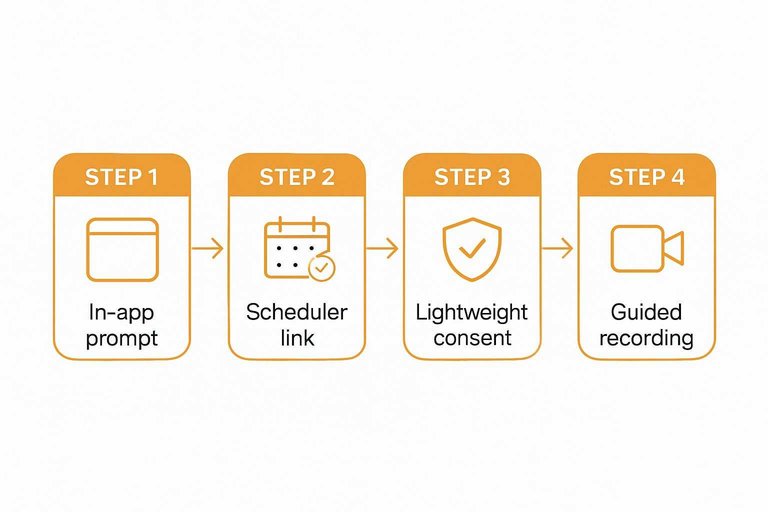
- Show an in-app prompt immediately after the activation event.
- Send to a scheduler link with two time options.
- Capture lightweight consent before recording starts.
- Record with guided prompts on-screen.
- Send a quick edit for approval within the same thread.
Speed beats polish here, because delay kills recall.
What worked
Your prompts should create a tight before-and-after story. Keep questions few, and answers usable.
- Ask for the “first win” in one sentence.
- Ask how long setup took.
- Ask what felt easier than expected.
- Ask what they tried before.
- Cap the video at 60 seconds.
You’re mining objections and resolving them in their words. If you need help tightening the prompts, use a testimonial question generator to keep the ask lightweight.
What didn’t
Bad timing and heavy asks create drop-off fast. The friction shows up as silence, not complaints.
- Asking before value is felt.
- Sending a long question list.
- Demanding multiple takes.
- Requiring studio-quality uploads.
- Burying consent in legalese.
The moment you make it feel like work, you lose the candor.
Viability check
You need proof this produces usable assets, not just replies. Evaluate the path from ask to publishable clip.
Look at completion rate, where people drop, and how often legal slows you down. Then map the best quotes to your top objections on core pages.
If the clips don’t answer real objections, you’re collecting content, not conversion.
Example 2: Support save story
A resolved support ticket can become your most believable testimonial. You capture relief, speed, and outcomes, without the glossy “we value customers” vibe.
Best-fit scenarios
This works when support is part of your product, not a cost center. Use it when the stakes are real and the fix proves competence.
Think complex setups, finicky integrations, regulated environments, and workflows that break loud. Also perfect when your competitor story is “they vanished after onboarding.”
If support prevents failure, your testimonial is really a risk story.
How to collect
Do it fast, while the emotion is still available.
- Tag “save moments” inside your support tool.
- Invite the customer within 24 hours of resolution.
- Ask three guided questions on a simple recording page.
- Get permission for name and title before publishing.
Speed beats polish here, because memory fades into “it was fine.”
What worked
You’re pulling a mini story arc, not a product review.
- Ask “what broke” in plain words.
- Ask “what changed” after the fix.
- Ask “what you’d tell a peer” choosing vendors.
- Keep the support agent off-camera.
The customer becomes the hero, and your team stays credible.
What didn’t
Don’t ask while they’re still frustrated, even if you’re eager. Don’t overcredit support in a way that implies your product fails often.
Don’t publish without stating what the original issue was, in customer language. Otherwise it reads like PR, not proof.
Clarity turns a “nice save” into a trustworthy buying signal.
For any published customer endorsements, follow the FTC’s endorsement and review guidance so permissions, disclosures, and presentation don’t create compliance risk.
Example 3: Webinar clip capture
Webinars already contain the moment you want: someone saying what changed for them. Capture that moment as peer learning, not a pitch, and it lands as credible.
Imagine a product clinic where an attendee asks a “how did you handle this?” question. The answer becomes a natural testimonial, because it started as help. If you want to see how video testimonials get collected in practice, webinar clips are one of the cleanest sources.
Best-fit scenarios
This works when your audience shows up live and talks. It’s especially strong when questions are specific and outcomes are practical.
- Recurring webinars with returning attendees
- Customer panels with real operators
- Product clinics with active Q&A
- Community sessions with peer advice
- Live trainings with chat highlights
If people already teach each other in your sessions, you’re one prompt away from usable proof.
How to collect
Do the prep so the live moment stays effortless. You’re designing for clarity, consent, and clean capture.
- Pre-brief speakers on the exact clip goal.
- Show a consent slide before recording starts.
- Ask one crisp “before/after” question live.
- Capture clean audio with a dedicated mic track.
- Mark timestamps as shoutouts happen.
When collection is built into the run-of-show, it stops feeling like extraction.
What worked
Short clips win when they feel real and specific. Context beats hype every time.
Use honest caveats like “it didn’t fix everything,” then name what improved. Add role context on-screen, like “Ops lead” or “Founder,” so viewers can self-identify. Keep clips tight, and ship them with captions for silent feeds.
What didn’t
Webinar energy can turn into unusable footage fast. Your job is to protect the edit.
- Long rambles without a point
- Jargon-heavy talk that excludes newcomers
- Clips with no clear problem statement
- Comments that sound like a sales pitch
- Audio that drifts or clips
If the viewer can’t name the problem in five seconds, the clip won’t convert.
Example 4: Loom async win
Async Loom-style testimonials remove the scheduling tax. You still get a real voice, plus on-screen proof that feels grounded—and tools like ShowTrust can make the request-and-approve loop simple so those clips don’t get stuck in someone’s inbox.
Imagine a customer recording right after they finish a task. The details are fresh, and the “here’s what I did” energy comes through. When you can then curate the best moments and publish them where prospects can verify them quickly, the credibility compounds.
Best-fit scenarios
This shines when your customers are busy, distributed, or hard to pin down live. It’s even stronger when they can show the workflow on-screen.
Use it when:
- Operators have no meeting time
- Teams span multiple time zones
- Workflows live inside dashboards
- Proof requires screen context
- Reviews need quick turnaround
If they can show the work, you get credibility without a calendar invite. And if you’re collecting these at any volume, having a lightweight way to organize, approve, and display the strongest ones (instead of hunting through drives and threads) helps the format stay sustainable.
How to collect
Give a tight template so they can hit record and finish fast. Pair it with a single, shareable request link/form so the ask is frictionless and the response lands in one place.
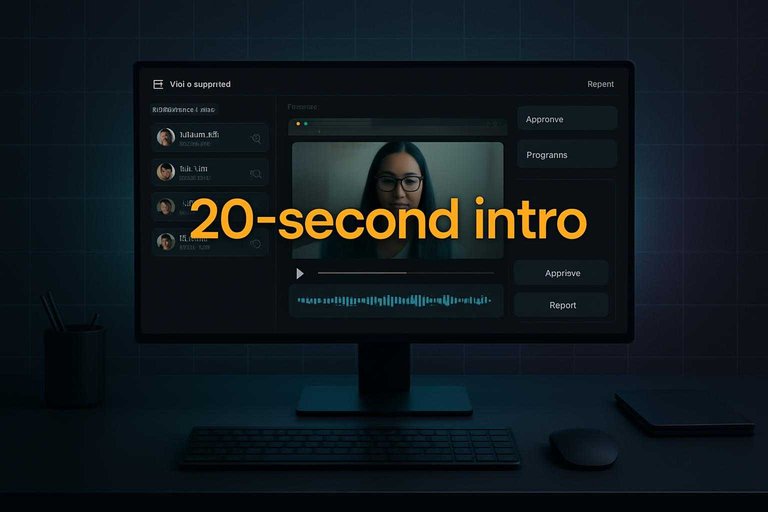
- Record a 20-second intro: who you are and your role.
- Show the workflow on-screen while narrating your steps.
- Describe the impact in plain language, not metrics.
- Recommend it to a specific persona and why.
When the structure is clear, the customer’s voice stays natural—and when submission is centralized, it’s easier to curate and publish the best clips consistently.
What worked
You want guidance, not a teleprompter. The goal is “specific and real,” not “perfect and rehearsed.”
Do this:
- Provide a skeleton, not full lines
- Ask for one real moment of surprise
- Encourage showing tabs and artifacts
- Suggest hiding sensitive information
- Offer a one-take “good enough” rule
Specific beats polished every time. It also makes curation easier later, because you can approve and surface the moments that map cleanly to common objections and use-cases.
What didn’t
Raw screen recordings create risk and rework. Accessibility gaps also show up fast when video becomes your proof.
Don’t ask for unredacted screens without clear redaction guidance. Don’t ship videos without captioning, readable fonts, and basic brand-voice alignment. Also avoid letting “collected” turn into “lost”: if you don’t have a clear approval/organization step before publishing, you’ll end up with a pile of unusable clips and no public-facing proof to show for it.
To align with current norms, use captioning and engagement benchmarks to keep async clips watchable and accessible.
Example 5: Onsite micro-booth
An onsite micro-booth turns event buzz into usable testimonials fast. You get high-energy clips without dragging people into a formal “interview” vibe.
Best-fit scenarios
This works when customers are already in a social, talkative mode. It’s strongest where advocacy is normal and expected.
- Conferences with customer speakers
- User groups with repeat attendees
- Partner events with joint customers
- Community meetups with demos
- Booth traffic with warm leads
If they already tell your story in public, a booth just captures it cleanly.
How to collect
Keep the flow tight so you can film more people without feeling rushed.
- Pre-book short slots with calendar links.
- Use one-liner prompt cards beside the camera.
- Record a two-minute take with no retakes.
- Capture an instant release form on a tablet.
- Hand a small thank-you gift and exit quickly.
Throughput is the game, and tight constraints make it feel effortless.
What worked
Simple lighting and audio beat fancy gear every time. Use one key light, a good mic, and a branded backdrop that stays in frame.
Ask one tight question tied to a real moment of value. “What changed after week one?” beats “How do you like us?”
Specific moments create clips your buyers actually trust.
What didn’t
Small mistakes kill booth output. Most are avoidable with basic planning.
- Shooting next to loud foot traffic
- Running long, wandering interviews
- Asking multiple questions per take
- Nudging people not ready to speak
- Waiting to handle releases later
Protect the vibe, and you protect the footage.
Example 6: Review-to-video
You already have high-intent proof sitting in your reviews. The move is turning a strong written claim into a short, matching video moment.
Keep continuity tight. The review sentence is the script spine, not a loose prompt.
Best-fit scenarios
This works when reviews already flow in and buyers trust those channels. You’re just upgrading the same proof into a richer format.
If you have any of these, you’re ready:
- Marketplace product reviews
- G2/Capterra-style listings
- App store ratings
- Internal NPS comments
If reviewers already tell stories, video becomes a follow-up, not a cold ask.
How to collect
Use the review itself as your targeting filter. Then ask for one specific expansion, not a full testimonial.
- Identify a specific, detailed review.
- Ask them to expand one claim on video.
- Offer editing approval before publishing.
- Publish with clear attribution and context.
The tighter the ask, the higher the yes-rate.
What worked
The best versions keep one thread from text to video. You’re not hunting for new points, just spoken proof.
Do this consistently:
- Quote the exact review sentence first
- Ask for the moment behind it
- Keep the prompt to one claim
- Add b-roll if allowed
Your job is continuity, not creativity.
What didn’t
Incentives can poison trust fast. And mismatched nuance creates a credibility gap you can’t edit away.
Offer fair thanks, not a bribe. Then sanity-check the cut against the original review, word for word.
If the video walks back the claim, you just downgraded your best proof.
Pick one moment and ship a repeatable ask
- Choose one scenario from the use-case map where buyers currently hesitate (setup, proof, switching, or ROI).
- Run a two-week pilot with a single collection method (e.g., post-onboarding ask or support save story) and one clear prompt focused on before/after.
- Capture consent, context, and a usable soundbite—then trim to one claim, one outcome, and one specific detail.
- Publish it where the objection lives (pricing page, competitor page, onboarding emails), and keep the request cadence so collecting becomes routine.
Turn Stories Into Conversions
Collecting video testimonials is only half the work—getting them approved, organized, and displayed where prospects decide is what makes them convert.
ShowTrust makes it easy to request video testimonials with a shareable link, curate the best clips, and publish them via widgets or a public wall to build instant credibility.
Written by
ShowTrust
Notes from the ShowTrust team on collecting testimonials and building authentic social proof.
Share: