August 26, 2026
·
11 min read
9 Pricing Page Testimonial Limitations Worth Knowing in 2026
A practical collection on the limits of pricing-page testimonials in 2026—and how to spot vague praise, segment mismatch, proof gaps, selection bias, credibility issues, stale context, and feature distortion before they undermine conversions.

A testimonial can make your pricing page feel safer—or quietly raise more questions than it answers. When someone is ready to buy, they read like a skeptic: scanning for relevance, proof, and any hint that the product won’t work for their situation.
This collection walks you through what testimonials routinely miss, the misuse patterns that erode trust in 2026, and seven specific limitations to watch for. You’ll also get practical fixes—prompts, grouping, evidence pairing, verification signals, and refresh habits—plus the point where each approach stops working.
What testimonials miss
Pricing-page testimonials can persuade fast, because they borrow trust from other buyers. They also hide gaps, amplify bias, and create real compliance and trust risks in 2026. If your pricing page is the decision page, vague social proof becomes a liability.
High-intent scrutiny
Pricing clicks signal evaluation, not inspiration. Buyers compare you side-by-side, then pull in security, procurement, and finance questions.
You’ll see scrutiny cluster around a few themes:
- Security and privacy posture, even for “simple” tools
- Procurement requirements like vendor risk reviews
- ROI proof tied to their baseline and timeframe
- Plan comparability, limits, and hidden fees
Generic praise can’t answer those questions. It just fills space where evidence should live.
Common misuse patterns
Testimonials fail when they try to do pricing’s job. The goal is clarity, not applause.
- Put a vague quote above pricing
- Use celebrity-style logos without context
- Show quotes from mismatched segments
- Hide key limits behind sliders
- Rotate aggressive testimonial carousels
If your proof interrupts comparison, it reduces trust instead of increasing it.
2026 trust shifts
AI-written endorsements are cheap, and buyers know it. Deepfakes and review manipulation make “sounds real” a weak standard.
Skepticism rises when identity and authorship are unclear. Verification becomes part of the message, not a footnote.
When they still work
Testimonials can help if they behave like evidence, not decoration.
- Use outcomes with context, not empty praise.
- Name an identifiable role and company, with permission.
- Match the quote to the plan and segment shown.
- Pair the quote with proof like screenshots, docs, or numbers.
Make proof easy to verify. That’s the new persuasion.
Limitation 1: Vague praise
Generic praise collapses on a pricing page because buyers are doing risk math, not vibe checks. “Easy to use” doesn’t explain why a higher tier is safer or smarter. This is also where a social-proof workflow helps: when you collect testimonials with structured prompts and then curate what you publish, you avoid a wall of interchangeable compliments and instead show verifiable decision context.
Red-flag phrases
Vague lines look positive, but they carry zero proof. They also sound interchangeable with any competitor.
- “Game-changer” with no scenario
- “Love it” with no outcome
- “Best” with no comparison
- “Highly recommend” with no buyer type
- “Easy to use” with no task
If the quote could sit on any homepage, it won’t close pricing doubt.
What specificity looks like
Specific quotes earn their space when they answer, “For whom?” and “Compared to what?” Pricing pages need context that maps to a tier.
Imagine a quote that mentions a concrete job, the old workaround, and the team shape. Add the workflow change in plain language, like fewer handoffs, faster approvals, or fewer missed steps.
Tools like ShowTrust make this easier to execute consistently because you can request testimonials with the right questions, approve the strongest ones, and then display them in a way that keeps the context intact rather than buried in a long scroll.
When a buyer recognizes their own situation, the tier starts to feel justified.
Fix: targeted prompts
You don’t need better writers. You need better questions.
- Ask what triggered the search or switch.
- Ask which feature they use weekly.
- Ask what setup felt like for their team.
- Ask what they compared you against.
- Ask what changed in the workflow after adoption.
Prompting for decision details turns praise into evidence—and it’s much easier to keep this consistent when you’re using a simple testimonial collection form/link that bakes these prompts into the request and routes responses into an approval/curation queue.
Breakdown point
Even specific quotes can fail when the buyer’s risk is structural, not informational. Think long sales cycles, regulated environments, or painful switching costs.
At that point, testimonials support the story, but they won’t replace security reviews, procurement needs, or migration proof. For a sense of the kinds of evaluation criteria buyers use, see CISA’s software acquisition guide.
Limitation 2: Segment mismatch
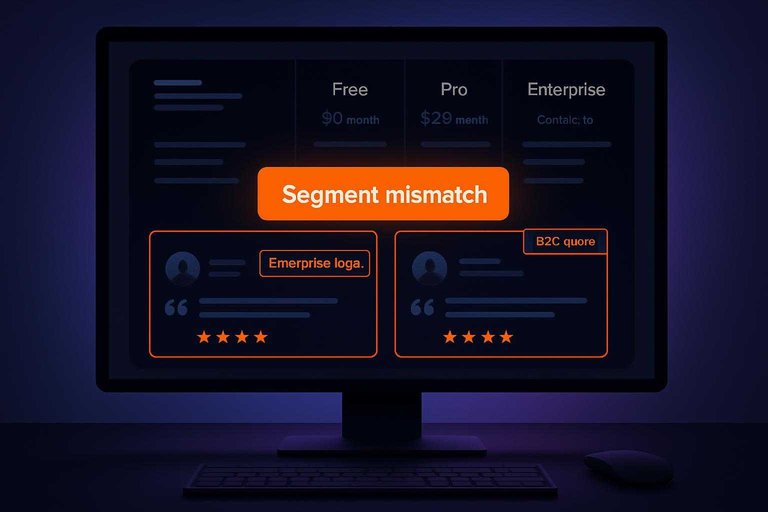
Segment-mismatched testimonials bend reality. They make your pricing look either too cheap or too expensive, then churn shows up later.
Mismatch signals
Segment mismatch usually leaks through small cues. Spot them early, before they shape expectations.
- Enterprise logo beside an SMB plan
- B2C quote on a B2B pricing page
- Different geography than your target
- Job title that never buys
Treat these as pricing bugs, not design details.
Reader interpretation
Prospects don’t read testimonials. They role-play them.
They map themselves to the speaker, then assume similar needs and constraints. If the speaker is bigger, smaller, or different, buyers misjudge fit, complexity, and support.
Fix: segment grouping
Group testimonials so the reader sees “people like me” first.
- Tag every testimonial by plan, industry, and role.
- Place the most relevant quote beside each plan price.
- Add a simple filter for industry and role.
- Default to the visitor’s likely segment when you can infer it.
- Keep one “broad use” quote for edge cases.
Relevance reduces support surprises, which protects retention.
Where it breaks down
Segmentation can still fail when your product is truly horizontal. The same feature lands differently in every context.
It also breaks with buying committees, where finance, IT, and users need different proof. One quote can’t carry three objections.
Limitation 3: Proof deficit
Testimonials can sound convincing, yet still fail at the pricing page.
Cautious buyers compare alternatives, implementation effort, and risk.
A quote without evidence feels like marketing when the stakes rise.
Missing proof types
Pricing-page testimonials often omit the details buyers need to trust the claim.
They also skip the artifacts that reduce perceived switching risk.
- Screenshots of real outcomes
- Workflows showing how it works
- Benchmarks under stated conditions
- Integration and migration notes
- Security and compliance assurances
Without these, the buyer must imagine the hard parts.
Pairing with artifacts
You can keep pricing clean and still add proof.
Use small “proof companions” that answer the next skeptical question.
A mini-case card can include role, use case, and one concrete artifact.
A feature callout can pair a quote with a screenshot or workflow snippet.
Public references can be a logo link, marketplace listing, or docs mention.
The goal is a frictionless click from claim to evidence.
Fix: evidence ladder
Add proof in layers so buyers self-serve depth.
- Start with the quote near the plan decision.
- Add one artifact under it, like a screenshot or workflow.
- Link to a deeper page, like a short case note or third-party validation.
- Offer an optional reference call, if the buyer asks.
Escalation beats clutter, because only skeptics click.
Breakdown point
Sometimes you cannot show artifacts at all.
That happens in confidential industries, stealth teams, or strict customer policies.
In those cases, prove process, not outcomes.
Show security posture, implementation steps, and support boundaries instead. If you’re selling to enterprise, be ready for security questionnaires as vendor-risk assessments.
Limitation 4: Selection bias
Pricing page testimonials often come from your happiest customers. That creates rosy expectations. Buyers feel the cherry-picking fast, and trust drops.
Bias patterns
Selection bias shows up in predictable ways. You can spot it in a single scroll.
- Only power users featured
- Only big-logo brands highlighted
- Only recent wins showcased
- Only founders quoted
- Admins and approvers missing
If the same persona keeps talking, your page stops feeling like reality.
Trust cost
When buyers sense curation, they assume the hard parts are hidden. They compensate by doing more work, like asking for references or digging into review sites.
That extra effort quietly moves your pricing page from “decision help” to “marketing claim.”
Fix: balanced sampling
Build a testimonial set that matches how your product is actually adopted.
- Segment customers by tenure, plan, and use case.
- Pull quotes from each segment, including neutral positives.
- Add one admin or approver perspective per segment.
- Rewrite quotes to include “before/after process,” not adjectives.
- Rotate quarterly, keeping the mix consistent.
Balanced sampling makes your promise believable, even when the product is not perfect yet.
Where it breaks down
Balanced sampling fails when your customer pool is tiny. Early-stage products, narrow verticals, or brand-new tiers often lack enough variety for a fair mix.
In that case, fewer quotes with clearer context beats a fake sense of coverage.
Limitation 5: Credibility gaps
Anonymous or unverifiable testimonials feel risky in 2026 because your buyers are trained to assume manipulation. AI text generation is common, and fraud patterns look eerily similar to “generic praise” with no trail—exactly the kind of fake review pattern buyers are on guard for. Once that doubt appears, your pricing page stops selling and starts defending itself.
Verification signals
Give people quick proof that a real customer exists and agreed to be quoted.
- Full name, correctly spelled
- Role, tied to use case
- Company name, not a nickname
- Linkable profile or website
- Permission note and capture date
If a buyer can’t verify in one click, they’ll assume you can’t verify either.
Privacy tradeoffs
You can increase trust without doxxing your customers. Pick the lightest verification that still matches your buyer’s risk level.
Examples that often work:
- Initials + role + company
- Full name + company only
- “Verified customer” label with internal proof
Match the disclosure to the deal size, because privacy and credibility are always negotiating with each other.
Fix: consent workflow
Treat testimonials like regulated content, not copy.
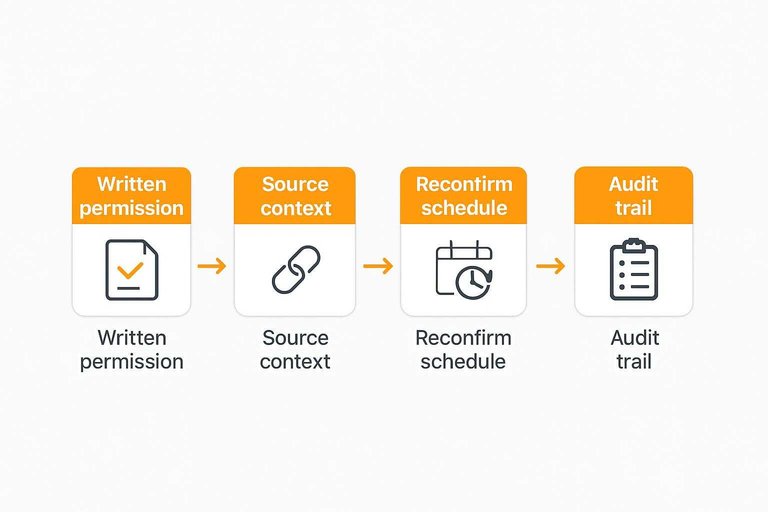
- Capture written permission and approved wording in one place.
- Store source context, like email thread or form submission.
- Reconfirm on a schedule or when roles change.
- Offer a simple revocation path and honor it fast.
- Keep an audit trail for edits, dates, and approvers.
When procurement asks, you’ll have receipts instead of excuses.
Breakdown point
Even verified testimonials can fail when buyers assume everything is synthetic. Some will also fear competitor smear campaigns, especially in tight markets.
High-stakes procurement can demand references, security reviews, or third-party validation anyway. At that point, testimonials are supportive, not decisive.
Limitation 6: Stale context
Old testimonials can accidentally sell a product you no longer offer. Pricing, features, onboarding, and support shift faster than your quote library.
Imagine a quote praising “white-glove setup” that now lives behind an enterprise tier. That’s the line that gets crossed.
Staleness triggers
Testimonials go stale when your customer’s experience no longer matches today’s buying path. Watch for these common triggers.
- Rebranding that changes perceived category
- Tier renames that break comparisons
- Major UI changes that alter workflows
- Pricing increases that shift value math
- Acquisitions that change support ownership
If two or more happened, your old quotes need context fast.
Recency framing
You can keep strong testimonials without misleading people. Add simple framing that anchors the quote in time.
Put a clear date near the quote, not hidden in a tooltip. Add a product version note when UX changed. Use “customer since” labels to signal long-term depth.
Small metadata prevents big misreads.
Fix: refresh cadence
Treat testimonial freshness like you treat pricing accuracy.
- Review pricing-page testimonials every quarter.
- Rotate testimonials by tier so each plan stays represented.
- Retire quotes after major pricing or packaging changes.
- Replace onboarding and support quotes after process changes.
- Re-approve older quotes when messaging shifts.
If your pricing moved, your proof must move too.
Where it breaks down
Your best stories often come from long-term customers. They also lived through an onboarding flow that no longer exists.
That creates a tradeoff between credibility and accuracy. Keep the story, but pin it to the era.
Limitation 7: Feature distortion
Testimonials can spotlight the wrong feature. It happens when a loud benefit is real, but not central to the plan you’re selling.
Imagine a basic-tier quote praising SSO, while SSO only exists on Enterprise. That’s how you get mis-selling, angry replies, and support tickets.
Distortion patterns
Testimonials usually distort in repeatable ways. Spot the pattern, then fix the placement.
- Enterprise-only security praised on Basic
- Niche integration framed as universal
- Add-on feature described as included
- Power-user workflow sold as default
- Legacy feature praised, now removed
When you see two or more, your page is selling a fantasy.
Expectation mismatch
Buyers read testimonials as scope, not vibes. They assume the quote reflects what they’ll get on their chosen plan.
Then reality shows up fast: paywalls, add-ons, missing limits, or an upgrade prompt mid-setup. Support gets the “your site said…” ticket, and retention takes the hit.
The damage isn’t the missing feature. It’s the broken trust.
Fix: plan-locked placement
Attach every testimonial to what it actually requires.
- Place quotes inside the tier column they match.
- Add a short label like “Enterprise feature” when needed.
- List prerequisites under the quote: seat count, SSO, region, API access.
- Add “Works with” notes for add-ons and integrations.
- Link to the exact feature row or help doc.
Make the quote carry constraints, not just praise.
Breakdown point
Plan-locking can backfire when packaging is fluid. It also struggles when “the plan” isn’t the real unit.
Bundles get complex, usage-based pricing changes meaning by volume, and frequent tier edits turn quote placement into a maintenance trap. You’ll either misplace quotes or stop updating them.
When pricing is dynamic, lock to eligibility rules, not plan names.
Use Testimonials Like Evidence, Not Decoration
- Audit your current block for the seven failure modes: vagueness, segment mismatch, proof deficit, selection bias, credibility gaps, stale context, and feature distortion.
- Rewrite collection prompts so customers supply specifics (who it’s for, what changed, what they compared) and group quotes by segment and plan.
- Pair each quote with an “evidence rung” (artifact, screenshot, workflow example, policy, or verification signal) and add recency context.
- Set a refresh cadence and remove anything you can’t verify, can’t place to the right plan, or can’t connect to a concrete outcome the reader cares about.
Turn Praise Into Proof
If your pricing-page testimonials are vague, mismatched, or outdated, they can quietly undermine trust right when buyers need certainty.
ShowTrust makes it easy to collect specific, credible testimonials and publish them as embeddable widgets or a public wall—so prospects can verify social proof fast.
Written by
ShowTrust
Notes from the ShowTrust team on collecting testimonials and building authentic social proof.
Share: