August 19, 2026
·
Updated September 3, 2026
·
9 min read
11 Testimonial Slider Embed Costs Worth Knowing in 2026
A case-study-led breakdown of what testimonial slider embeds really cost in 2026 — map tool fees, dev/design effort, legal and privacy requirements, performance and accessibility work, plus security, analytics, and ongoing support so you can budget and choose build vs buy confidently.

A testimonial slider looks like a tiny website upgrade—until your “quick embed” turns into a week of reviews, revisions, and approvals. The surprise usually isn’t the subscription price; it’s everything surrounding it.
This case study walks you through 11 costs teams commonly miss in 2026, from developer time and design alignment to permissions, privacy, accessibility, and performance budgets. You’ll also get a comparison grid mindset and a build-vs-buy framework you can use before you commit.
Why costs surprise teams
Teams hear “simple embed” and picture a copy-paste snippet. In 2026, that snippet sits inside stricter UX, privacy, and performance standards.
The surprise is the surrounding work. And that work can be worth it when it protects trust.
What a slider embed is
A testimonial slider embed is a reusable UI block that cycles through quotes, names, and proof points on your site. It usually ships as a script tag, a CMS block, or a component inside your design system.
It gets treated as a quick win because it looks isolated. But it still touches layout, fonts, images, analytics, and load order.
If it can break your page, it’s not “just an embed.”
2026 buyer expectations
Buyers expect polished, compliant proof, not a flashy widget. Those expectations add work, but they reduce brand risk.
- Keyboard and screen-reader support
- Documented consent and release rights
- Fast loading and minimal layout shift
- Privacy-safe tracking and scripts
- Clear attribution and context
If you can’t defend it in a review, don’t ship it.
Cost vs benefit lens
Cost isn’t just the slider price. It’s engineering time, QA time, legal review, and ongoing maintenance.
Judge the benefit with four lenses: revenue impact, credibility lift, risk reduction, and time-to-launch. A homepage slider might raise conversion confidence, while a pricing-page slider might reduce objections.
The right question is “Where does proof change decisions fastest?”
The 11 embed costs
“Cost” isn’t just what you pay a vendor. It’s also the time you spend, the risk you accept, and the opportunities you delay.
Treat each embed decision like a trade: what you give up versus what you unlock. If you measure only dollars, you’ll miss the costs that usually bite later.
1) Tool subscription
A testimonial slider rarely costs “just the plan.” Pricing often hides in feature gates, seats, and add-ons.
Subscriptions commonly bundle these levers:
- Plan tiers that unlock embeds, analytics, or more sources
- Seat-based pricing for marketing and support access
- Limits on views, widgets, or testimonial volume
- Paid extras for branding removal or advanced styling
Pay for the constraints you actually hit, not the features you admire in a demo.
2) Developer time
Even “copy-paste” embeds consume engineering time once you account for your stack, your release process, and your edge cases.
Developer time usually goes to:
- Integration with your framework, CMS, or tag manager
- QA across devices, browsers, and page templates
- Environment setup for staging, previews, and rollbacks
- Ongoing maintenance when the vendor script changes
If you can’t justify the hours against the conversion upside, the embed is already overpriced.
3) Design alignment
Sliders touch your brand in a very visible spot. Small mismatches erode trust faster than you expect.
- Match typography, spacing, and color tokens
- Handle responsive layouts without awkward cropping
- Respect reduced-motion preferences by default
- Keep components consistent across templates
If it looks “embedded,” users treat it like an ad.
4) Content sourcing
The slider is only as credible as what’s inside it. Getting real, usable testimonials is operational work.
- Collect quotes from the right customer segments
- Secure approvals and confirm exact wording
- Edit for clarity without changing meaning
- Refresh regularly to avoid “old news” vibes
Fresh content is a compounding asset, not a one-time task.
5) Legal permissions
Permissions are the hidden schedule killer. They also protect you when a “nice quote” becomes a compliance problem.
Release forms, attribution rules, and claims substantiation vary by industry and region. If you mention outcomes, you may need proof, context, or disclaimers. If you use names, photos, or logos, you need explicit rights.
Get the permission workflow right early, or you’ll rebuild the slider around what you’re allowed to say.
6) Performance budget
Every embed competes with your page speed. A slow slider can cancel the trust boost you’re trying to buy.
Script weight, render-blocking behavior, and third-party calls add latency and failure points. Images need sizing, compression, and lazy loading, or they’ll punish mobile users. If the widget loads late, your layout can shift and feel broken—especially when it’s implemented as an iframe-based embed.
If the slider costs you speed, it costs you conversions twice.
7) Compliance and consent overhead (privacy, accessibility, and third-party governance)
In 2026, the cost to ship a testimonial slider embed code responsibly often lives outside engineering. Even if the widget “works,” you may still need internal approvals, documentation, and ongoing checks to keep it shippable.
Common non-dev overhead includes:
- Privacy review: Confirm what data the embed collects (cookies, IP addresses, analytics events), how it’s disclosed, and whether you need a consent gate before loading it.
- Third-party script governance: Security and IT teams may require vendor due diligence, a risk assessment, an allowlist process, and an owner for ongoing monitoring when the script changes.
- Accessibility QA: Sliders can fail keyboard navigation, focus handling, contrast, and motion expectations. Plan time to test with keyboard-only users and screen readers, and to validate reduced-motion behavior.
- Copy and policy updates: You may need to update cookie banners, privacy notices, or internal data maps so the embed is accurately represented.
If you don’t budget for these workflows, the “simple embed” becomes a slow, cross-team release that stalls at the last mile.
More hidden costs
7) Accessibility work
A testimonial slider is a mini app, not a static block. If it ships inaccessible, your brand wears it.
Keyboard navigation, focus order, and visible focus states often need custom work. ARIA roles, labels, and live-region behavior can get tricky fast. Reduced motion support matters when sliders auto-advance or animate.
If you can’t pass basic audits, the cheapest embed becomes the most expensive fix.
8) Privacy and consent
Most slider embeds pull assets and scripts from third parties. That changes what you must disclose and when you can load it.
- Cookie banner copy and categorization updates
- Default-off tracking until consent is granted
- Third-party calls that fire before consent
- Consent-mode side effects on attribution
- Reduced analytics value from opt-outs
Treat privacy as product behavior, not legal garnish.
9) Security review
An embed is code you didn’t write running on your pages. Security teams will treat it like any other vendor risk.
- Vendor security questionnaire and approval cycle
- CSP updates for scripts and frames
- Supply-chain risk from dependencies
- Ongoing monitoring for new domains
- Incident response ownership if compromised
If it touches production, you own the blast radius.
10) Analytics setup
You can’t improve what you can’t measure, and sliders are measurement traps. They look “engaging” while masking what users actually did.
Event tracking should separate impressions, interactions, and downstream actions. Attribution gets messy when sliders rotate content or lazy-load after consent. A/B tests need stable variants and consistent exposure logic.
Measure credibility with care, or you’ll optimize for motion instead of trust.
11) Support overhead
Sliders drift out of date because someone has to own the content. When no one does, accuracy quietly decays.
Content updates need workflow, approvals, and source-of-truth rules. Broken embeds happen after theme changes, script conflicts, or vendor updates. Outages will land in your support queue, even if you didn’t cause them.
Assign an internal owner, or the slider becomes a permanent low-grade incident.
Cost comparison grid
You’re not choosing a slider. You’re choosing a cost model and a maintenance burden.
| Embed approach | Typical cost buckets | What you usually get | Hidden costs to watch |
|---|---|---|---|
| Copy-paste JS embed | Tool subscription | Fast setup, hosted UI | Script bloat, CSP issues |
| WordPress plugin | Plugin fee | Dashboard controls, themes | Conflicts, updates, lock-in |
| No-code widget | Subscription | Templates, simple styling | Limited control, branding caps |
| Custom HTML/CSS/JS | Dev time | Full control, performance | QA, accessibility, upkeep |
| Video testimonials slider | Video hosting, editing | Higher trust, richer proof | Load time, captions, approvals |
Shortlist by “ongoing cost,” not “setup cost.” That’s where budgets get surprised.
Build vs buy decision
You’re not choosing a “testimonial slider.” You’re choosing ongoing costs: dev time, review time, and risk — plus the operational overhead of collecting, approving, and keeping proof current.
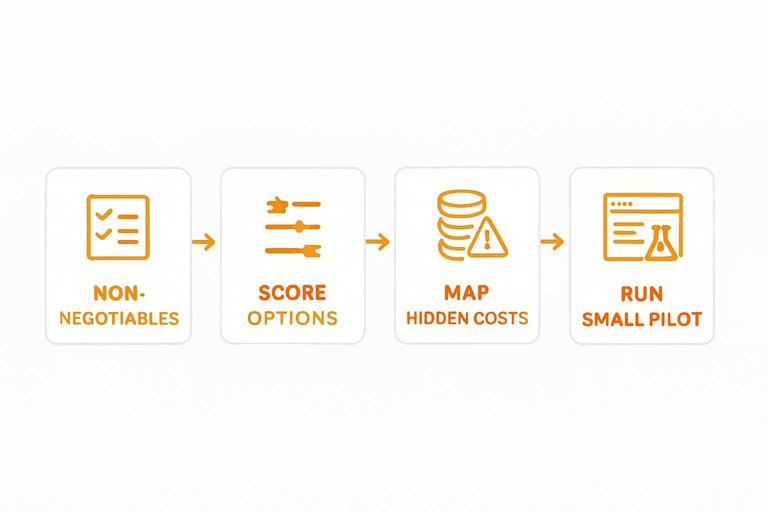
- Write down your non-negotiables: platforms, editors, accessibility, and approvals.
- Score each option on constraints: build, lightweight plugin, or SaaS embed (including whether it also handles collection and curation, not just display).
- Map hidden costs: maintenance, security updates, vendor lock-in, and performance.
- Run a small pilot on one page, then measure friction in your workflow — e.g., how quickly you can request testimonials, review them, and publish updates without engineering support.
- Pick the simplest option that meets constraints, then document the exit plan. Tools like ShowTrust can be a good benchmark here because they combine request links/forms with an embeddable display and a public wall, reducing the “extra systems” you end up building around a widget—especially if you might later need access the ShowTrust API for deeper integrations.
If your exit plan feels hard, you’re buying a dependency, not a feature.
For a reality check on the ongoing overhead, review best practices for third-party embeds before committing.
Real-world rollout story
A testimonial slider looks like a small widget. In practice, it pulls design, legal, performance, and ownership into one decision.
Starting constraints
You usually start with a launch date already promised. Dev time is scarce, and nobody wants a new “mini project” sneaking in.
Brand guidelines show up fast. Stakeholders expect the slider to look premium, feel effortless, and never risk trust.
Implementation choices
You need a path that ships cleanly. Then you need a way to prove it was worth shipping.
- Decide vendor embed versus custom component, based on control and maintenance.
- Pick a few high-intent pages, not the entire site.
- Define success signals like engagement, leads quality, and support load.
- Scope a pilot with a rollback plan and one clear owner.
Treat it like a product experiment, not a design flourish.
Unexpected friction points
The first working version often isn’t the version you can publish. Small gaps become cross-team blockers.
- Approvals slow down: brand, legal, and sometimes customer success.
- CLS surprises appear from late-loading images and fonts.
- Consent conflicts happen with third-party embeds and tracking.
- Carousel accessibility breaks: focus traps, keyboard nav, and motion settings.
- Ownership confusion starts: who updates testimonials and handles complaints.
If three teams can block it, it’s not “just a widget.”
What changed after launch
After launch, teams usually stop treating testimonials as static assets. They start treating them as content with lifecycle.
You prune aggressively. Stale quotes, vague praise, and mismatched industries get removed.
Design gets tightened to match the page’s intent. Performance work shifts from “make it load” to “make it disappear.” Governance hardens, because someone must own updates and takedowns.
Lessons learned
Costs aren’t only subscription fees or developer hours. They’re coordination, risk, and long-term upkeep.
- Count legal and consent work as real scope, not “later.”
- Prefer fewer pages with better fit over sitewide coverage.
- Bake accessibility in, or you’ll rebuild the interaction.
- Decide who owns content updates before the first embed.
- Keep an exit plan, even with a “forever” vendor.
The benefits justify the effort when trust is a bottleneck, not when you just need decoration.
Budget the Embed Like a Product, Not a Snippet
- Audit your reality: list your current testimonials, where consent/permissions live, and which pages must stay within performance and accessibility budgets.
- Price the full stack: add tool subscription + developer time + design alignment + content sourcing + legal review + performance work, then layer in accessibility, privacy/consent, security review, analytics, and support.
- Use the grid to compare options: score “build” and “buy” on speed to launch, compliance risk, ongoing maintenance, and control over UX.
- Run a small rollout: ship on one high-intent page first, validate performance and tracking, then scale only after support and update workflows are clear.
Reduce Embed Costs Fast
Once you’ve mapped the true costs of a testimonial slider embed code, the next challenge is rolling it out without ongoing developer time, maintenance, and performance tradeoffs.
ShowTrust helps you collect, curate, and publish verified testimonials with embeddable widgets and a public wall—so you can launch social proof faster and keep total costs predictable.
Written by
ShowTrust
Notes from the ShowTrust team on collecting testimonials and building authentic social proof.
Share: