June 10, 2026
·
15 min read
Advanced Social Proof Widgets for SaaS: Patterns That Convert
An advanced pillar guide to building social proof widgets that actually convert for SaaS—use the proof‑fit triangle, intent-based placement, segmentation rules, compliance-safe authenticity, performance-minded rendering, and interference-aware experimentation to turn proof into decisions.

Social proof widgets are everywhere, yet many of them quietly underperform—or worse, make your product feel less trustworthy. If your “Trusted by” bar isn’t moving sign-ups, the problem usually isn’t that you need more logos; it’s that the proof doesn’t match intent, context, or risk.
This pillar breaks down the mental model behind proof that persuades, then maps proven widget patterns to the right surfaces and audiences. You’ll learn how to personalize without being creepy, ship fast without hurting performance, and run experiments that don’t lie to you.
Conversion Mental Model
A social-proof widget is a decision accelerator. It works when it reduces a specific doubt at the exact moment your user is deciding.
Three levers determine the outcome: claim strength, proximity to the decision, and added friction. Get them right and conversions often lift; get them wrong and you quietly poison trust.
Proof-fit triangle
Strong claims raise the bar for proof. Higher buyer risk raises it again.
Credibility is the counterweight, and it must match both.
Imagine a “Save 30% on costs” claim beside a vague logo strip. Skepticism.
Imagine a low-stakes feature claim paired with a dense enterprise case study. Indifference.
The fit is the triangle: claim strength, buyer risk, proof credibility. When one corner outruns the others, your widget turns into a warning label.
Placement by intent
High-intent surfaces have one job: resolve the next fear without slowing the click.
- Pricing page: reduces “Is this legit?” and “Will it fit me?”
- Checkout: reduces “Will billing be safe?” and “Can I undo this?”
- Trial start: reduces “Will setup waste my time?”
- Upgrade modal: reduces “Is this worth it now?”
- Invite teammates: reduces “Will others adopt it?”
- Cancellation flow: reduces “Am I missing value?”
Put proof where the fear peaks, not where your design has empty space.
Widget failure modes
People habituate fast. The same “Trusted by” strip becomes wallpaper.
Banner blindness follows. Your best proof becomes part of the chrome.
Then reactance kicks in when proof feels pushy. Users resist being steered.
Worst case is trust collapse. One manipulative, irrelevant widget makes every claim suspect.
Your widget is either a quiet assistant or a loud salesperson. Pick one.
Micro-friction audit
Audit doubts step-by-step, then add only the proof that removes the doubt.
- List each step from landing to activation or purchase.
- Write the user’s main doubt at that step.
- Mark the decision needed to proceed.
- Add the smallest proof element that answers the doubt.
- Remove any proof that adds new questions.
Proof should feel like a footnote, not a detour.
Widget Pattern Catalog
Advanced social proof works when it argues with a specific objection. Generic “trusted by” noise just steals attention from your actual message.
Real-time activity
Real-time widgets make your product feel alive, not “maybe later.” They work when the activity is obviously relevant to the visitor.
Use three common forms:
- Activity feeds: a short list of recent, similar actions
- “Just happened” toasts: one event, then disappear
- Queue counters: live counts for requests, reviews, or approvals
Filter hard. Match by use case, company size, region, or integration, and enforce a tight recency window so nothing looks staged.
If your feed can show an irrelevant event, it will.
Outcome snapshots
Outcome widgets compress proof into something scannable. Pick a format that fits where the buyer is in the funnel.
- Mini case cards → mid-funnel validation
- Before/after deltas → late-funnel justification
- Time-to-value chips → early-funnel momentum
- ROI ranges → late-funnel budgeting
- “Saved me from…” snippets → problem-aware discovery
Treat each snapshot like a rebuttal to one doubt, not a trophy shelf.
Peer benchmarking
Benchmarking widgets answer the quiet question: “What do teams like mine do?” They work best when the comparison set is a true cohort.
Use patterns that avoid vanity:
- “Teams like yours” comparisons based on role, size, and stack
- Cohort-based adoption stats, like feature uptake by maturity level
- Maturity ladders that show the next step, not just the average
Avoid broad aggregates that hide the real story. “All customers” is usually a meaningless bucket.
If the cohort isn’t credible, the benchmark becomes a red flag.
Proof bundles
Proof bundles work when you have many proof types, but little space. You’re building a compact module with depth on demand.
- Pick one anchor claim that matches the page’s primary objection.
- Stack one proof each: logos, quote, rating, and a key badge.
- Add progressive disclosure with tabs, a “more” drawer, or accordions.
- Keep each detail skimmable, with a clear source and context.
- Track expands and downstream clicks to spot what convinces.
Bundle for speed, then let the skeptic drill down.
Objection-specific proof
The highest-converting widgets feel like they were built for one hesitation. Map the objection to the smallest proof unit that can dissolve it.
- Security → compliance badge with scope, plus security FAQ drawer
- Onboarding time → time-to-first-value chip, plus setup timeline widget
- Support quality → response-window widget, plus named support quotes
- Integration risk → “works with your stack” matrix, plus integration stories
- Switching cost → migration checklist widget, plus rollback reassurance panel
When you can name the fear, you can pick the right proof shape.
Interactive proof
Interactive proof beats static proof when the buyer needs self-relevance. Interaction increases diagnosticity because the visitor supplies the inputs.
Use three strong patterns:
- Calculators that model value with the buyer’s own variables
- Sandbox testimonials that filter by role, industry, or tech stack
- Clickable story stacks that reveal short, sequenced proof beats
Make the interaction lightweight. One choice, one reveal, then a clear next action.
When buyers participate, they believe the result belongs to them.
Segmentation and Personalization
Personalized proof works when it reduces your buyer’s uncertainty, not when it shows off your data. The goal is simple: match the proof to the moment, then stay boringly respectful.
Segmentation signals
Use signals you can trust, then combine them with restraint. Sparse or noisy inputs create brittle experiences that break on your best traffic.
- Use page context to infer job-to-be-done
- Use UTM intent to infer campaign promise
- Use firmographics to match industry and size
- Use plan tier to reflect current commitment
- Use product events to reflect active workflows
- Use CRM stage to reflect sales context
Treat weak signals like suggestions, not truth, and your widget stays credible.
Relevance rulesets
Rulesets keep personalization consistent when multiple signals collide. Without a hierarchy and a fallback, you’ll ship a widget that changes its story mid-session.
Pick a priority order, like lifecycle stage over industry, then industry over company size. Add tie-breakers, like “same use case” beats “bigger logo,” and cap frequency to avoid thrash. Always keep a safe fallback, like generic trust markers, when confidence drops.
Optimize for “most similar,” not “most impressive,” or you’ll win clicks and lose trust.
Cold-start fallback
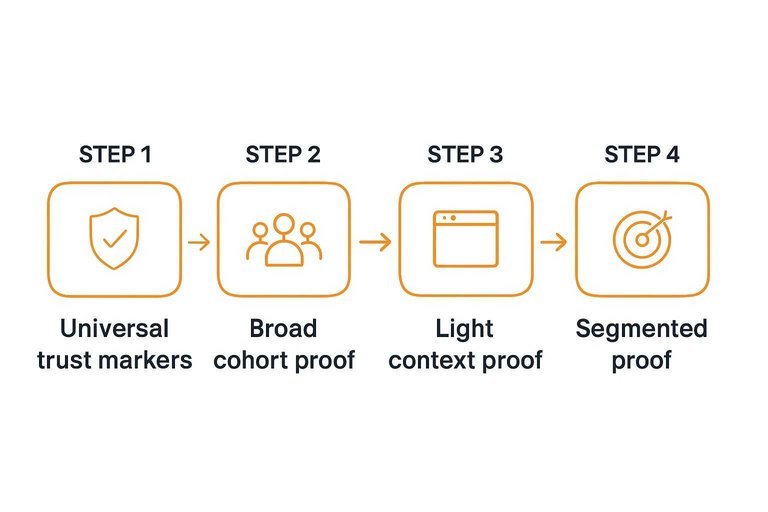
Start with proof that works for everyone, then tighten relevance as signals firm up.
- Show universal trust markers like security, compliance, and uptime language.
- Add broad cohort proof like “teams in SaaS” or “remote companies.”
- Introduce light context proof from page intent, like the feature being viewed.
- Switch to segmented proof once two signals agree, like industry plus size.
- Keep a manual escape hatch when signals conflict or disappear.
Confidence should rise before specificity does, not the other way around.
Avoiding personalization creep
Creep happens when your widget reveals more about the visitor than they meant to share. You can personalize without implying surveillance.
Prefer privacy-first phrasing like “Popular with finance teams” over “You’re in finance.” Do inference on-device when you can, and avoid storing sensitive attributes unless you need them for the product. Add a small “Why you’re seeing this” link that explains the signal in plain language.
If you can’t explain it simply, you probably shouldn’t personalize it.
Trust, Compliance, and Ethics
Advanced social proof widgets are persuasion tools with legal and reputational blast radius. Build them like compliance-adjacent product features, not marketing snippets. You want proof that holds up under scrutiny and still reads fast.
Authenticity guarantees
Your widget needs a clear source of truth, or it becomes an argument waiting to happen. The goal is defensible proof, even when someone questions selection bias.
Treat every proof item as an auditable record:
- Bind events to a system-of-record ID, not a screenshot.
- Store immutable logs of capture, edits, and display rules.
- Require editorial review for claims, context, and permissions.
- Preserve “why shown” metadata for each impression.
If you can explain “where it came from” in one click, cherry-picking claims lose oxygen.
Regulated-proof checklist
Regulated industries and global traffic turn “nice widget” into “mini compliance surface.” Build a checklist you can enforce in code, not a doc.
- Capture explicit consent for quotes, names, and logos.
- Add clear disclosure wording for incentives or affiliations.
- Substantiate testimonials with supporting records on request.
- Follow review-platform terms for display and modification.
- Enforce regional privacy, retention, and deletion requirements.
- Meet accessibility for motion, contrast, and screen readers.
If any bullet is manual, it will break under campaign pressure.
Security proof layering
Security and privacy proof often matters, but walls of badges don’t convert. Use progressive disclosure so buyers can go deeper without slowing everyone else.
- Show a single trust headline with one primary badge.
- Expand to a short “what it covers” panel on click.
- Offer a second layer for SOC2/ISO/GDPR specifics and scope.
- Add optional detail for residency, subprocessors, and SSO methods.
- Link to authoritative docs with versioned change history and validate your markup using a review schema generator.
Good compliance UX lets confident buyers skim and cautious buyers verify.
Dark-pattern boundaries
Advanced widgets can manipulate as easily as they can reassure. Draw bright lines early, then automate enforcement before someone “tests” you into trouble.
No-go zones are simple:
- Fake urgency like fabricated timers or expiring access.
- Misleading counts that omit scope, time window, or sampling.
- Unverifiable logos or “customer” claims without permission.
- Notifications that mimic system alerts or security warnings.
Set internal review triggers for any new claim type, any aggregation logic change, and any UI that creates pressure. That’s the line between persuasion and deception.
Engineering for Performance
Fast social proof widgets feel invisible. Slow ones feel like ads.
Your job is boring reliability: stable layout, quick interactivity, and clean measurement. Tools like ShowTrust can help here if they keep the widget lightweight and predictable—so testimonials build credibility without becoming a performance tax.
Render strategy choices
Rendering strategy decides two things: when pixels appear and when the widget becomes interactive. Pick the one that minimizes layout shift for your layout, not your ideology.
SSR works when the widget has predictable height and safe defaults—often the case with testimonial widgets if you can reserve space and render a stable shell. Edge rendering helps when proof is geo-sensitive and you want low tail latency. Hydration islands fit when only the widget needs JS, not the whole page. Client-only is fine for non-critical placements, where you can reserve space and accept delayed content.
Treat the widget like a UI dependency. If it can’t render predictably, it should not block your page.
Data delivery pipeline
A clean pipeline keeps your widget fast and your numbers defensible—especially when you’re turning customer feedback into public trust signals.
- Capture events with a unique id and timestamp, then retry safely.
- Normalize into a strict schema, then drop unknown fields.
- Aggregate into rollups, then bound cardinality by design.
- Apply privacy filters, then enforce k-anonymity style thresholds.
- Serve via API with edge cache, then tag responses with version keys.
- Render in the widget client, then handle empty and stale responses.
Idempotency is the quiet hero here. Without it, retries become “growth.” For implementation details, see the ShowTrust API documentation.
Latency and CLS traps
Most widget “performance problems” are really sequencing problems. Fix order, reserve space, and remove surprises.
- Late-loading fonts; preconnect, subset, and use font-display swap.
- Unbounded images; set width/height and use responsive srcset.
- Third-party scripts; load async, isolate, or proxy through your domain.
- Synchronous API calls; use timeouts, cache, and stale responses.
- Carousel reflow; fix container height and avoid measuring after paint.
If the widget changes layout after first paint, users notice. Google notices too. This matters a lot for social-proof blocks—if testimonials are meant to increase trust, they can’t arrive with jank that feels like an ad unit.
Resilient degradation
Widgets fail in boring ways: slow networks, empty datasets, and blocked requests. Design for “nothing” first, then treat proof as an enhancement.
Use explicit “no proof” states that look intentional, not broken. Prefer stale-while-revalidate so you show last-known-good while refreshing quietly. Add circuit breakers so repeated upstream failures stop hammering your API. Keep safe defaults: reserved height, neutral copy, and no blocking scripts when data is missing.
A widget that degrades gracefully earns trust. A widget that jitters loses it.
Experimentation That Holds Up
Social proof widgets are not passive UI. They change what users do, and what users do changes the widget.
If you test them like a static banner, you will overclaim results. Then you will ship a lie.
Unit of randomization
Randomization is about preventing spillover. Social proof creates spillover fast, especially in B2B SaaS.
User-level randomization is clean for individual flows, like onboarding or checkout. Session-level randomization is fragile, because the same person can see both variants. Account-level randomization fits team products, but it reduces sample size.
Contamination is the silent killer. One teammate screenshots a “12 teams signed up today” widget. Someone forwards it in Slack. A shared kiosk or SSO login shows the variant to everyone.
If teams coordinate decisions, randomize at the team boundary. Otherwise you are measuring conversation, not UI.
Interference-aware tests
Some widgets create network effects, so your variants interact. You need a design that expects interference.
- Identify where users influence each other, inside and outside the product.
- Choose cluster randomization by account, workspace, region, or referral source.
- Add a stable holdout that never sees the widget, for baseline drift.
- Use geo splits when cross-team sharing is low and traffic is local.
- For “activity” widgets, freeze the underlying activity stream per variant.
If the widget changes behavior, treat it like a marketplace feature. Isolation is the job.
Guardrail metrics
Conversion is not the only outcome you are buying. Social proof can raise clicks while eroding trust.
- Trust signals: brand search, security-page clicks
- Refunds and cancellations, by plan and cohort
- Support tickets tagged “misleading” or “confusing”
- Complaint mentions in chat, email, and reviews
- Page speed and layout shift regressions
- Accessibility regressions: focus, contrast, announcements
If guardrails move, you did not run a conversion test. You ran a risk transfer.

Novelty and decay
Social proof often pops, then fades. Your first week is not your truth.
Ramp in slices, not jumps. Start with a small exposure, then expand only if guardrails stay flat.
Re-test on a cadence that matches your traffic and release cycle. Use time-sliced analysis: day-by-day or week-by-week effects, not one blended average.
Habituation looks like a shrinking effect with stable mix. Genuine lift holds after the first exposure window.
If it decays, you may need rotation, personalization, or fewer impressions. Otherwise you are paying for a sugar high.
Copy and Visual Micro-Patterns
Your social proof widget wins or loses in the details. Micro-copy and micro-layout choices decide whether proof feels real or rehearsed.
Treat credibility like UX. Reduce friction, increase clarity.
Specificity ladders
Vague praise is easy to dismiss, because it has no surface area. Add concrete context in small increments so the claim becomes testable.
Imagine a quote that starts as “Great product.” Then it gains a role, a use case, a constraint, and an outcome type. “I’m a RevOps lead using it to clean pipeline hygiene, with strict audit requirements, and it reduced manual handoffs.” Add timeframe only when it’s natural, not forced.
Specificity is a filter: the more context you add, the less it feels like marketing.
Attribution elements
Attribution is your receipt. Each element answers a silent objection: “Is this a real person, in a real job, at a real place?”
- Full name, spelled consistently
- Role title, specific not generic
- Company name, plus domain
- Headshot policy, default to opt-in
- Verification tag, explain criteria
If you can’t stand behind attribution, you can’t expect users to stand behind belief.
Visual hierarchy rules
Proof should support the action, not fight it. Layout and contrast decide which element feels like the “main character.”
- Lead with a relevance cue: segment, role, or use case label.
- Place the proof content next: quote, metric type, or logo row.
- Put the CTA last, aligned with the primary page action.
- Reduce proof contrast: smaller type, softer color, tighter line height.
- Add one scannable anchor: bolded phrase or highlighted noun.
When proof competes with your CTA, you don’t get more trust. You get indecision.
Localized proof language
Localized proof isn’t translation. It’s credibility, formatted the way your audience expects.
Match units, punctuation, and date formats to the region. Keep job titles and seniority conventions natural, even if wording changes. Use trust markers that travel well, like verifiable domains and recognizable role labels, not idioms that turn weird.
Literal translations often sound like ads. Native phrasing sounds like a peer.
Choosing Widgets by Surface
Different pages carry different objections, even when your copy stays the same. Match the widget to the surface, or you’ll add noise instead of trust.
| SaaS surface | Best-fit proof widget | Objection removed | Common pitfalls |
|---|---|---|---|
| Marketing homepage | Rotating logo wall | “Is this legit?” | Too many tiny logos |
| Product/feature page | Use-case mini stories | “Will it work here?” | Vague, context-free claims |
| Pricing page | Plan-specific counters | “Is it worth it?” | Unqualified vanity metrics |
| Signup/onboarding | Peer benchmark nudge | “Am I doing it right?” | Shaming language, pressure |
| In-app upgrade modal | Contextual testimonial snippet | “Why upgrade now?” | Generic quotes, no fit |
Treat every widget like UI, not decoration, and it will earn its space.
Ship Proof Like a Product, Not a Decoration
- Start with the proof‑fit triangle: define the decision you’re trying to unlock, the audience’s primary risk, and the proof type that best reduces it.
- Pick a widget pattern and place it by intent (evaluation vs. reassurance vs. activation), then run a quick micro‑friction audit to remove anything that reads as vague, noisy, or “too marketing.”
- Add segmentation rules and cold‑start fallbacks that keep relevance high without crossing into personalization creep, and validate authenticity/compliance before you scale distribution.
- Engineer for performance and resilience (render strategy, data pipeline, graceful degradation), then test with interference-aware experiments and guardrails so wins hold up after novelty fades.
Frequently Asked Questions
- What’s the best social proof widget for SaaS if I don’t have lots of recognizable customer logos yet?
- Use proof that doesn’t rely on brand recognition: customer quotes with specific outcomes, role/title attribution, and “why we chose you” snippets, plus lightweight product signals like usage milestones or integrations. Start by collecting a small set of high-quality testimonials and rotate them by use case rather than trying to look “big.”
- Should a social proof widget for SaaS be static or real-time (like “X people signed up today”)?
- Static proof is usually more believable for high-consideration SaaS because it’s easier to verify and less likely to trigger skepticism. Real-time widgets can work when the event is clearly defined and auditable (e.g., “New review posted”), but avoid vague activity counters that feel manufactured.
- How do I prevent social proof widgets from hurting conversions by looking spammy or distracting?
- Limit motion, keep the widget visually subordinate to the primary CTA, and show fewer but more specific claims with clear attribution (name, role, company, or source). Also cap frequency per session and avoid interruptive placements that compete with pricing, forms, or key product explanations.
- What’s a practical way to keep testimonials fresh without constantly redesigning my social proof widget for SaaS?
- Treat testimonials as a content pipeline: request new quotes after key success moments (onboarding completion, support resolution, renewal) and retire stale items on a schedule. A tool like ShowTrust can help by centralizing collection and approvals, then letting you embed curated testimonial widgets without rebuilding layouts.
- Can I use a social proof widget for SaaS in outbound sales, not just on my website?
- Yes—repurpose the same proof as a shareable page or a short “proof pack” link in emails and sequences, tailored to the prospect’s industry and job role. Keep it scannable: 3–5 quotes max, each tied to a specific objection the prospect is likely to raise.
Turn Testimonials Into Conversions
All these widget patterns work best when your proof is fresh, credible, and easy to place across the right surfaces without slowing the page.
ShowTrust helps you collect, curate, and publish testimonials as fast, embeddable social proof widgets your prospects can verify in seconds.
Written by
ShowTrust
Notes from the ShowTrust team on collecting testimonials and building authentic social proof.
Share: